

A faceless narrated channel: the tools, the workflow, the next episode
No presenter, no camera, one voice and one look that repeat. Here is the pipeline behind two real episodes of a fictional channel, and where a preset gets you there faster.
- 12 min read
- Updated
You run a faceless channel on NOLGIA with four pieces that repeat every episode: a script, a narration take read by a voice you saved on a character, b-roll clips made in one locked look, and a Studio timeline where the clips and the take are cut together and exported. Nothing in the pipeline needs a person on camera, and the two things that make a channel feel like one channel, the voice and the look, are saved once and reused.
This guide builds two episodes of a fictional channel, After Hours Atlas, short stories about cities after dark. Each episode is ten seconds of two clips and one narration line. Everything you can play here is real output, and we say plainly where a preset helped and where it did not.
What goes wrong, and the fix
| Mistake | Why it hurts | Fix |
|---|---|---|
| A new look every episode | Viewers cannot tell episode two belongs with episode one | Write the look once, as one sentence, and paste it first in every b-roll prompt |
| Choosing the narrator by ear each time | The voice drifts between models and sessions | Save the voice on a character and use Speak as, see The same voice in every video |
| A script longer than the clips | The take runs past the picture and you re-render both | Two short sentences per ten seconds; check the take's length before you cut |
| Garbled lettering in the b-roll | A street sign that reads as nonsense pulls the viewer out of the story | Say exactly what a sign or label reads, or upload the logo image; if lettering comes out garbled, regenerate that shot. Check every clip at full size |
| Writing the whole pipeline again for episode two | Repeat work is where channels die | Keep the look sentence, the character and the timeline; change only the script and the shots |
Before you start
- A niche in one line. Ours: short stories about cities after dark, for people who cannot sleep.
- A look in one sentence. Ours: anamorphic night photography, amber sodium streetlight and warm practical light on wet streets, light haze, fine film grain.
- A character with a saved catalog voice for the narrator. Ours is Isla Marr, the narrator from The same voice in every video: a generated portrait with the ElevenLabs v3 voice Sarah.
- Pro or above for the video models. Speech runs on every plan.
Anamorphic night photography, amber sodium streetlight and warm practical light on wet streets, light haze, fine 35mm film grain, deep blacks, cinematic contrast.
Write the script to the clip length
Each episode here is two five second clips, so each script is two sentences, one per clip. Write it before you make anything else; the narration and the shot list both come from it.
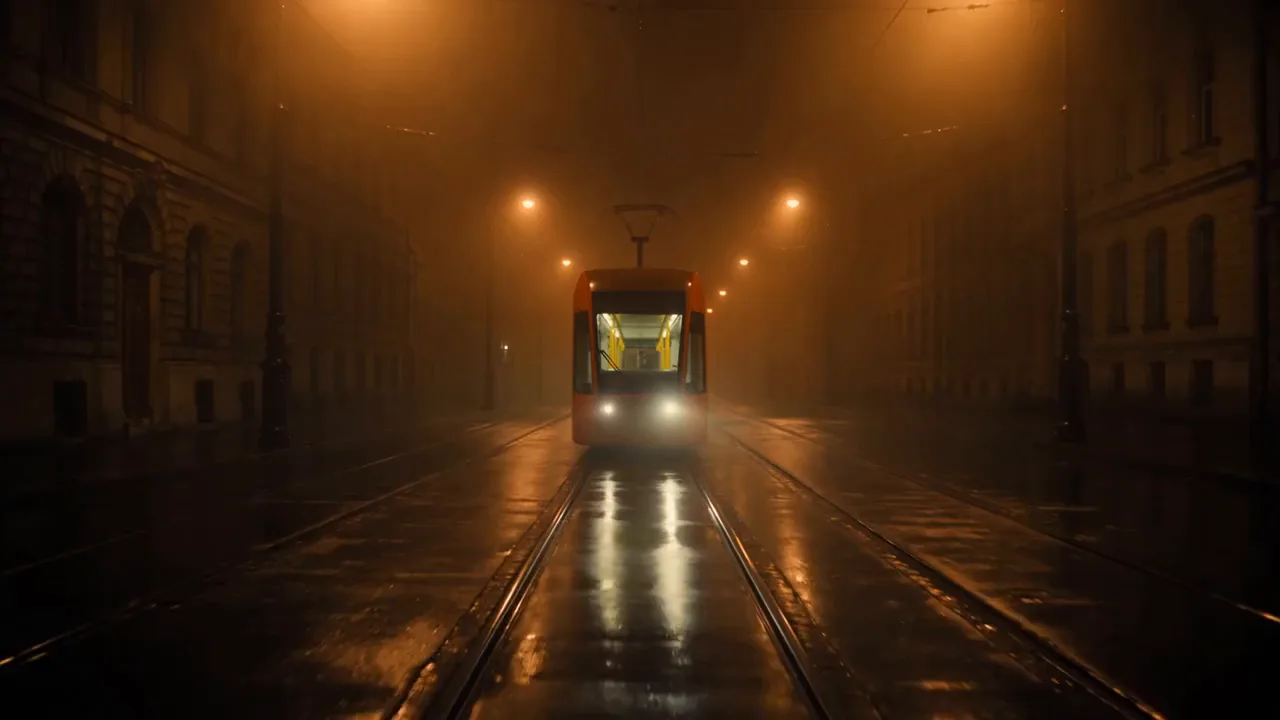
Every city has a tram that runs after the timetable ends. Nobody gets on. That is not the point.
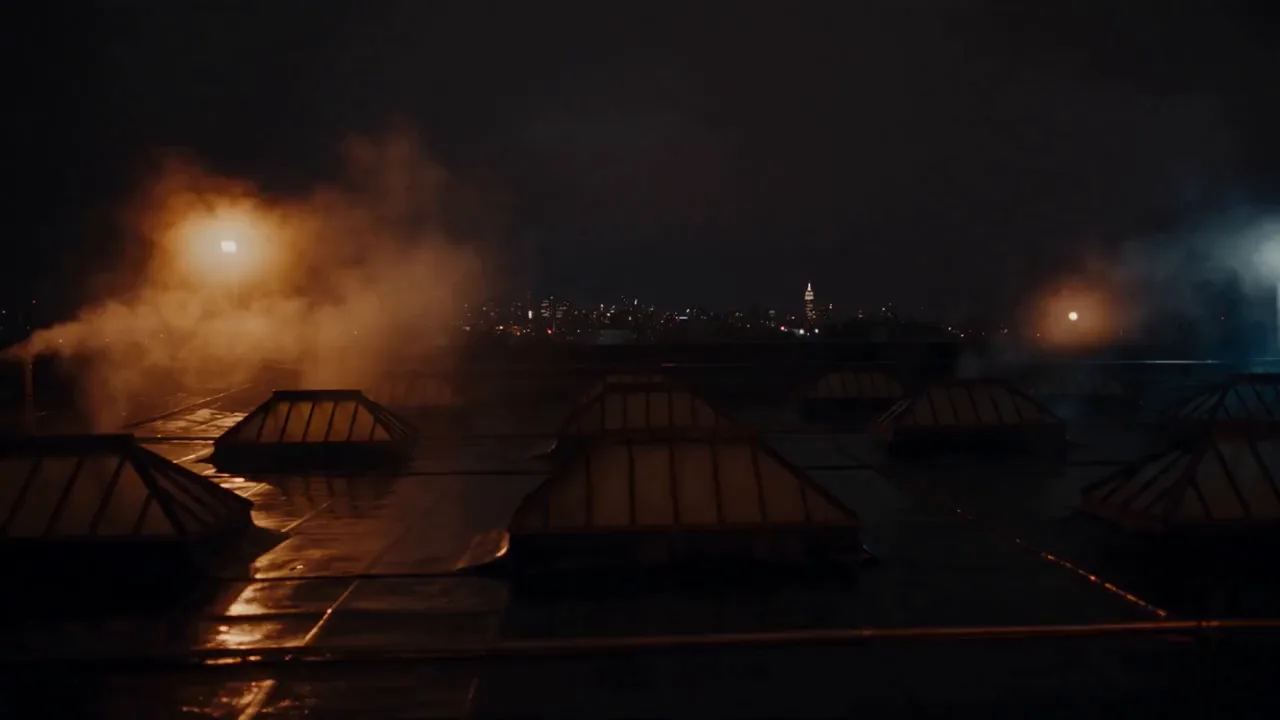
At three in the morning the city is not asleep, it is breathing through its rooftops. That hum is a thousand rooms staying warm.
Read it with the saved voice
Open the audio composer on the Voiceover task, press Speak as, pick the narrator, paste the episode's script and press Generate audio. One take per episode; the button shows the price for exactly those characters. Ours came back at 6.2 seconds for episode 1 and 8.5 seconds for episode 2, both under the ten second picture.
Tip:Check the take's length against the picture. The Library shows each audio asset's length. A ten second episode wants a take under nine seconds so the last word lands before the cut.
Make the b-roll in one look
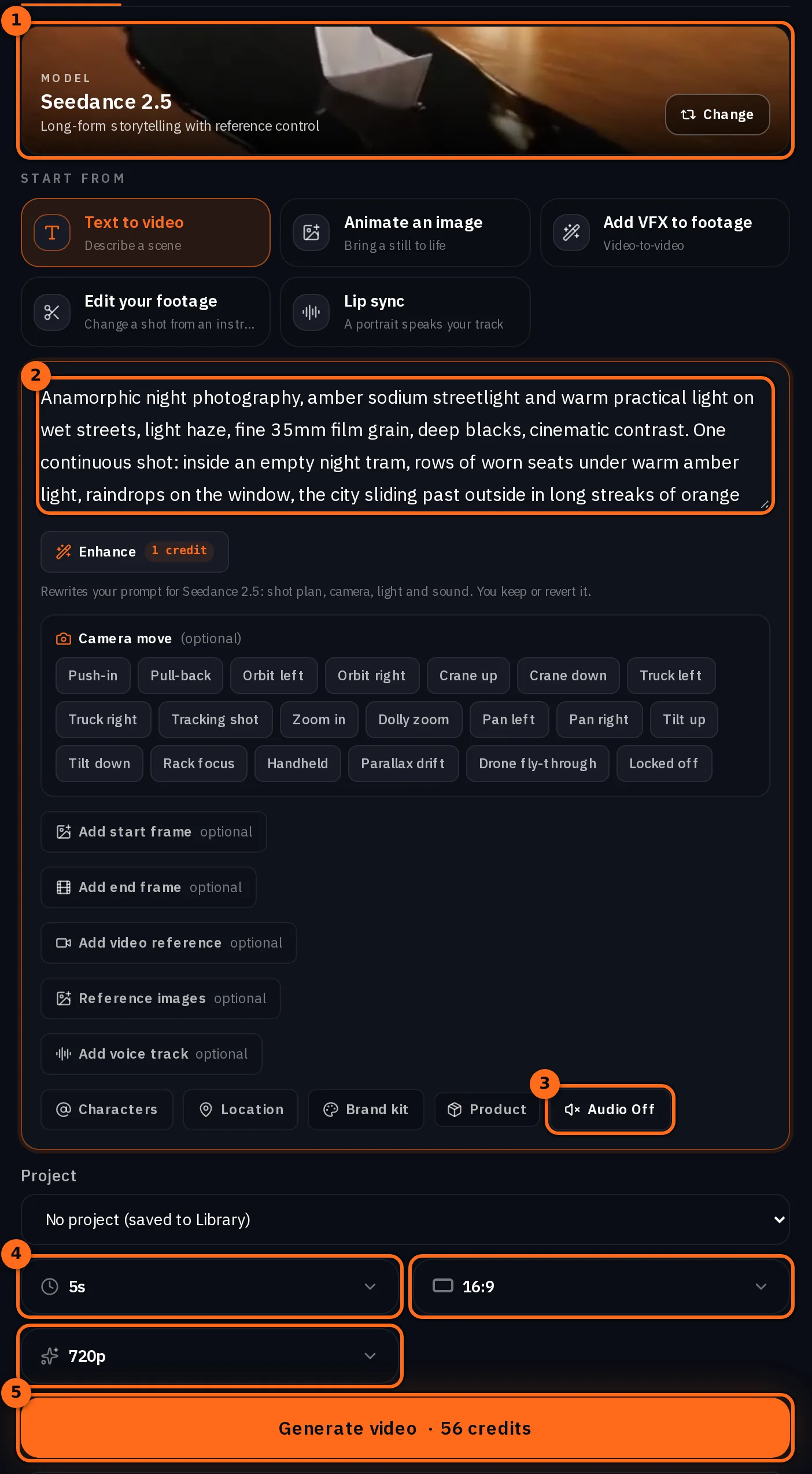
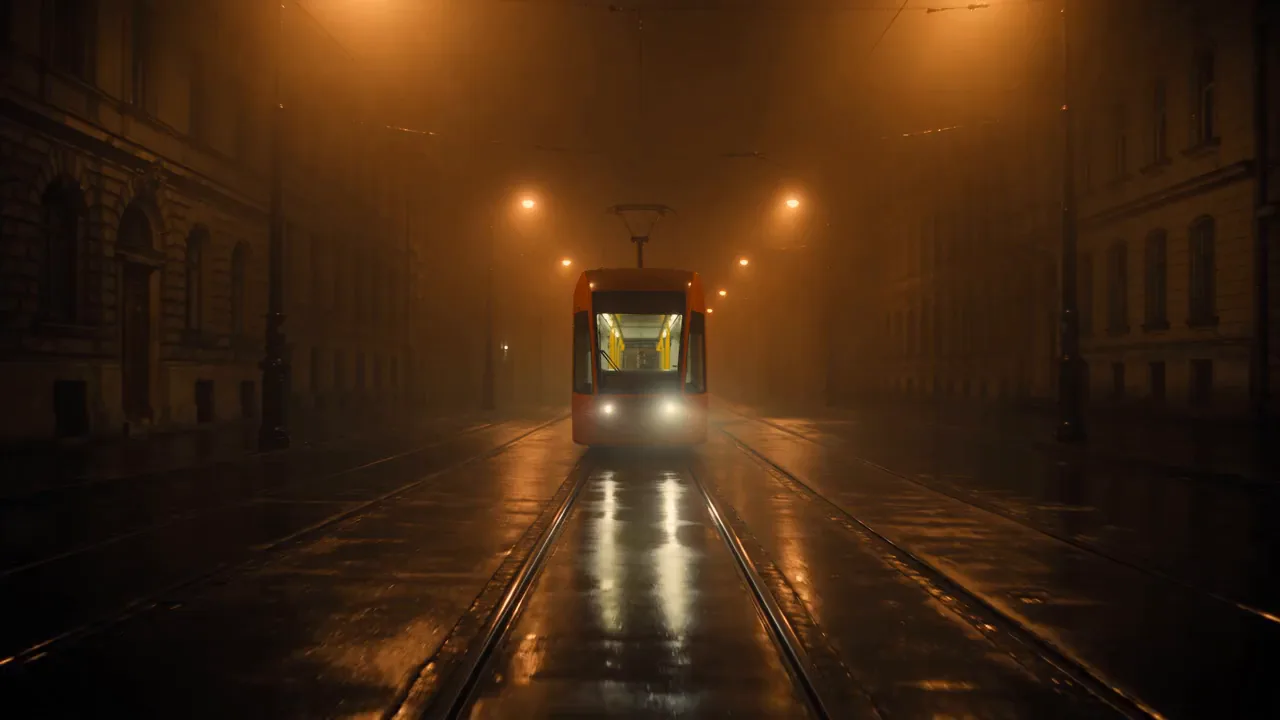
Open the video composer, pick Seedance 2.5 in the model picker, press the audio switch until it reads Audio Off, keep five seconds, 16:9 and 720p, and write each shot as the look sentence followed by one continuous shot. The button shows the live price for those settings. Two shots per episode. All four shots are Seedance 2.5 with these settings, and each one is its first run: the tram came back empty, with no driver in the cab, the first time. Our prompts end with no signs and no lettering because this channel's streets are empty by design; if your shot needs a sign or a label, say exactly what it reads, or upload the logo image.
Anamorphic night photography, amber sodium streetlight and warm practical light on wet streets, light haze, fine 35mm film grain, deep blacks, cinematic contrast. One continuous shot: an empty night tram glides slowly along a wet street toward the camera, its windows glowing warm amber and showing empty seats, no passengers and no driver. Bare wet stone facades on both sides lit only by tall sodium streetlamps. No signs, no lettering, no posters, no people anywhere in the frame. Slow low-angle tracking shot.
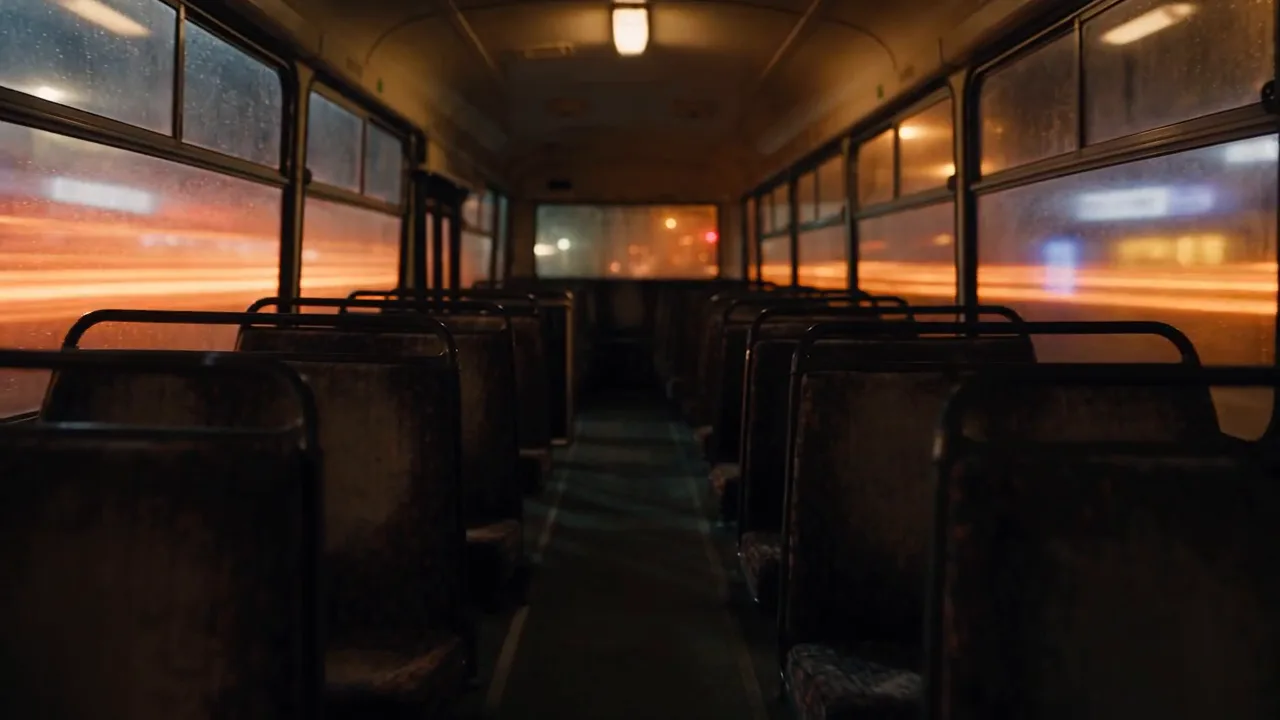
Anamorphic night photography, amber sodium streetlight and warm practical light on wet streets, light haze, fine 35mm film grain, deep blacks, cinematic contrast. One continuous shot: inside an empty night tram, rows of worn seats under warm amber light, raindrops on the window, the city sliding past outside in long streaks of orange sodium streetlight, slow dolly forward down the aisle. No text, no logo, no readable signs.
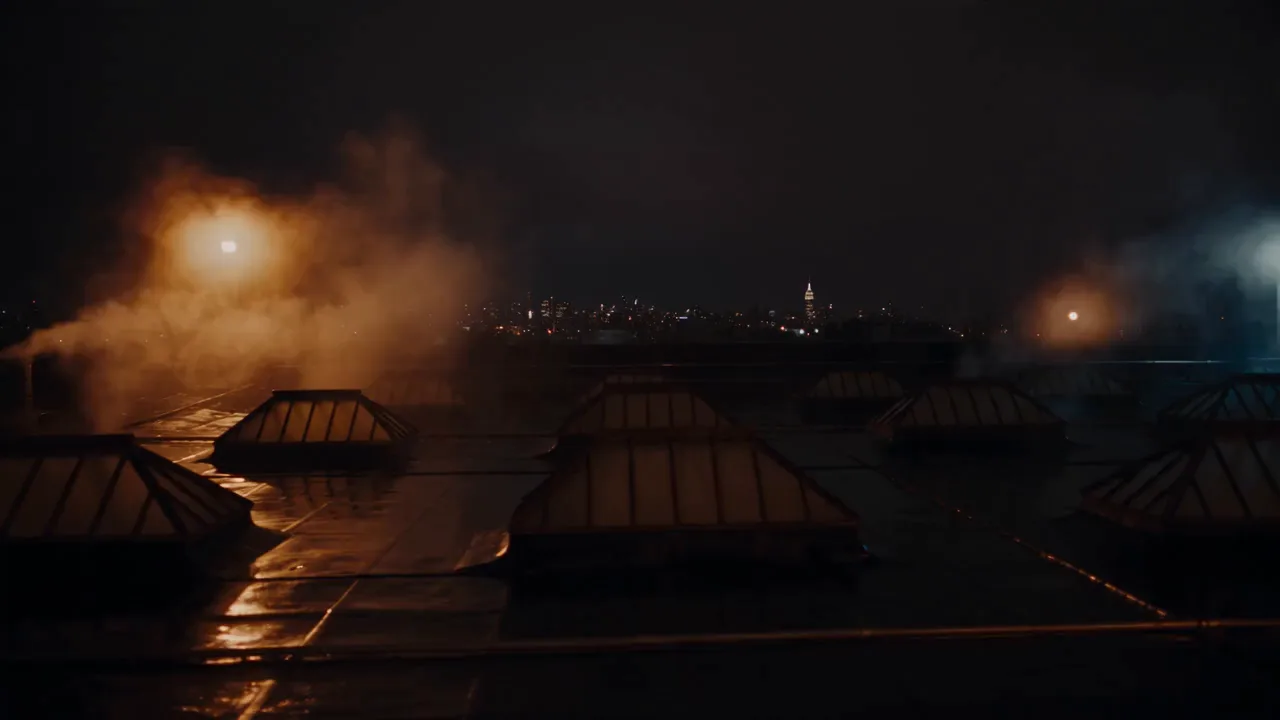
Anamorphic night photography, amber sodium streetlight and warm practical light on wet streets, light haze, fine 35mm film grain, deep blacks, cinematic contrast. One continuous shot: a city rooftop at three in the morning, rows of humming air-conditioning units under orange sodium light and one cold work lamp, thin steam rising and drifting, the blurred skyline behind, slow lateral tracking shot. No text, no logo, no readable signs.
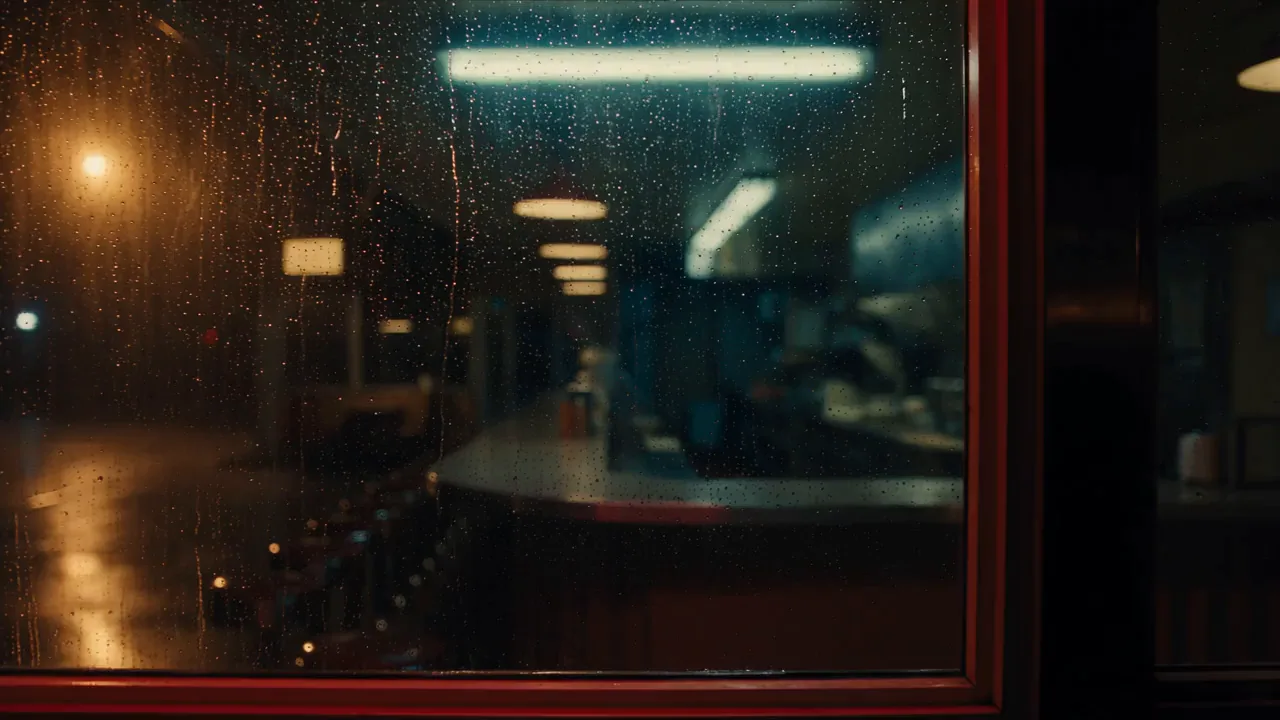
Anamorphic night photography, amber sodium streetlight and warm practical light on wet streets, light haze, fine 35mm film grain, deep blacks, cinematic contrast. One continuous shot: an empty late-night diner seen through rain-streaked glass, warm pendant lights glowing over the counter and one flickering fluorescent tube above the grill, a slow push-in through the reflections, amber streetlight from the street behind the camera. No text, no letters, no logo, no readable signs.
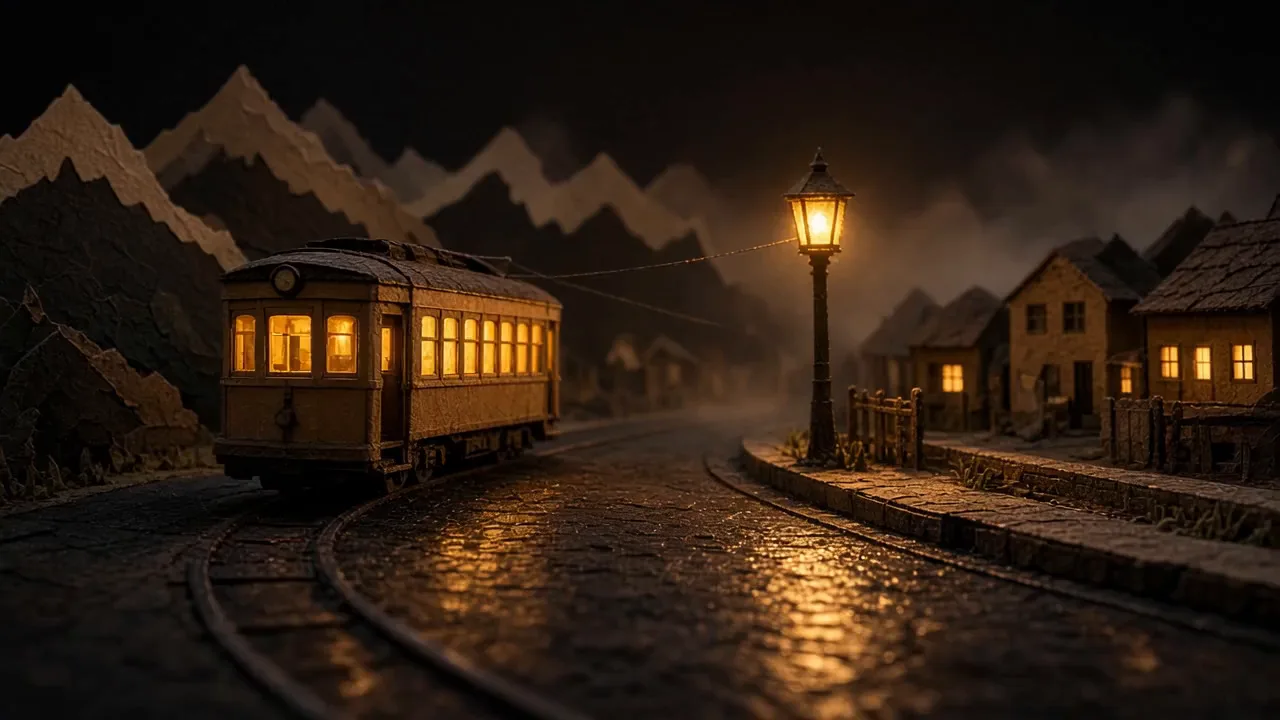
Watch for this:The preset locks a different look. The Narrated channel video preset is the fastest b-roll: one run, three questions. Its locked look is a paper storybook world. We answered its look question with our amber sentence and got a paper diorama village and a paper tram gliding past a little station, warmed to our amber light: the preset kept its paper world and took only our light. Use the preset when its storybook look is your channel's look; write the shots yourself when it is not.
Cut it in Studio
Open Timelines, press New timeline, put it in the channel's project and open it. In Studio's left panel switch from Project media to Library, search for the shot and press the + on its card: shot one lands at 0. Press Jump to end on the transport and press + on shot two, so it starts where shot one ends. Drag the scrubber back to where the first word should land (0.8 seconds in episode 1) and press + on the narration take. Each + lands a clip on a fresh track; ours sit on one video track, and the cut plays the same either way. Then the score and the ambience, below.
The score. Make it in the audio composer's Music task, asking for a quiet stretch as long as the narration and a lift after it. Play it in the Source preview, press Mark In where the quiet stretch starts and Mark Out ten seconds later, move the playhead to 0 and press +. These timelines were made today, so the export dips the score under the voice and evens the loudness, about -14 LUFS. The Audio inspector sets any sound's level and fades. Then add the ambience: a tram rolling past on wet rails under shot one and light rain under shot two, each a short Sound effect.
Melancholic late-night cinematic score for a short story about an empty night tram, 70 bpm, soft felt piano, warm sub pad, distant brushed percussion, instrumental, no vocals. Very quiet and sparse for the first eight seconds, then a gentle swell of strings, then quiet again, and that shape repeats.
Very quiet, steady nocturnal ambient pad for a city at three in the morning: a soft warm synth drone, a faint slow pulse, a distant hum, gentle and continuous from start to finish, low level, instrumental, no vocals.
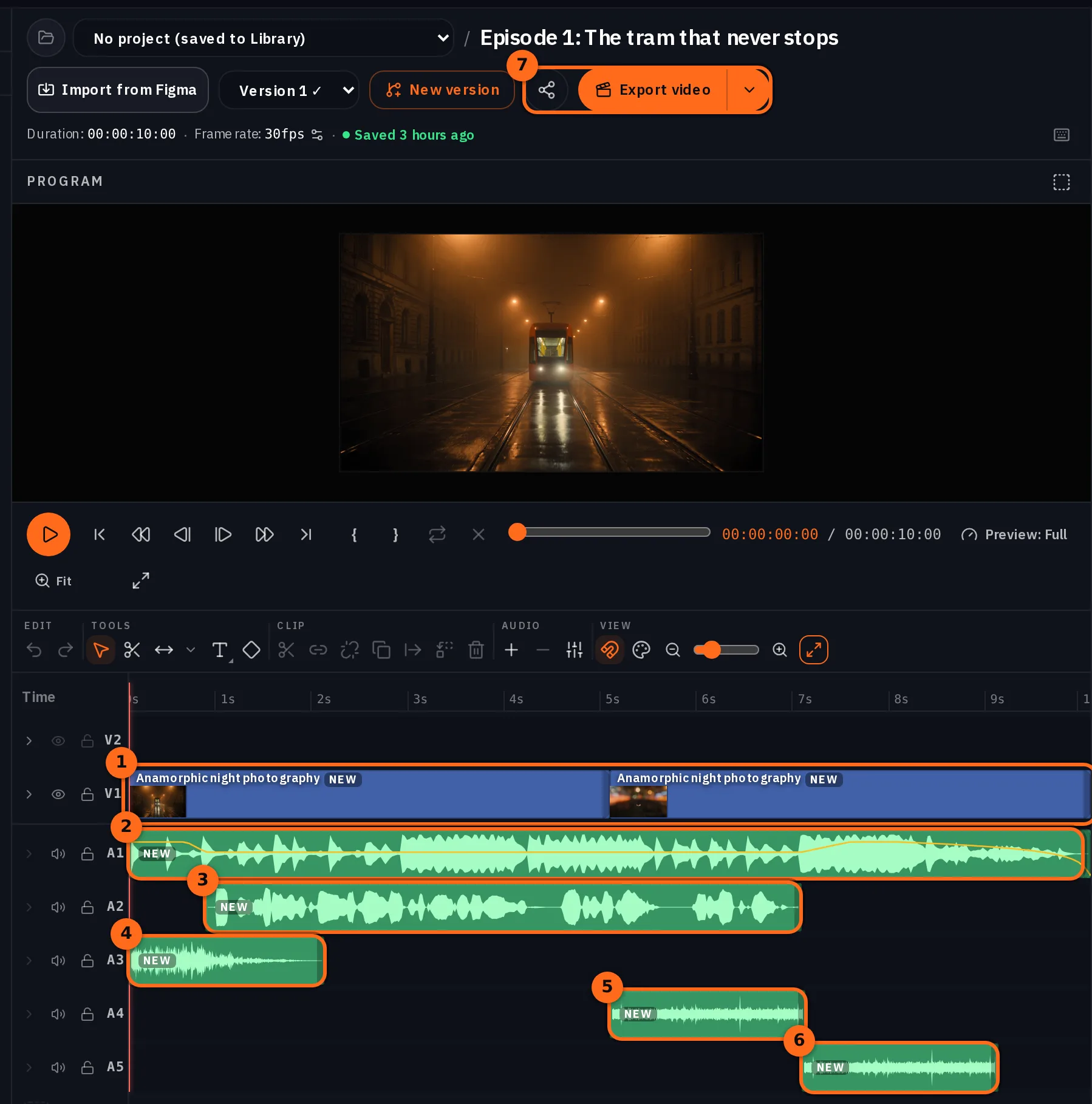
We measured both exports: no gap of silence longer than half a second (0.2 s at most), and the voice well above the score and the ambience while she speaks: in nine of ten 50 ms windows of her speech it is at least 6.8 dB above everything else (8.6 dB in episode 2).
Tip:Or let the blocks assembler cut it. The API and the MCP tool nolgia_render_blocks take ordered clip and narration pairs and return one MP4 without a timeline: each pair fills a fixed block, a short take is centred, a long one is sped up to 1.25x. It is not billed either. We cut these episodes in Studio so you can see the lanes.
Hand the next episode to the agent
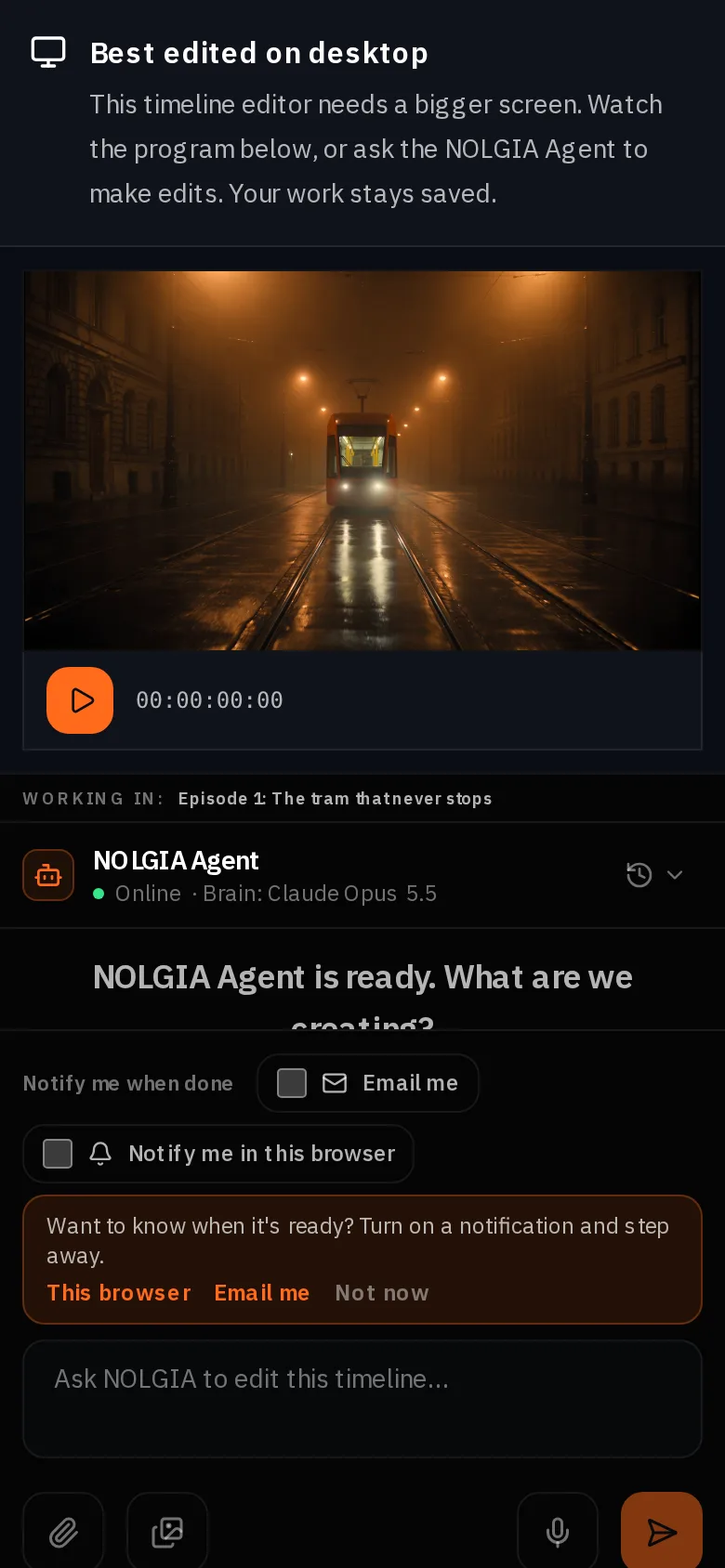
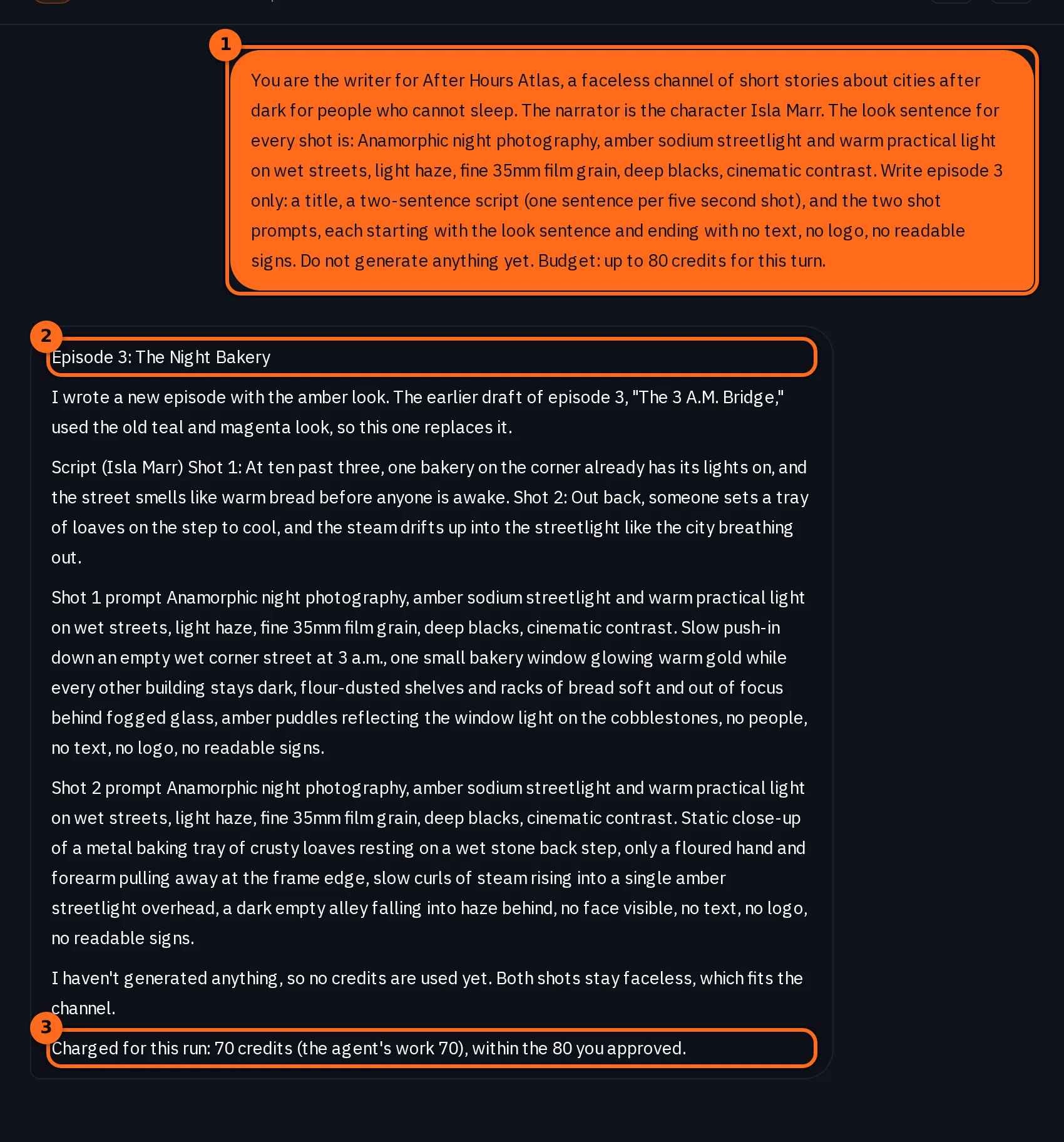
The NOLGIA Agent holds the channel's context in a chat: the niche, the look sentence, the narrator's name. We started a new chat with the brief below, ended it with a budget line for the turn (you can read it in the screenshot), and asked for episode three's script and shot list only. It answered in one turn with a title, two sentences and two shot prompts in the look sentence, and generated nothing, so the turn cost the per turn rate of its brain and nothing else. It also remembered an earlier episode 3 draft from another chat on the account, in the old look, and said this one replaces it. From there you can ask it to make the clips and the take and file them in the project, or run the shots yourself.
You are the writer for After Hours Atlas, a faceless channel of short stories about cities after dark for people who cannot sleep. The narrator is the character Isla Marr. The look sentence for every shot is: Anamorphic night photography, amber sodium streetlight and warm practical light on wet streets, light haze, fine 35mm film grain, deep blacks, cinematic contrast. Write episode 3 only: a title, a two-sentence script (one sentence per five second shot), and the two shot prompts, each starting with the look sentence and ending with no text, no logo, no readable signs. Do not generate anything yet.
Which tool for which job
| Job | Tool | Why |
|---|---|---|
| Script | You, or the NOLGIA Agent | The agent keeps the channel's context turn to turn |
| Narration | Audio composer, Speak as | The voice is pinned to the character |
| B-roll in your own look | Video composer, Seedance 2.5, audio off | Silent b-roll that moves well; the look sentence travels in the prompt |
| B-roll in the storybook look | Narrated channel video preset | One run, three questions, native sound on |
| A whole narrated video from a topic | Narrated explainer preset | Script, voice, scenes and cut in one run, at a higher price |
| The cut | Studio, or the blocks assembler | Studio for control, blocks for speed; neither is billed |
Where you still regenerate
- A look sentence is not a lock. Two shots in the same look still differ in grain, palette and framing, and an object can come back as something else: our rooftop units came back as skylight hoods.
- Levels. The export dips the score under the voice and evens the loudness. If the score still buries a line, lower its Clip volume in the Audio inspector, or move its Mark In to a quieter passage.
- Lettering. A street scene can grow signs you did not ask for, and generated lettering can come out garbled. Say exactly what a sign or label reads, or upload the logo image; if lettering comes out garbled, regenerate that shot. Check every clip at full size before the cut.
- Posting is yours. NOLGIA does not schedule or publish to YouTube or TikTok. Download the MP4 and post it.
- No income promise. This guide is about making episodes, not about what a channel earns.
What it costs
One ten second episode here is two clips, one narration take, one score, three short sound cues and an unbilled export. The preset and the explainer show their own estimates. Live rates:
- Narrated channel video
39 credits per 5s at 720p (23 at 480p for drafts, 70 at 1080p)
Takes 2 to 5 min
- Narrated explainer
Priced on the review card before it runs
Takes 10 to 40 minutes
Seedance 2.5Pro and up
Per 5s clip
480p 26 credits · 720p 56 credits · 1080p 137 credits
1080p renders at 16:9 and 9:16
ElevenLabs v3Every plan
Per 1,000 characters
Standard 6 credits
Lyria 3.5Every plan
Per generation
Standard 5 credits
Stable Audio 3 MediumEvery plan
Per generation
Standard 3 credits
ElevenLabs SFXEvery plan
Per generation
Standard 4 credits
Read live from the catalog when this page loads. Every price is shown before you generate. See every rate.
A chat turn with the NOLGIA Agent bills at the rate of its brain, shown on the Agent page.
Try it yourself
Episode 1's two shots, silent
A shot you make from our prompt will differ from ours; the look sentence holds the palette and the mood, not the frame. The tram came back right on our first run; yours may not.
Checklist for every episode
- Script: one sentence per shot, written first.
- Narration: Speak as the narrator, one take, length under the picture.
- B-roll: look sentence first, one continuous shot, audio off.
- Inspect every clip at full size, and regenerate any shot whose lettering comes out garbled.
- Score: asked for with a quiet stretch as long as the narration; ambience as short cues.
- Studio: Library tab, shot one with +, Jump to end, shot two with +, the take at the playhead, the score window at 0, the cues, Export video.
- Save the script and shot list in the project for the next one.
Questions and answers
- How do I keep the same look across episodes?
- Write the look as one sentence and paste it at the start of every shot prompt on the same model. It holds the palette and the mood; framing and grain still vary a little, so inspect each clip.
- How do I keep the same narrator?
- Save a catalog voice on a character and use Speak as in the audio composer. The model and the voice follow the character every time.
- Should I use the Narrated channel video preset?
- When its storybook look is your channel's look, yes: one run, three questions. When you want your own look, write the shots in the video composer; the preset keeps its paper world and takes only your light.
- Does NOLGIA post the episode for me?
- No. You download the MP4 and publish it yourself. There is no scheduling.
- How long can an episode be?
- As long as your timeline. The blocks assembler takes up to sixty blocks and ten minutes; Studio has no such cap. Each five second clip is priced on its own.
- What does the agent add?
- It keeps the channel's context and drafts the next script and shot list in one turn. It can also run the generations and file them in the project if you ask it to.
Make the first episode
Open the video composerRelated guides
Audio
The same voice in every video
Save a catalog voice on a character, read every line with Speak as, and lay a music bed and a sound cue under it in Studio. One narrator, three clips, made for real.
· 11 min read
Audio
Voice, music and sound effects for your video
Make a narration line, a music bed and a sound effect in the audio composer, then lay them under your clip in Studio. Which model does which job, and what each one costs.
· 10 min read
Agent
The NOLGIA Agent cookbook: what to say, and what happens next
Ten messages you can send the NOLGIA Agent, what it does with each one and the preset behind it, from product photos and a listing set to a hook score and a graded cut.
· 6 min read