

NOLGIA Agent
AI video agent
The legwork, handled. The calls, yours.
AI video agent on your own account: tell it the outcome, and it drafts the shot list, runs the generations, checks every take and lays out a first cut on your timeline. You make every creative call.
How it works
How a brief becomes a cut.
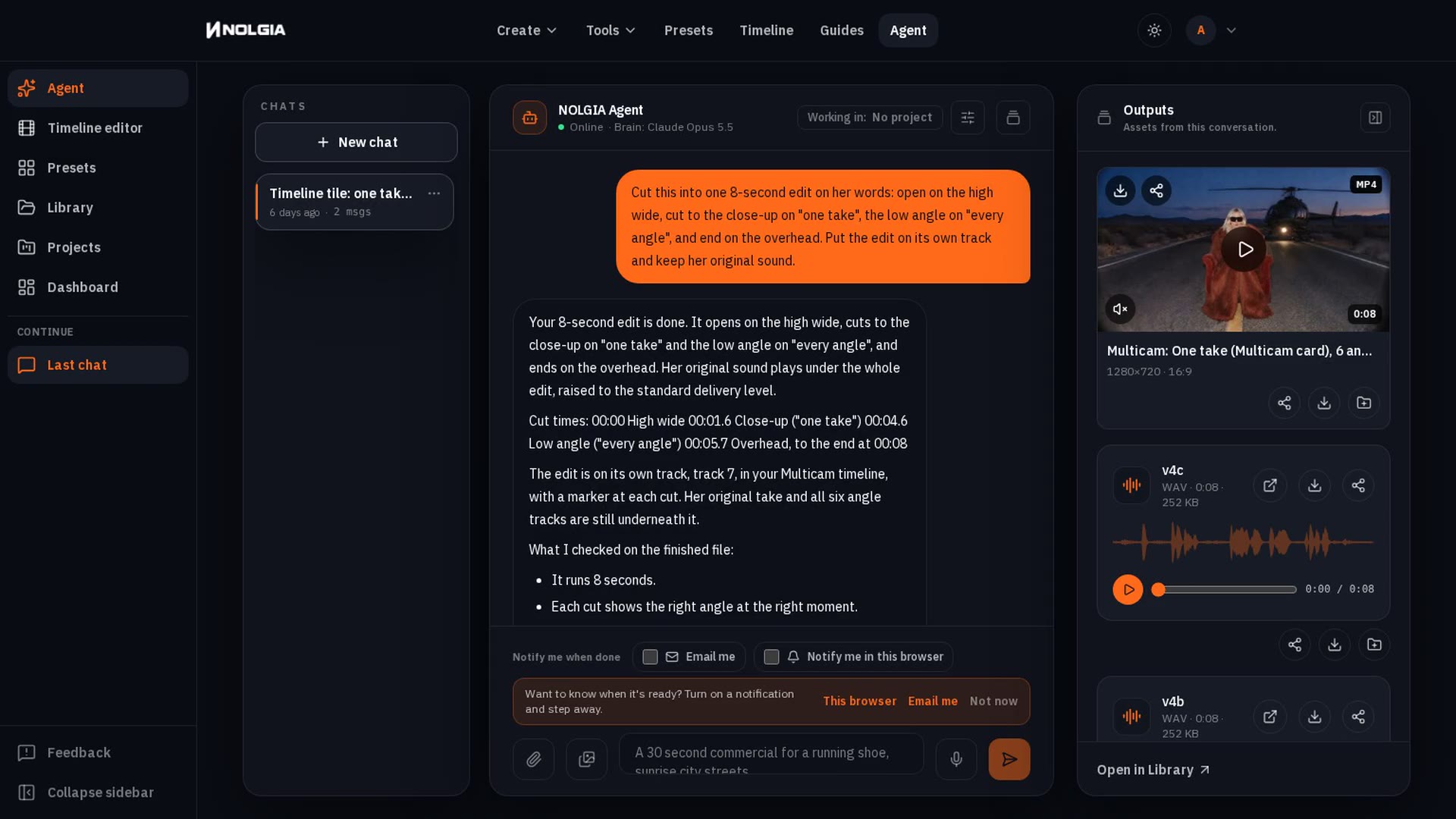
Four steps, and you can step in at any of them. The agent shows its plan and its work as it goes, in the chat and in the Outputs dock.
- Step 1
Brief
Describe the outcome in one message, or open a preset and answer the questions it asks. Attach references, name your characters with @, and pick the models if you care.
- Step 2
Plan
The agent writes the shot list and works through it as a checklist you can watch in the chat. Reply with a note at any point and it adjusts the plan.
- Step 3
Produce
It runs the generations on the same models the app uses, checks each result, and re-rolls what falls short. Every clip lands in the Outputs dock as it finishes.
- Step 4
Cut and notes
It assembles the cut on a timeline you can open in the editor, and it keeps working there: ask it to swap a shot, tighten a beat or re-grade a scene. Its timeline edits arrive as proposals you apply or discard, so the cut stays yours.
What ships today
Built for repeat work, not one lucky shot.
The parts that make a producer useful on the second project: it asks the right questions, it keeps your people consistent, it suggests the next move and it tells you when it is done.
Guided presets
Every preset in the catalog opens as a guided chat that asks only for what it needs: an image, a character, a timeline, a line of text, a choice, a table. Answer in order, review the credit estimate, press Create once.
Project cast
Give a project a cast of characters, each with reference images, and every generation in that project pulls them in. Mention one by name in the brief and the agent keeps the face, the wardrobe and the look consistent from the first shot to the fiftieth.
Content-aware follow-ups
After each reply the agent offers next steps derived from what it just made: extend a clip, try a variation, open the cut. When it asks you to choose, the options become the chips. Nothing is sent until you say so.
Notify when done
Long runs finish while you are elsewhere. Turn on a completion email, the one channel that reaches you after every NOLGIA tab is closed, or a browser notification, which fires while a NOLGIA tab stays open in the background. The chat picks up exactly where it left off when you return.
Pricing
One rate per turn.
Every message you send is one turn, billed by the brain the agent thinks with. A turn costs about 10 to 120 credits, depending on the brain, and never more than 200 credits for the agent's own work. Each brain's rate is a minimum: a longer turn whose model cost passes it bills that cost instead, one credit for every $0.01 of model cost, and your ledger shows what each turn charged. The images, video and audio it generates bill separately at the normal model rates. A guided preset shows what its whole run typically costs before you press Create, and the agent asks you before the run would pass its limit.
Included with Studio plans. Compare plans
- Default brainAbout 10 credits a turn
- Gemini 3.8 FlashAbout 35 credits a turn
- Claude Opus 5.5About 120 credits a turn
- Gemini 4 ArgonAbout 70 credits a turn
- GPT-6.1 SolAbout 70 credits a turn
FAQ
Questions producers ask.
- What is the NOLGIA Agent?
- A hosted assistant that runs on your own account and takes the legwork. You brief it in chat; it plans the shots, runs image, video and audio generations on the same models the app offers, checks the results, assembles a cut on a timeline and files everything into your project. It remembers your projects, characters and notes between sessions.
- What does a turn cost?
- A chat turn typically costs about 10 credits on the default brain, 35 on Gemini 3.8 Flash, 120 on Claude Opus 5.5, 70 on Gemini 4 Argon, and 70 on GPT-6.1 Sol, and never more than 200 credits for the agent's own work. Each brain has a minimum rate: 10 credits on the default brain, 25 on Gemini 3.8 Flash, 70 on Claude Opus 5.5, 70 on Gemini 4 Argon, and 70 on GPT-6.1 Sol. The default is 10 credits. Each rate is a minimum: a longer turn whose model cost passes it bills that cost instead, one credit for every $0.01 of model cost, and your ledger shows what every turn charged. Any images, video or audio the agent generates bill separately at the normal model rates shown on the pricing page. A guided preset shows what its whole run typically costs before you press Create, and the agent asks you before the run would pass its limit.
- Which plan includes it?
- Studio plans include your own hosted NOLGIA Agent. It deploys automatically on Studio Mid and Studio Max, and with one click on Studio Min. Free accounts start with 36 free credits, no card needed, and a card on file (no charge) adds 10 free credits every day for generating directly in the app, so you can try the presets and models before choosing a plan.
- Can it keep my characters and products consistent?
- Yes. Add characters with reference images to a project's cast and every generation in that project uses them. Mention a character by name in the brief and the agent casts them in every shot, and each clip is checked against their main photo. The face holds best in close and medium shots. The agent can also generate expression and turnaround sheets for a new character before you commit to a run.
- Do I have to watch it work?
- No. A run keeps going after you close the tab and the transcript is saved on the server. Turn on a completion email to hear about it with every NOLGIA tab closed; a browser notification on this device fires while a tab stays open in the background. Open the chat later and the finished clips are waiting in the Outputs dock.
- Does it work inside the editor too?
- Yes. The same agent sits beside the timeline in the editor, scoped to the cut you have open. Ask it to swap a shot, add a title or tighten a section and it edits that timeline; you keep the full editor for the rest.
Give it the brief.
Start a chat, describe the outcome, and watch the plan appear. Your first credits are on us.