

如何製作逼真的 AI 影片
逼真的 AI 影片並非僅靠一個提示詞就能完成。它是一項小型製作:涉及誰在片中、他們身處何地、每個鏡頭的外觀、攝影機如何觀看,以及所有人的動作,這些都必須在生成任何一個片段之前確定。以下是基於為 NOLGIA 製作的一部真實的 1990 年代後期紐約短片所呈現的流程,包含每個實際發送的提示詞,以及每個鏡頭所需的拍攝次數。
- 閱讀時間 21 分鐘
本文由英文自動翻譯。閱讀原文
本指南將完整追蹤一個實際作品的製作過程:一部設定於 1990 年代末紐約的直式短片,內容是兩位朋友在屋頂、消防梯和街角對著攝影機說話,並告訴你它是如何製作的。這是為 NOLGIA 使用即時編曲器製作的,片中人物皆為虛構。以下每個提示詞均照原樣引用;唯一的變動是將長破折號改為連字號。
此工作流程背後的核心理念是控制。與其要求影片模型同時創造人物、場景、鏡頭和表演,不如先逐一確立這些元素,讓模型只需完成最後一步:讓畫面動起來。順序為:願景、角色、地點、鏡頭、攝影機、靜態圖、影片提示詞、影片、音樂和剪輯,每個階段都為下一個階段提供基礎。
為什麼大多數 AI 影片看起來仍然像 AI
寫實感並非來自 photorealistic 這個詞。它來自同時控制許多細節,而每個常見的破綻都在本指南的某個步驟中得到修正。
| 什麼會露餡 | 為什麼會發生 | 在哪裡修正 |
|---|---|---|
| 每個鏡頭中出現不同的人,或不同的服裝 | 模型每次都是根據文字憑空創造人物 | 步驟 2:建立角色設定表,儲存為角色並套用到每個鏡頭 |
| 世界背景的年代不對 | 除非特別指定,否則模型會繪製現代場景,有時即使指定了也是如此 | 步驟 3 和 6:在每個提示詞中指明年代,並檢查每個靜態畫面是否出現當時尚未存在的事物 |
| 沒有人在操作的攝影機 | 提示詞從未說明誰在操作攝影機,或它如何移動 | 步驟 5 和 7:每個節拍只使用一種攝影機運動,並從頭到尾描述清楚 |
| 僵硬的表情和忙亂的手部動作 | 提示詞只說明發生了什麼,卻沒說明人物在事件發生時的行為表現 | 步驟 7:為每句台詞寫明眼神、手部動作和語氣 |
| 無法修改的配樂 | 影片片段的聲音是一條音軌:對白、環境音和音樂混在一起 | 步驟 9:影片片段中只保留對白和環境音,配樂另行製作 |
從腳本和視覺構想開始
一切從劇本和你想要的感覺開始。在輸入任何提示詞之前,先用平實的文字告訴 NOLGIA Agent 你要製作什麼:故事、角色的行動、時代背景、寫實程度、你想像中的鏡頭,以及成品影片應有的氛圍。接著請它提供一份計畫,而不是一個提示詞。
- 故事: 發生了什麼事,以及每個角色說出的台詞。
- 角色: 他們是誰,以及在鏡頭前的表現方式。
- 世界: 地點與時代。一個 1990 年代後期的故事,需要 1990 年代後期的汽車、服裝和街道。
- 外觀: 多麼寫實,以及用什麼拍攝。我們使用的是朋友的一般消費級攝影機。
- 鏡頭: 手持或固定,特寫或廣角,靜止或移動。
- 感覺: 觀眾在結尾時應該感受到的情緒。
I want to make a short vertical 9:16 video, about 25 seconds, in three shots. Two friends in their late twenties, a man and a woman, talk straight to a camcorder on a New York rooftop, on a fire escape and on the street, where they catch a yellow taxi. Here are their lines: [paste the script]. It is set in the late 1990s and should look like real footage from a consumer camcorder of the time: handheld, warm late-afternoon sun, soft optics, analog grain. They are casual and funny, like friends being filmed, not presenters. It should feel candid, nostalgic and real, not like an ad. Before writing any prompts, help me plan it: describe each character and each place in detail, then break the script into shots with the framing, the camera move and what happens in each one.這支短片的劇本是其三個鏡頭的對白:
ROOFTOP. SHE: Everyone's trying to make cinematic AI videos, but most of them still look... AI. HE: The trick isn't just the model, it's how you build the whole shot.
FIRE ESCAPE. SHE: This is where the magic happens.
STREET. HE: That's the NOLGIA workflow. SHE, from the back of a taxi: Start making with NOLGIA today. Comment 'nol' to know more.提示:先詢問計畫. 劇本是後續一切工作的基礎:角色、地點、角度、動作、光影和聲音都必須為它服務。在生成任何內容之前,先與 Agent 確定這些要素,之後的每個提示詞都會變得更簡短且更明確。
在設計場景前先設計角色
在圍繞人物建立場景之前,先設計每一個人。目標不是打造一張漂亮的臉,而是一個可信、屬於你世界的人物,並透過完整描述,讓後續每個鏡頭都從同一個人出發。角色設定表能在一張圖中完成這件事:同一個人的正面、四分之三側面與側面視角,包含全身與特寫,加上幾個表情,以及一張真實皮膚的極致特寫。
- 真實細節: 皮膚紋理與毛孔、自然的眼睛與頭髮、真實的手、可信的比例、穿在身上的衣服。
- 可能存在的光線: 透過窗戶的日光或實用檯燈,具有真實的高光與陰影,而非均勻的 AI 光暈。
- 時代感: 該時代的髮型、妝容、服裝、配件與輪廓。1990 年代的角色不應以 2020 年代的風格造型。
- 單一服裝: 設定表中每個畫面都使用相同的衣服與珠寶,因為每個鏡頭都會複製這張設定表。
Solid white background. Create an ultra-realistic cinematic character reference sheet for a young adult woman in her mid-to-late 20s, designed for a realistic video campaign.

CHARACTER:
A naturally beautiful but completely believable young woman, around 25-28 years old. Long naturally styled light brown / dark blonde hair with soft volume, expressive eyes, natural eyebrows, realistic facial proportions and subtle imperfections. Warm, confident, playful personality. She should feel like a real person rather than a professional model.

WARDROBE:
Simple understated casual clothing with a slightly nostalgic late-1990s / early-2000s feeling: fitted dark burgundy long-sleeve top, relaxed blue jeans, small gold earrings and delicate layered gold necklace. Simple everyday accessories. No visible logos, no text, no branding. Keep the exact outfit and accessories identical across every frame.

CHARACTER SHEET LAYOUT:
Create a single professional character reference sheet containing multiple realistic photographic frames of the EXACT SAME WOMAN:
1. Full-body front view
2. Full-body 3/4 view
3. Medium waist-up front view
4. Medium 3/4 view
5. Side-profile view
6. Natural relaxed expression
7. Genuine smile / small laugh
8. Speaking naturally, mouth slightly open as if mid-sentence
9. Curious / surprised expression
10. EXTREME FACE CLOSE-UP showing authentic real skin texture, visible pores, tiny imperfections, peach fuzz, fine facial hairs, natural lips, subtle under-eye texture and realistic eye detail

The extreme close-up must look like a real cinema-camera photograph of human skin. Preserve natural skin texture. NO beauty filter, NO airbrushing, NO plastic skin, NO excessive makeup, NO CGI.

VISUAL STYLE:
Extremely photorealistic live-action photography. Warm nostalgic consumer-camcorder aesthetic inspired by late-1990s / early-2000s home-video footage. Slightly soft vintage lens rendering, subtle analog grain, gentle highlight halation, mild chromatic imperfections, natural exposure, warm organic skin tones, slightly lifted blacks and subdued contrast.

LIGHTING:
Natural available light. Soft daylight through windows, warm practical lamps indoors, occasional gentle sunlight hitting the hair and face. Slight natural lens flare and atmospheric glow when appropriate. Lighting must feel accidental and real rather than professionally staged.

CAMERA:
Handheld consumer/prosumer camcorder aesthetic. Camera is physically close to the subject, with imperfect human framing and subtle handheld movement. Occasional slight focus hunting and natural focus falloff. Mostly 35mm-50mm equivalent perspective, with the extreme close-up using a portrait lens.

ENVIRONMENT:
Authentic everyday locations such as a cozy neighborhood café, apartment, kitchen, hallway, sidewalk or casual restaurant. Realistic lived-in backgrounds, practical objects and imperfect environments. Nothing overly luxurious or artificially perfect.

IMPORTANT:
This is a CHARACTER CONSISTENCY SHEET. Every frame must depict the exact same woman with identical facial structure, hairstyle, skin tone, body proportions, jewelry and clothing. No identity drift. No wardrobe changes. No face reshaping. No beauty retouching.

Overall feeling: intimate, candid, nostalgic, playful, slightly funny, warm and extremely realistic - like a genuine person being casually filmed on an old camcorder, not a polished commercial model.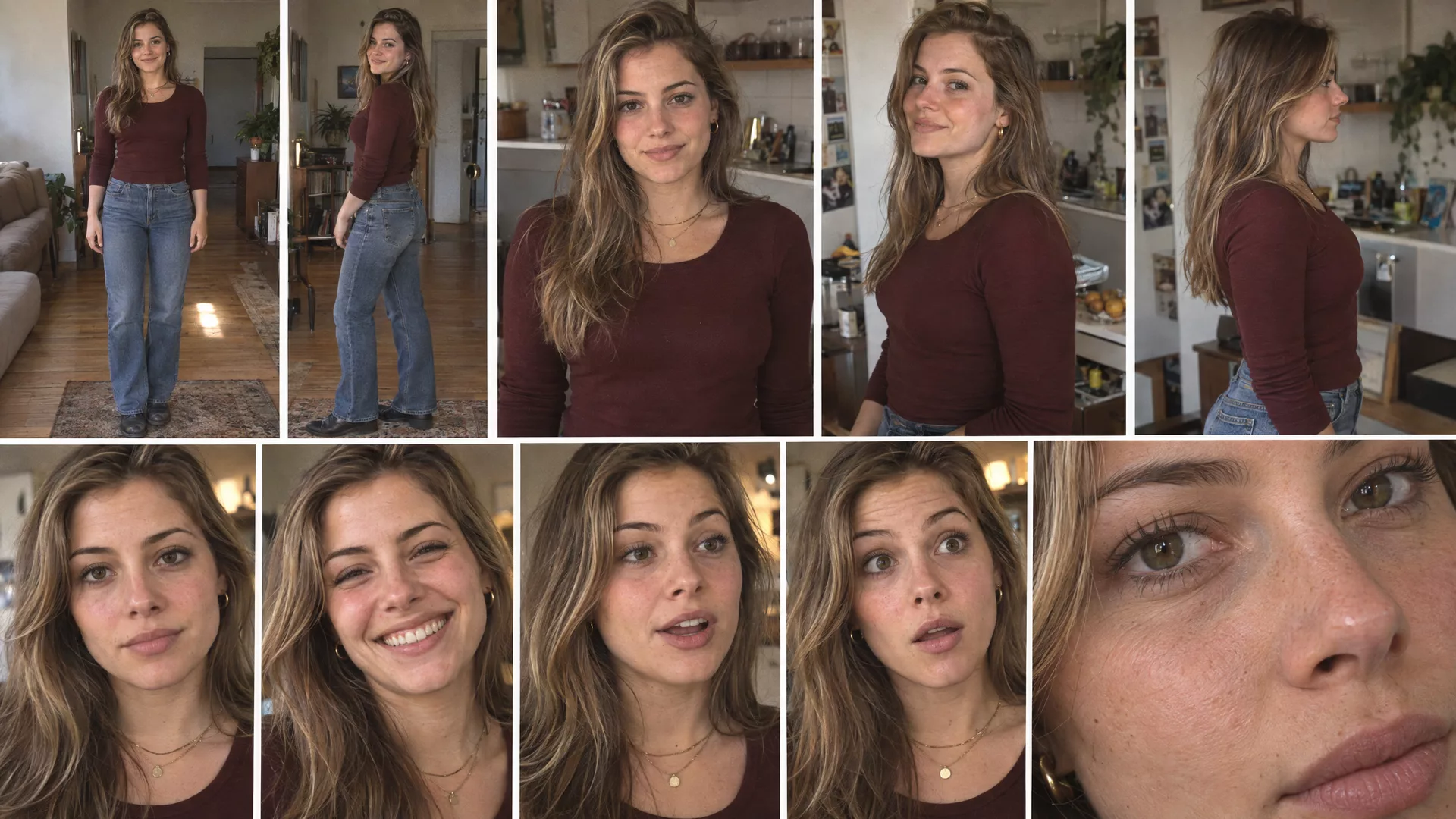
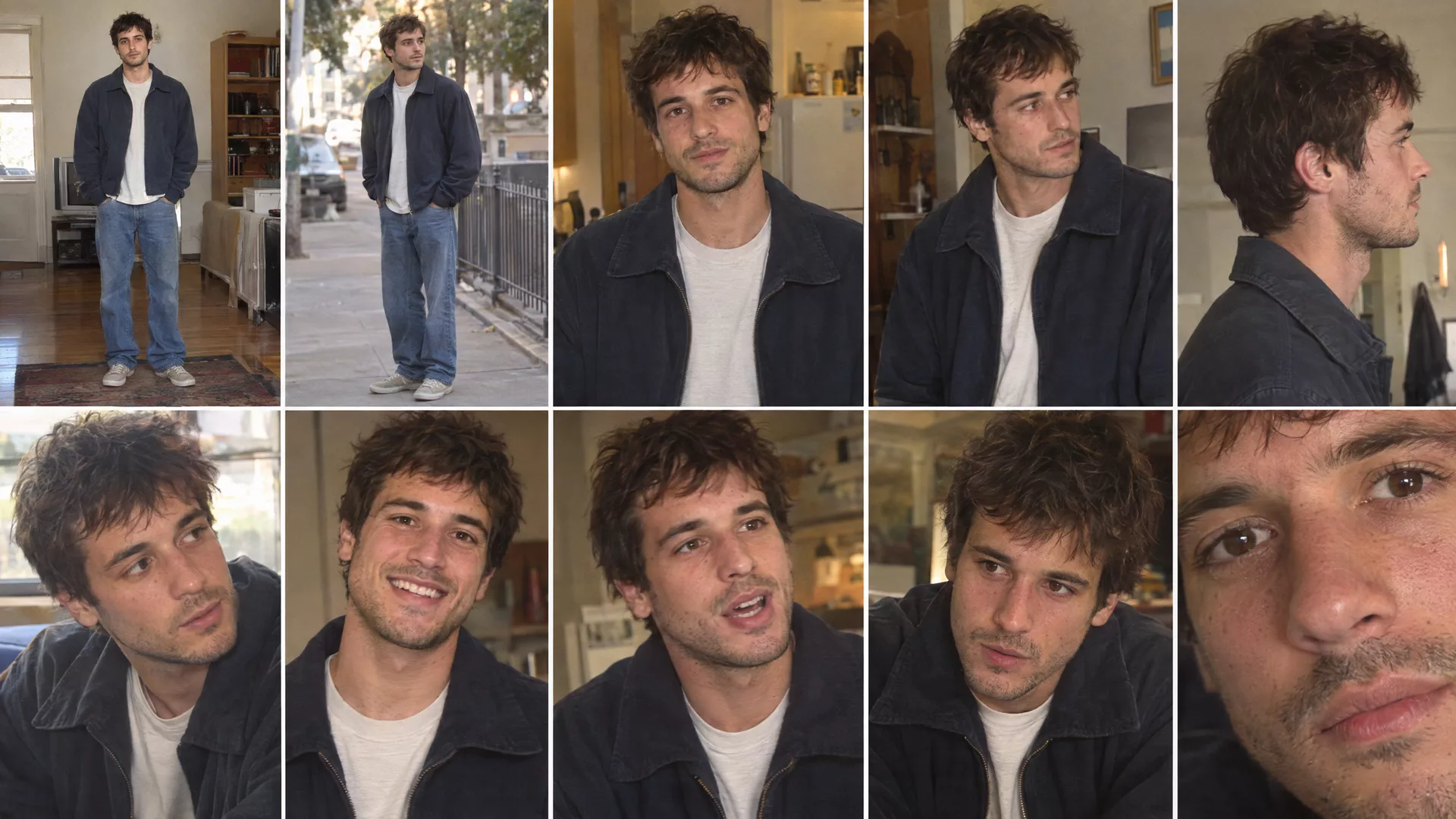
若要儲存,請從標頭的 建立 選單中開啟 角色。輸入 名稱 和 說明,開啟 加入參考圖片,然後 上傳圖片 你已有的角色表,或使用 生成圖片 搭配 肖像提示詞 和模型,接著點擊縮圖將其選為參考圖片。按下 建立角色。點擊卡片上的 在影片中使用,即可開啟已附加該角色的影片編輯器。
注意:修正角色表,而非鏡頭. 設定表上的任何錯誤,都會反映在使用該設定的每個鏡頭中:現代的髮型、標誌、第二套服裝。請重新生成設定表直到正確為止;這只花費一張圖片的點數,而一個鏡頭的成本遠高於此。
建立地點,並檢查時代背景
即使人物寫實,若地點錯誤,整個鏡頭仍會顯得不对劲。請像確定人物一樣確定每個地點:它在哪裡、外觀如何、屬於哪個時代、有哪些物件、建築、車輛和道具,以及自然光的狀態。接著,尋找任何當時尚未存在的事物。
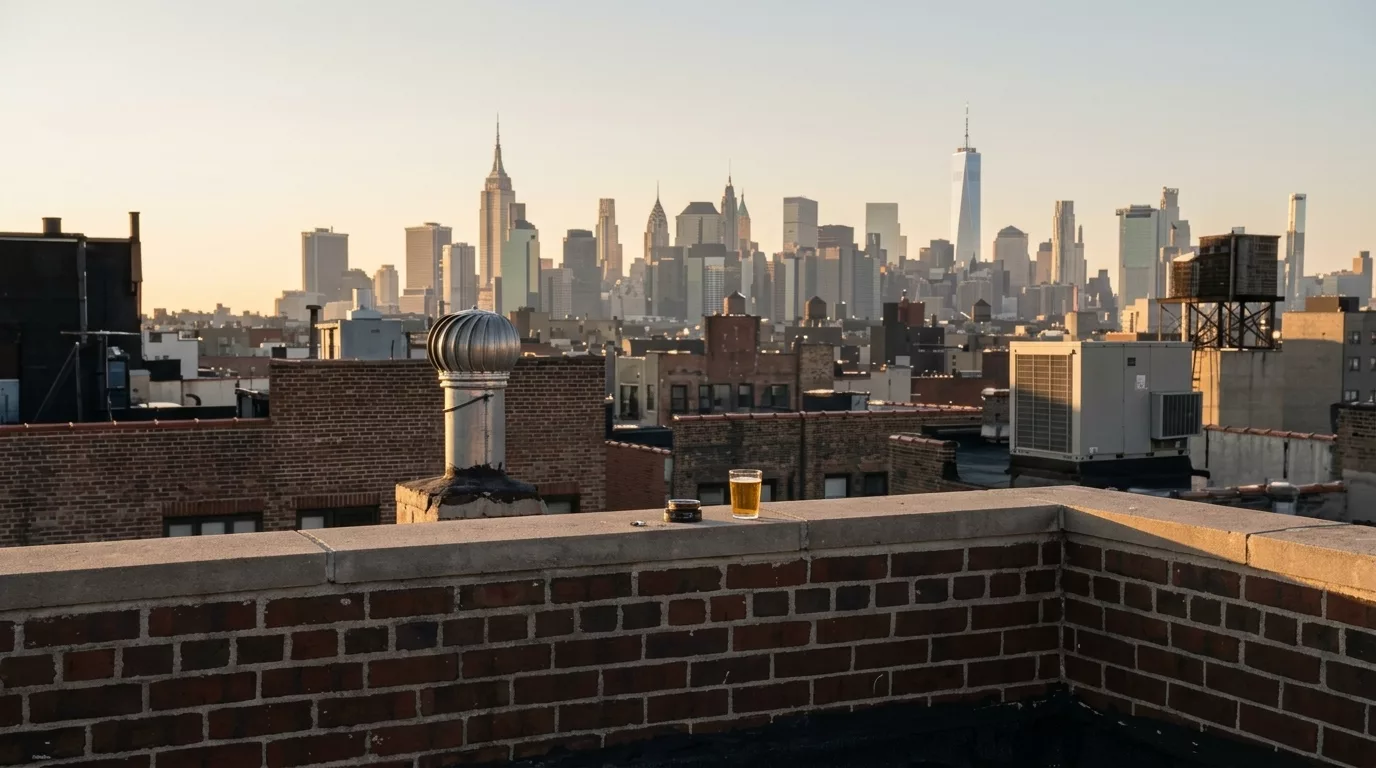
若要儲存地點,請從 建立 選單開啟 地點。填入 名稱 和 說明,透過 上傳 新增靜態圖片至 參考圖片,或從你的媒體庫中選取,然後按下 儲存地點。在影片編輯器中,地點 按鈕可將其附加至鏡頭。在此專案中,地點已寫入每個鏡頭提示詞,而屋頂則在之後儲存為地點,以便後續的屋頂鏡頭能從此起始。
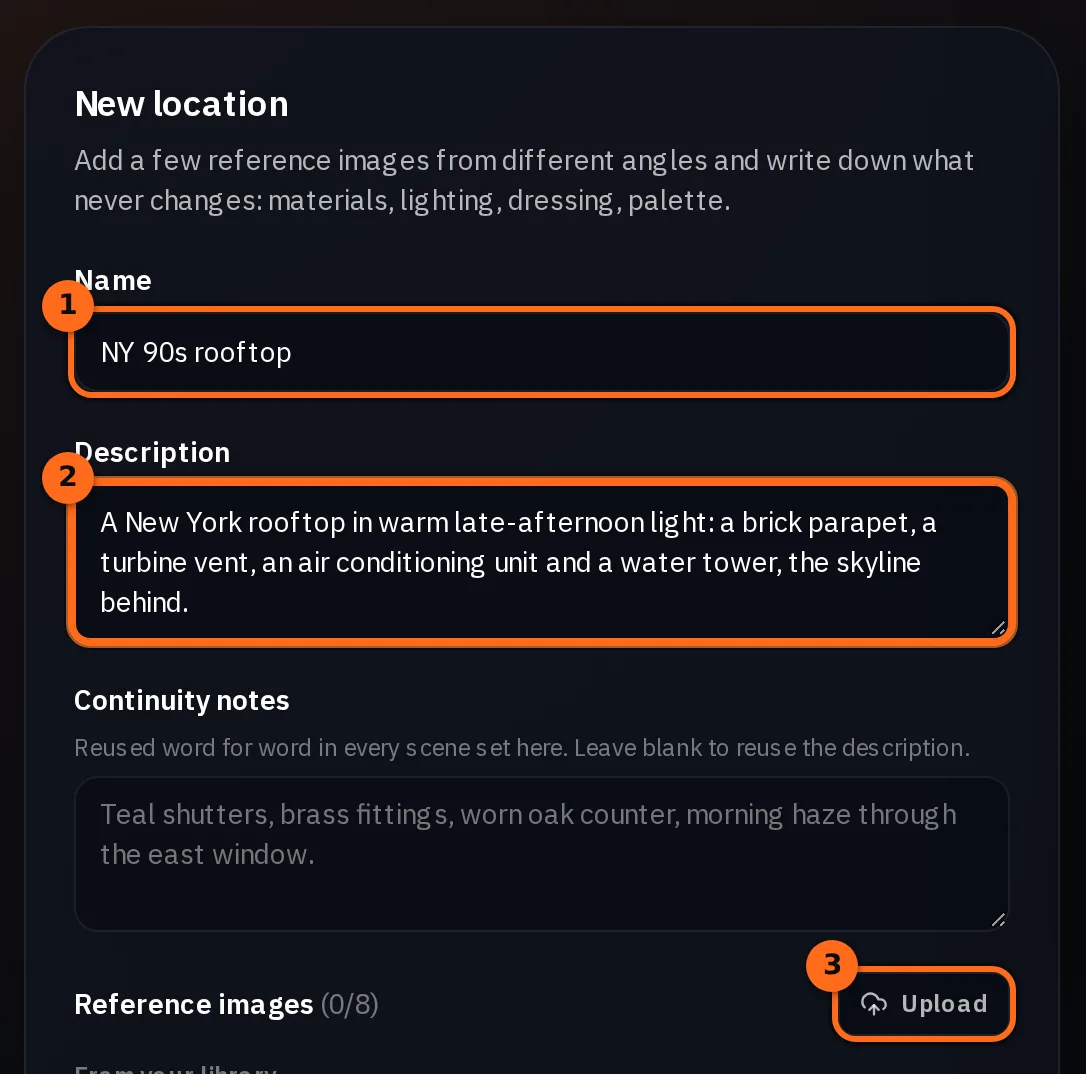
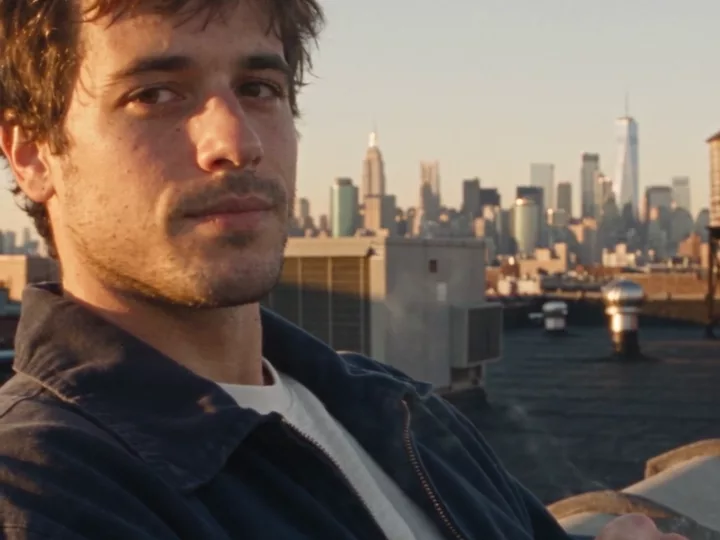
注意:模型繪製的是當今的天際線. 看看這張靜態圖中的天際線:右側的高樓是2014年啟用的世界貿易中心一號大樓,而右邊更細的塔樓則更新。屋頂鏡頭中也有同一座塔樓,儘管其提示詞寫著1990年代後期。對於時代劇,請檢查每一張靜態圖,確認是否有當時尚未存在的事物:手機、汽車、招牌、天際線。接著指出應該出現什麼,或者讓背景保持柔和且失焦。
將劇本拆解為鏡頭
現在將影片視為一組受控的鏡頭,而不是一次性的生成。請 NOLGIA Agent 將劇本轉換為鏡頭清單,並讓每個鏡頭都回答以下相同問題:
- 發生了什麼事,每個角色在哪裡?
- 每個角色在做什麼、看著什麼、說什麼?
- 觀眾應該看到什麼,攝影機在哪裡?
- 他們的臉部和手部在做什麼?
- 之前和之後發生了什麼事?
| 鏡頭 | 發生內容 | 攝影機 | 長度 |
|---|---|---|---|
| 1. 屋頂 | 她靠在牆上對著鏡頭說話;他坐在矮牆上抽菸並回應 | 低角度手持雙人鏡頭,快速光學變焦至她的特寫,短距離搖鏡至他 | 10 s |
| 2. 逃生梯 | 他們走下樓梯,她對著鏡頭說出台詞,然後從最後一階跳下 | 低角度仰拍,跟隨他們,推進至緊湊的特寫 | 4 秒 |
| 3. 街道 | 他邊走邊說出台詞,攔下一輛計程車,他們上車後,她從車窗說出最後一句台詞,計程車駛離 | 手持中廣角跟拍,重新構圖至計程車,在她於車窗處時拉近,保持鏡頭直到計程車駛離 | 12 秒 |
選擇構圖與運鏡
鏡頭是敘事的一部分,而非事後補充。對於每個鏡頭,先選擇構圖:廣角、中景、特寫、低角度或高角度、過肩鏡頭、跟拍、手持或細節鏡頭。然後選擇鏡頭如何移動,並使其符合當下情境:充滿活力的節奏適合手持或跟拍,親密的時刻則需要更平穩的鏡頭。不要給每個鏡頭相同的鏡頭運動。
| 運鏡 | 鏡頭動作 | 適用情境 |
|---|---|---|
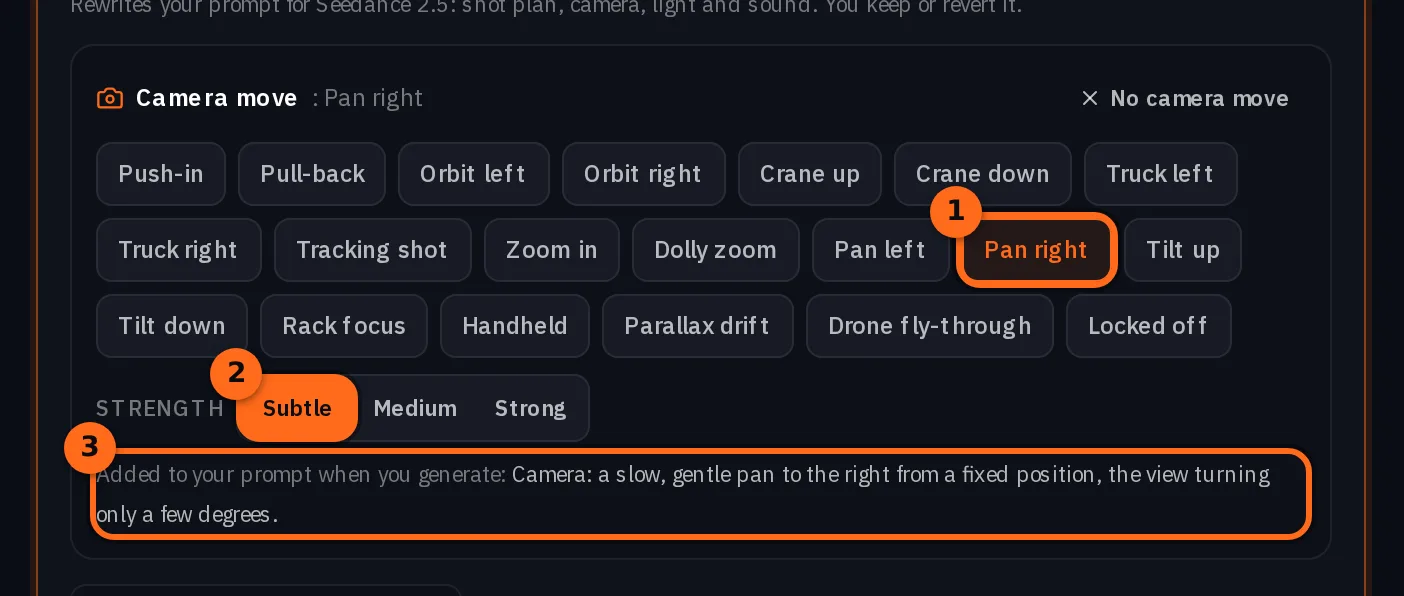
| 搖鏡 (Pan) | 原地向左或向右轉動 | 從一個人移向另一個人,例如屋頂上短暫轉向他的動作 |
| 俯仰 (Tilt) | 原地向上或向下轉動 | 展現高大的物體,或跟隨視線上移或下移 |
| 推軌或拉軌 (Dolly in or out) | 物理上向主體靠近或遠離 | 建立親密感,或拉遠以展示他們所在的位置 |
| 變焦 (Zoom in or out) | 鏡頭焦距改變,相機位置保持不動 | 一種突然、手工製作的感覺,就像屋頂上的攝影機變焦 |
| 跟隨 | 跟隨人物或動作 | 行走和奔跑,就像消防梯 |
| 手持 | 隨著人物的呼吸和腳步移動 | 任何應該感覺像是有人在現場拍攝的內容 |
| 靜止 | 保持不動 | 讓表演支撐鏡頭 |
提示:說明方向和距離. 屋頂提示詞用整整一個段落描述一個短橫移:最短暫的轉向他的動作,保持相同高度,沒有傾斜、環繞或推近。你對移動的描述越精確,模型自行發明的部分就越少。攝影機移動指南 解釋了十二種移動方式以及用於描述每種方式的用語。
在進行動畫製作前,先用靜態圖像鎖定視覺風格
在撰寫影片提示詞之前,請先為每個鏡頭的關鍵時刻撰寫圖片提示詞,並將其生成為靜態影像。靜態影像是你以低成本修正外觀的地方:角色、服裝、地點、時代、光線、構圖、角度、鏡頭、姿勢、表情、道具和背景。如果靜態影像不對,就不要繼續製作影片。
- 誰: 角色,從「角色」中附加,並指定服裝名稱。
- 地點與時間: 地點和時代,並附上能增強真實感的細節。
- 光線: 光源、方向、顏色和一天中的時間。
- 攝影機: 位置、角度、鏡頭和構圖。
- 表演: 姿勢、表情,以及眼神的方向。
- 連貫性: 與前後鏡頭相同的服裝、道具和光線。
一旦設定正確,就將其視為鎖定狀態。靜態圖片將成為影片的視覺參考,讓模型從已解決的內容開始,而不是重新發明角色和場景。若要製作一張圖片,請從 建立 選單開啟 圖片,透過 角色 附加演員陣容,透過 地點 附加場景,選擇影片將使用的 長寬比,然後按下 生成圖片。接著,在影片編輯器中,於 開始來源 下選擇 把圖片做成動畫,並使用 加入起始影格 來加入該靜態圖片。
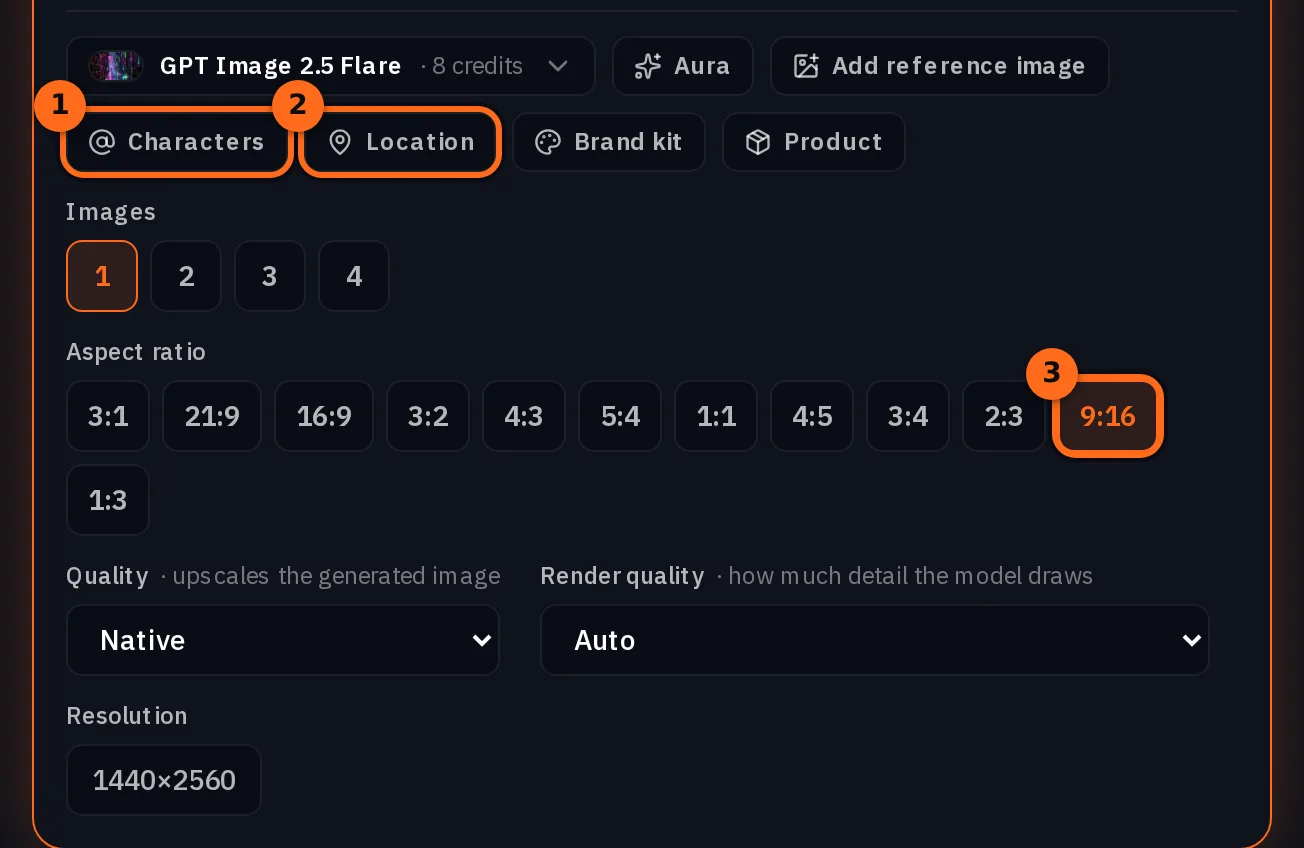
注意:我們在這段短片中做了什麼. 這裡的三個鏡頭直接從兩張角色設定圖進入 Seedance 2.5,場景與構圖都寫在每個提示詞中。內容最豐富的街道鏡頭拍了十次。如果某個鏡頭一直無法準確呈現構圖或場景,首先要加入的就是鎖定靜態圖。短片製作指南建議每個鏡頭都先從靜態圖開始。
逐拍撰寫影片提示詞
現在將每個鏡頭轉化為動作指令。「她對著鏡頭說話」是不夠的:要說明整個鏡頭中每一秒發生的事。下方的屋頂提示詞包含寫實鏡頭所需的所有部分,順序如下:
- 演員陣容鎖定: 使用設定圖中的相同兩個角色,臉部、頭髮、服裝或飾品不得有任何改變。
- 格式與場景: 9:16,真實的紐約屋頂,1990 年代後期,並搭配能營造氛圍的物品。
- 光線: 溫暖的午後陽光,說明光線如何灑落,以及隨著鏡頭移動時光線如何變化。
- 時間節拍: 0:00 到 0:02、0:02 到 0:05 依此類推,每個節拍包含動作、鏡頭移動以及引號中的對白。
- 表演: 手部如何移動、幅度多大、何時保持靜止;視線落在何處。
- 攝影風格與影像: 攝影機、手持感、顆粒感、色彩。
- 禁忌事項: 不使用穩定器、不使用平滑變焦、不使用美顏濾鏡、不使用網紅行為、不使用背景音樂。
- 聲音: 僅包含環境音與對話。
SEEDANCE 2.5 - ROOFTOP SCENE / 9:16 VERTICAL

Use the EXACT SAME male and female characters from the supplied character sheets.

Preserve their exact facial identity, hairstyle, skin tone, body proportions, clothing and accessories.

NO identity drift.
NO wardrobe changes.

FORMAT:
9:16 vertical.

LOCATION:
Authentic New York City rooftop, late 1990s America.

Concrete rooftop, brick walls, rooftop equipment, pipes, vents, water-tower elements and NYC skyline clearly visible.

The two characters feel like effortlessly cool young adults casually hanging out, not commercial presenters.

--------------------------------------------------
LIGHTING
--------------------------------------------------

Warm late-afternoon natural sunlight.

Use realistic sunlight and shadow across both characters.

Warm highlights on their faces and hair, natural shadows across their clothing and parts of their faces.

Allow subtle exposure breathing, highlight blooming and occasional natural lens flare as the camera moves.

The lighting must feel completely natural and available.

--------------------------------------------------
0:00-0:02 - OPENING
--------------------------------------------------

Start with a creative LOW-ANGLE handheld shot showing BOTH characters and the NYC rooftop.

The FEMALE is casually leaning against a rooftop wall.

The MALE is sitting casually on the inner side of the rooftop parapet, slightly slouched.

He is ALREADY smoking.

The female looks directly toward the camera and says:

“Everyone’s trying to make cinematic AI videos, but most of them still look…”

--------------------------------------------------
FEMALE PERFORMANCE
--------------------------------------------------

The female uses her hands while speaking, but ONLY in subtle, realistic conversational ways.

Her gestures should be restrained and believable:

- small movement of one hand while making a point
- slight open-palm gesture
- tiny wrist or finger movement
- occasionally moving one hand closer to her body
- relaxed natural arm movement

Do NOT have her constantly wave her hands.

Do NOT exaggerate the gestures.

Do NOT use influencer-style hand movements.

Her hands should sometimes remain completely still while she speaks.

The gestures should happen organically and occasionally, matching the rhythm of her speech.

She remains relaxed against the wall.

--------------------------------------------------
0:02-0:05 - SUDDEN OPTICAL ZOOM
--------------------------------------------------

As she continues speaking, suddenly hit the physical 1990s camcorder zoom rocker.

FAST, JERKY OPTICAL ZOOM:

LOW-WIDE TWO-SHOT
→ QUICK OPTICAL ZOOM
→ TIGHT CLOSE-UP OF FEMALE.

The zoom is sudden and slightly imperfect.

Mechanical zoom-rocker feel.
Small handheld wobble.
Brief motion softness.
Tiny autofocus adjustment.
Subtle exposure breathing.

End on a tight close-up.

She looks DIRECTLY INTO THE CAMERA and finishes:

“…AI.”

Keep her expression natural and understated.

--------------------------------------------------
0:05-0:07 - SHORT SIDEWAYS PAN TO MALE
--------------------------------------------------

IMPORTANT CAMERA INSTRUCTION:

The male is positioned relatively close to the female in the composition.

When transitioning from the female to the male, DO NOT make a long horizontal sweep across the entire rooftop.

Instead, perform the SHORTEST POSSIBLE SIDEWAYS HORIZONTAL PAN needed to move from her to him.

Think:

FEMALE CLOSE-UP
→ QUICK SHORT SIDEWAYS TURN
→ MALE.

The camera should rotate toward the SIDE OF THE FRAME WHERE THE MALE IS LOCATED.

The pan travels toward the NEAREST / SHORTEST SIDE of the next character.

If the male is just to the right of the female, pan quickly RIGHT.

If he is just to the left, pan quickly LEFT.

Never choose the longer direction around the composition.

The camera does NOT travel around the rooftop.

It simply makes a quick, short horizontal handheld turn toward the nearby character.

NO tilt up.
NO tilt down.
NO diagonal movement.
NO orbit.
NO push-in.
NO pull-out.

Keep the camera at approximately the same height.

Allow slight handheld motion blur and a tiny autofocus adjustment during the short pan.

--------------------------------------------------
0:07-0:10 - MALE
--------------------------------------------------

The short sideways pan lands naturally on the male.

Frame him in a low-angle medium close-up while still showing enough rooftop and NYC skyline to establish the location.

He remains relaxed and slightly slouched.

He is already smoking.

Warm sunlight catches one side of his face while the other remains naturally shaded.

He takes a small drag.

Subtle smoke catches the sunlight.

He looks toward camera and says:

“The trick isn’t just the model - it’s how you build the whole shot.”

He makes only a small, natural gesture with the cigarette.

No exaggerated movement.

--------------------------------------------------
CAMERA STYLE
--------------------------------------------------

Authentic late-1990s consumer/prosumer camcorder.

Handheld and imperfect, but visually intentional.

Use:
- creative low angles
- tight close-ups
- wide rooftop establishing framing
- sudden optical zoom
- short reactive sideways pan
- subtle handheld shake
- natural framing corrections
- realistic sunlight and shadows
- occasional focus breathing
- slight motion blur

The camera should feel like a real person casually filming their friends.

The camera movement should NEVER feel like modern stabilized cinema.

--------------------------------------------------
1990s IMAGE
--------------------------------------------------

Extremely photorealistic.

Authentic late-1990s American camcorder.

Slightly soft optical image.
Natural analog grain.
Warm organic skin tones.
Lifted blacks.
Subdued contrast.
Gentle highlight blooming.
Subtle halation.
Mild chromatic imperfections.
Natural lens flare.
Realistic exposure fluctuations.

Must look like actual footage recorded in the late 1990s, NOT modern footage with a retro filter.

NO gimbal.
NO perfect stabilization.
NO smooth cinematic zoom.
NO digital zoom.
NO long sweeping pan.
NO complicated camera movement.
NO exaggerated hand gestures.
NO influencer behavior.
NO beauty filter.
NO plastic skin.
NO CGI appearance.
NO background music.

Only authentic NYC rooftop ambience, distant traffic, wind and naturally recorded dialogue.

Cast: @Image1 is Male1. @Image2 is Female2.它生成的是下一步中的鏡頭 1。
提示:克制手部動作. 兩個對話提示詞都將手部視為表演的一部分:它們列出了允許的小動作,說明手部有時應完全靜止,並排除指點和網紅手勢,以免說話變成揮手。
提示:將名稱拼寫成發音方式. 街道提示詞將品牌名稱寫成其發音方式,以便模型知道如何發音:「That's the nol-jia workflow.」對於模型可能讀錯的任何名稱,請採用相同做法。
使用 Seedance 2.5 生成鏡頭
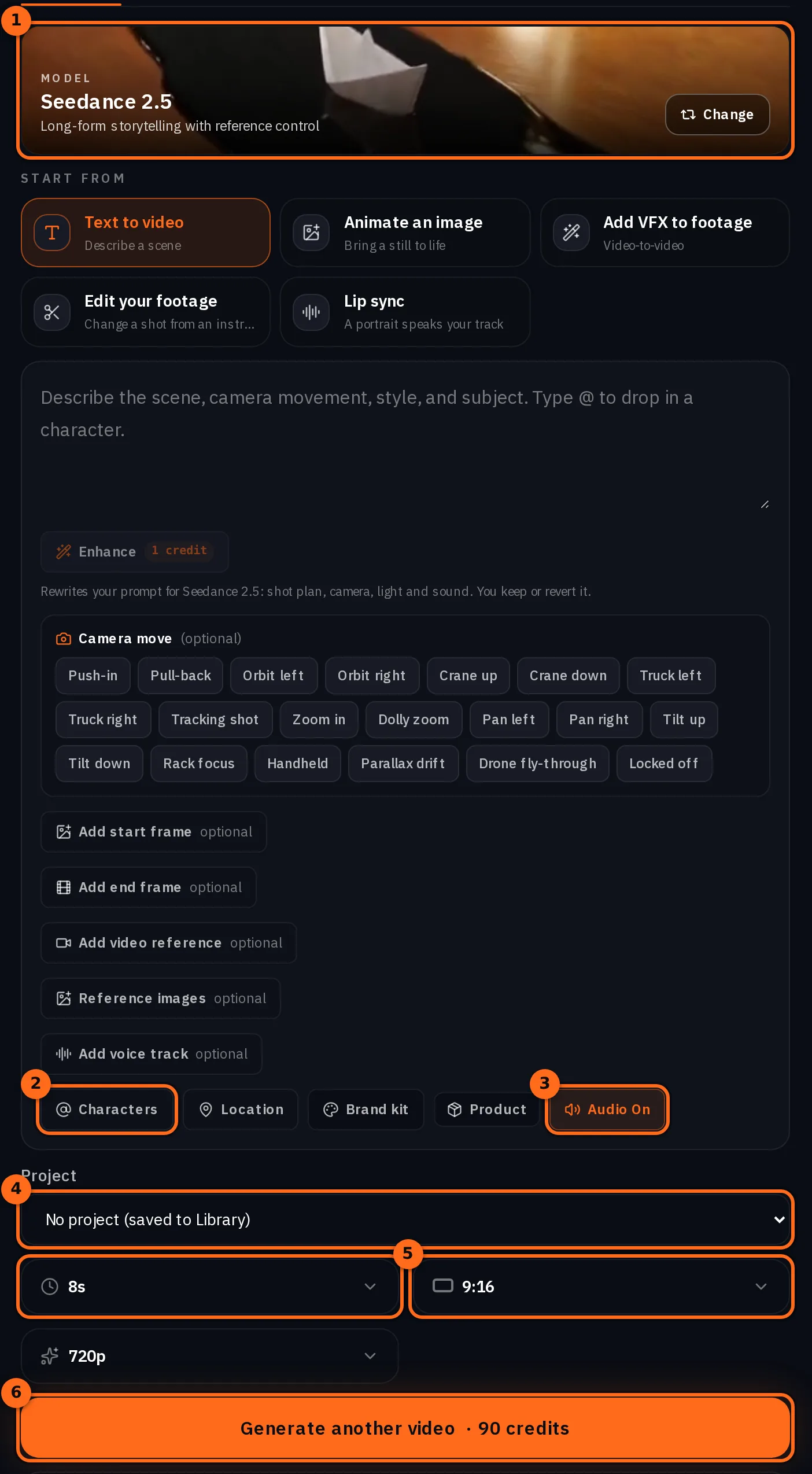
從 建立 選單開啟 影片。使用模型按鈕選擇 Seedance 2.5,將長寬比選項設為 9:16,將時長選項設為鏡頭長度,並保持 Audio On 開啟,以便對話和環境音與畫面一同生成。按下 角色 並加入兩位人物:他們會依選項順序成為 @Image1 和 @Image2,在提示詞中輸入 @ 即可插入名稱。在 專案 下拉選單中選擇你的專案,讓所有拍攝結果都存放在那裡,貼上提示詞並按下 生成影片。執行前,按鈕上會顯示價格。本指南中每個鏡頭提示詞的最後一行,也就是以 Cast 開頭的那行,是由 NOLGIA 根據附加的角色自動加入的;你不需要手動輸入。這一行會將每個角色對應到其參考圖片,後面接著你在角色上儲存的任何描述;我們的角色沒有儲存描述。製作這些鏡頭時,這一行還包含了每個角色肖像中的「Character portrait of …」和「Clean studio reference image, front-facing, even lighting.」字樣;NOLGIA 現在不再發送這些內容,因此這一行顯示的是目前實際發送的內容。
SEEDANCE 2.5 - FIRE ESCAPE STAIRCASE SCENE / 9:16 VERTICAL

Use the EXACT SAME male and female characters from the supplied character sheets.

Preserve their exact:
- facial identity
- hairstyles
- skin tones
- body proportions
- clothing
- jewelry/accessories

NO identity drift.
NO wardrobe changes.

FORMAT:
9:16 vertical.

LOCATION:
Authentic New York City fire escape staircase attached to an old brick building, late-1990s America.

The environment should clearly read as a real NYC fire escape: aged brick walls, metal staircase, urban buildings, rooftop elements and NYC street visible below.

--------------------------------------------------
CAMERA + OPENING
--------------------------------------------------

Start with a CREATIVE LOW-ANGLE handheld shot from below the fire escape staircase, looking upward as both characters walk DOWN the stairs.

Do NOT shoot through railings as a framing device.

Keep the camera physically close to them and slightly below their level.

The female is slightly ahead of the male.

The camera follows them with genuine handheld camcorder movement.

She looks DIRECTLY INTO THE CAMERA while walking and says:

“This is where the magic happens.”

Her delivery is casual, playful and natural.

--------------------------------------------------
FEMALE PERFORMANCE
--------------------------------------------------

While saying the line, she uses ONLY subtle, natural hand gestures.

Small conversational movements:
- slight movement of one hand
- relaxed wrist movement
- a small open-palm gesture
- subtle movement toward herself

Her hands should NOT constantly move.

No exaggerated pointing.
No influencer gestures.
No theatrical acting.

Her eye contact with the camera is important - she should keep looking directly into the lens while speaking.

--------------------------------------------------
TIGHT CLOSE-UP
--------------------------------------------------

As she says the line, the camera moves into a VERY TIGHT CLOSE-UP of her face.

Use a creative low-angle perspective.

Her face fills most of the vertical frame while the NYC fire escape and brick building remain recognizable around the edges.

Keep the camera handheld and imperfect.

Small natural camera shake.
Subtle focus breathing.
Slight motion softness.
Tiny framing corrections.

She continues walking down the stairs while maintaining eye contact with the lens.

--------------------------------------------------
SUNLIGHT + SHADOW
--------------------------------------------------

Use natural late-afternoon sunlight.

As they descend the fire escape, sunlight falls across the female's face and hair while parts of her face naturally fall into shadow.

The camera movement causes the sunlight to shift subtly across her face.

Use:

- warm sunlight
- natural hard/soft shadows
- subtle highlight blooming
- slight lens flare
- realistic exposure breathing
- natural skin texture

Do NOT use studio lighting.

The sunlight should feel like real available NYC afternoon sunlight captured on a 1990s camcorder.

--------------------------------------------------
ENDING - JUMP
--------------------------------------------------

As the female finishes:

“This is where the magic happens.”

Both characters reach the bottom of the fire escape.

They playfully jump down from the final low step onto the pavement together.

The jump should be small, natural and spontaneous - NOT a stunt.

As they jump, the camera operator reacts naturally with a quick downward shake and slight reframing.

Hold for a brief moment as they land.

--------------------------------------------------
CAMERA STYLE
--------------------------------------------------

Authentic late-1990s American consumer/prosumer camcorder.

Creative but spontaneous handheld photography.

Use:
- low-angle perspective
- tight facial close-up
- slight upward perspective
- natural handheld shake
- spontaneous framing corrections
- subtle motion blur
- autofocus breathing
- realistic exposure fluctuations
- sunlight and shadow interaction

The camera should feel like a friend casually following them down the fire escape.

NOT professional stabilized footage.

NO gimbal.
NO Steadicam.
NO perfect stabilization.
NO smooth cinematic tracking.
NO digital zoom.
NO slow motion.
NO exaggerated camera movement.

--------------------------------------------------
1990s IMAGE
--------------------------------------------------

Extremely photorealistic.

Authentic late-1990s American camcorder footage.

Slightly soft optical image.
Natural analog grain.
Warm organic skin tones.
Lifted blacks.
Subdued contrast.
Gentle highlight blooming.
Subtle halation.
Mild chromatic imperfections.
Natural motion blur.
Realistic skin pores and fine facial hairs.

Must look like ACTUAL late-1990s footage, NOT modern footage with a retro filter.

NO beauty filter.
NO plastic skin.
NO CGI appearance.
NO exaggerated acting.
NO influencer behavior.
NO background music.

Only natural NYC street ambience, footsteps, distant traffic, fire escape sounds and naturally recorded dialogue.

Cast: @Image1 is Female2. @Image2 is Male1.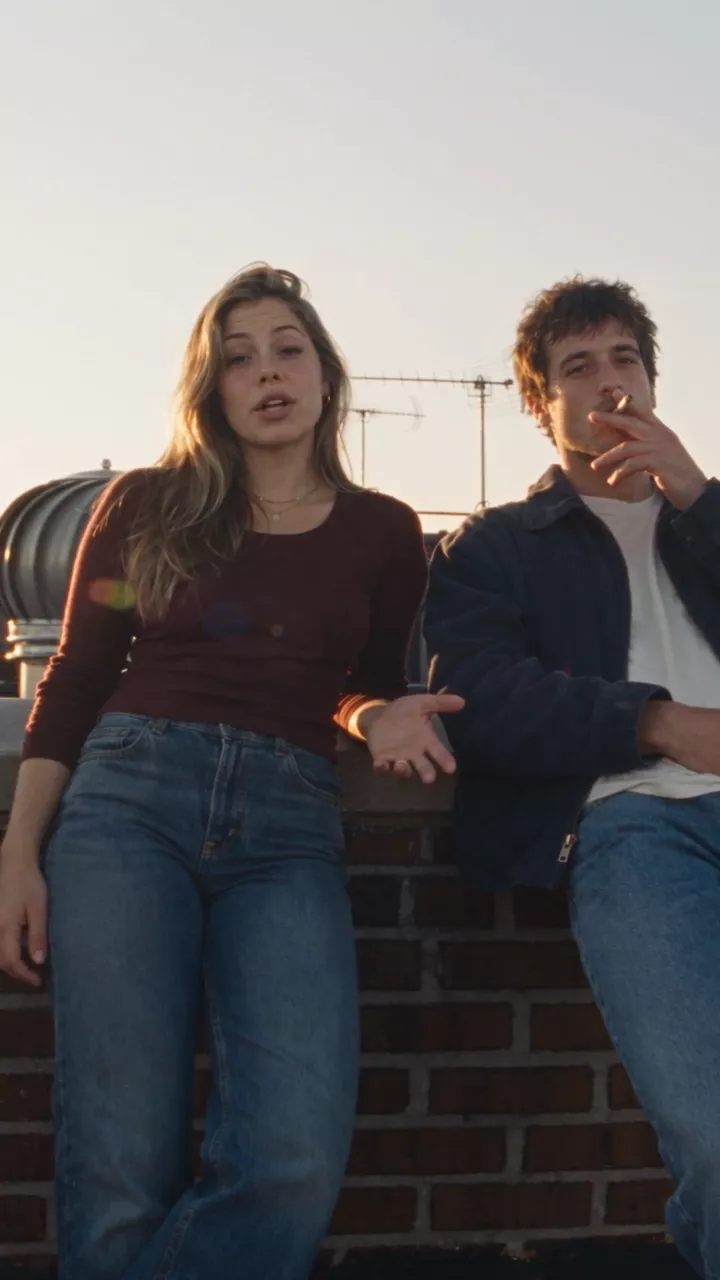
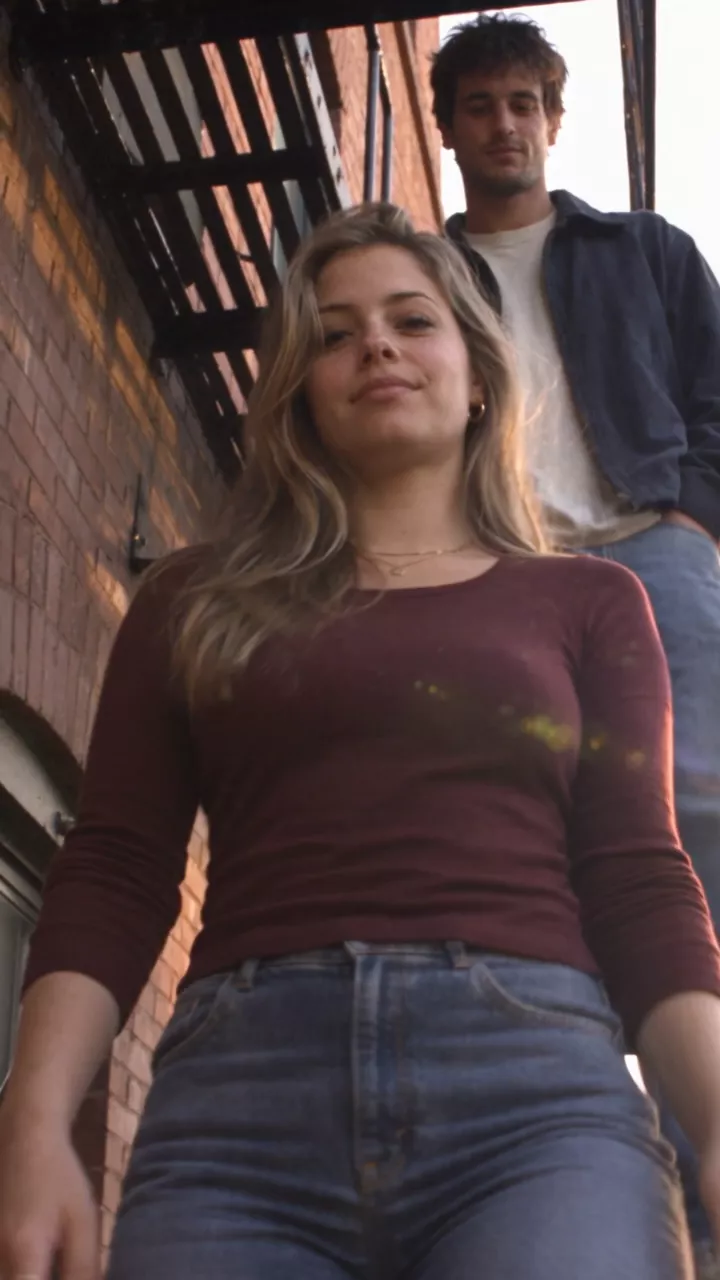
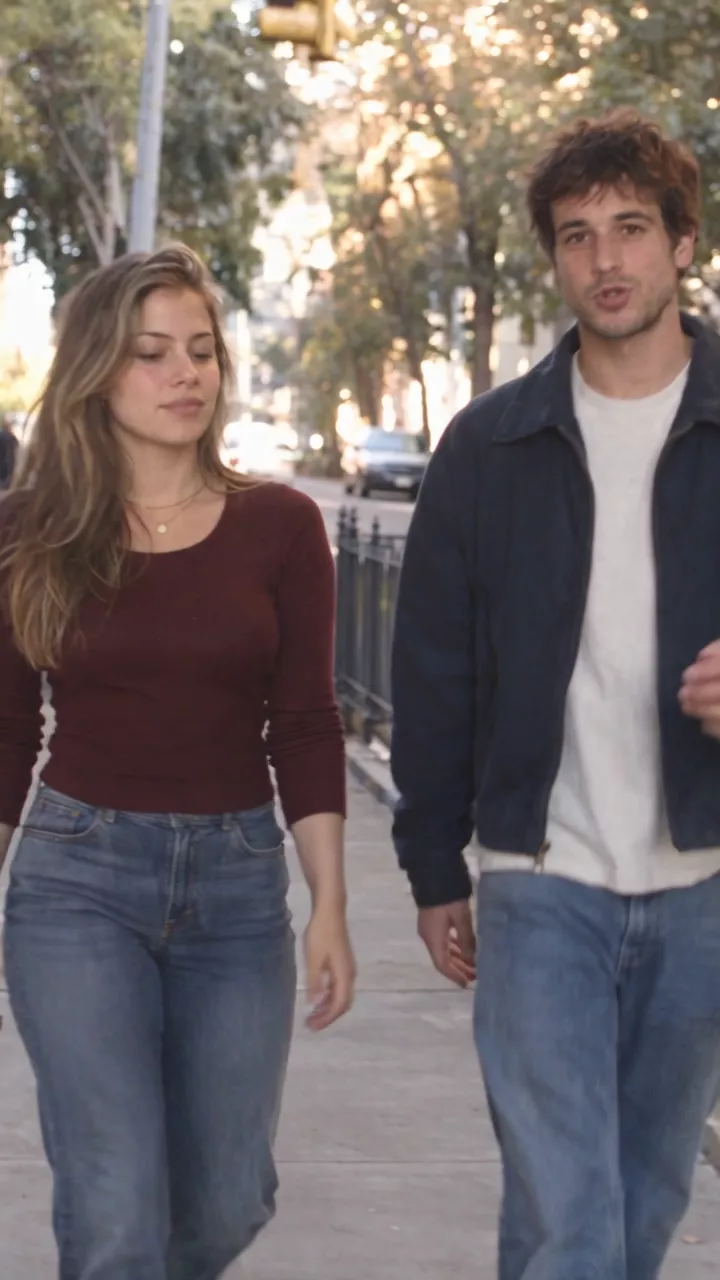
| 鏡頭 | 拍攝次數 | 我們保留的那段長度 |
|---|---|---|
| 1. 屋頂 | 4 | 10 s |
| 2. 逃生梯 | 3 | 4 秒 |
| 3. 街道 | 10 | 12 秒 |
預期需要重拍,並為此預留預算。鏡頭需要處理的細節越多,需要的重拍次數就越多:街頭鏡頭包含走路、一句台詞、攔計程車、兩人上車、第二句台詞以及汽車駛離,結果拍了十次。每次重拍只改變一個變數,並在評估其他部分之前,先仔細檢查臉部、手部、服裝和時代感。
決定音樂,並獨立製作
聲音是獨立的環節。有些影片完全不需要配樂,當對話、環境音或表演本身足以支撐氛圍時。如果你想要音樂,請為這支影片量身打造:情緒、節奏、角色、時代、地點以及說話方式都應融入其中。請 NOLGIA Agent 根據腳本和視覺風格撰寫音樂提示詞。
- 類型與時代: 1990 年代的爵士藍調,適合 1990 年代的故事。
- 速度與能量: 快速,但絕不能大到蓋過對話。
- 樂器: 明確列出:刷鼓、低音大提琴、電鋼琴、弱音小號。
- 情緒: 神秘、俏皮、有點古怪。
- 人聲: 無,位於對話之下。
- 絕對不能是: 沒有浪漫元素,沒有史詩般的漸強,沒有獨奏。
Fast-paced 1990s jazz-blues instrumental background score, mysterious, quirky and slightly unpredictable. Designed as an energetic underscore beneath spoken dialogue.

Tight, dry brushed drums with a quick nervous groove, walking upright bass, short staccato electric piano chords, muted jazz guitar riffs, occasional muted trumpet stabs and strange little keyboard flourishes. Use syncopation, abrupt pauses, unexpected chord changes and quick musical turns to create a clever, mischievous feeling.

The mood is mysterious and serious but subtly wacky - like a clever character is about to reveal something unusual. Fast-moving without becoming loud or aggressive. Keep the melody fragmented and understated so it never competes with narration.

Strong 90s analog character: dry studio recording, warm tape saturation, slightly dusty texture, punchy drums, tight bass, minimal reverb. Feels like a quirky 90s Japanese TV show, detective scene, creative-tech segment or fast-paced documentary.

NO romance, NO sentimental melody, NO dreamy atmosphere, NO epic cinematic buildup, NO funk, NO vocals, NO big solos. Keep it instrumental, rhythmic, tense, playful and constantly moving.
從 建立 選單開啟 音訊,在 你需要什麼? 下選擇 音樂,選取 Lyria 3.5,貼上提示詞並按下 生成音訊。這裡沒有長度設定:這次錄音回傳約 2 分鐘,你可以在時間軸上修剪它。配樂試了四次:前三次要求的是微妙、安靜的背景音樂,而上面這次要求的是快節奏。這就是專案中採用的版本。
提示:讓配樂不要混入片段中. 每個鏡頭提示詞都以 NO background music 結尾,並指明允許的聲音:該地點的環境音和對話。片段的聲音是一條音軌,因此如果配樂已燒錄在內,之後就無法調低音量或在節拍上剪輯。
在時間軸編輯器中組合
最後階段是剪輯:按順序排列三個鏡頭,將配樂放在下方,並調整時間,直到它播放起來像一支完整的影片。
- 開啟專案的工作區並按下 新時間軸,命名,將畫面尺寸設為 直式 9:16,然後按下 建立。
- 在 專案媒體 中,依序新增三個鏡頭:屋頂、消防梯、街道:將每個鏡頭拖曳到時間軸上,或將滑鼠移過並按 + 以在播放頭位置新增。
- 修剪每個鏡頭,使剪接點落在對白或動作上:使用 選取 工具拖曳片段的邊緣,或在新增前於預覽中設定 標記入點 和 標記出點。
- 在工具列的 音訊 群組中使用 新增音訊軌道,將配樂加在鏡頭下方的獨立音訊軌道上,在畫面結束處使用 分割 切開,並刪除多餘的尾部。
- 選取配樂,在 音訊 檢查器中降低 片段音量,或開啟 人聲迴避,讓對白更突出,並在結尾加上 淡出。
- 按 匯出影片。完成的 MP4 會存入你的媒體庫,按鈕旁的箭頭提供給 Premiere Pro 或 DaVinci Resolve 和 After Effects 的剪接版本。
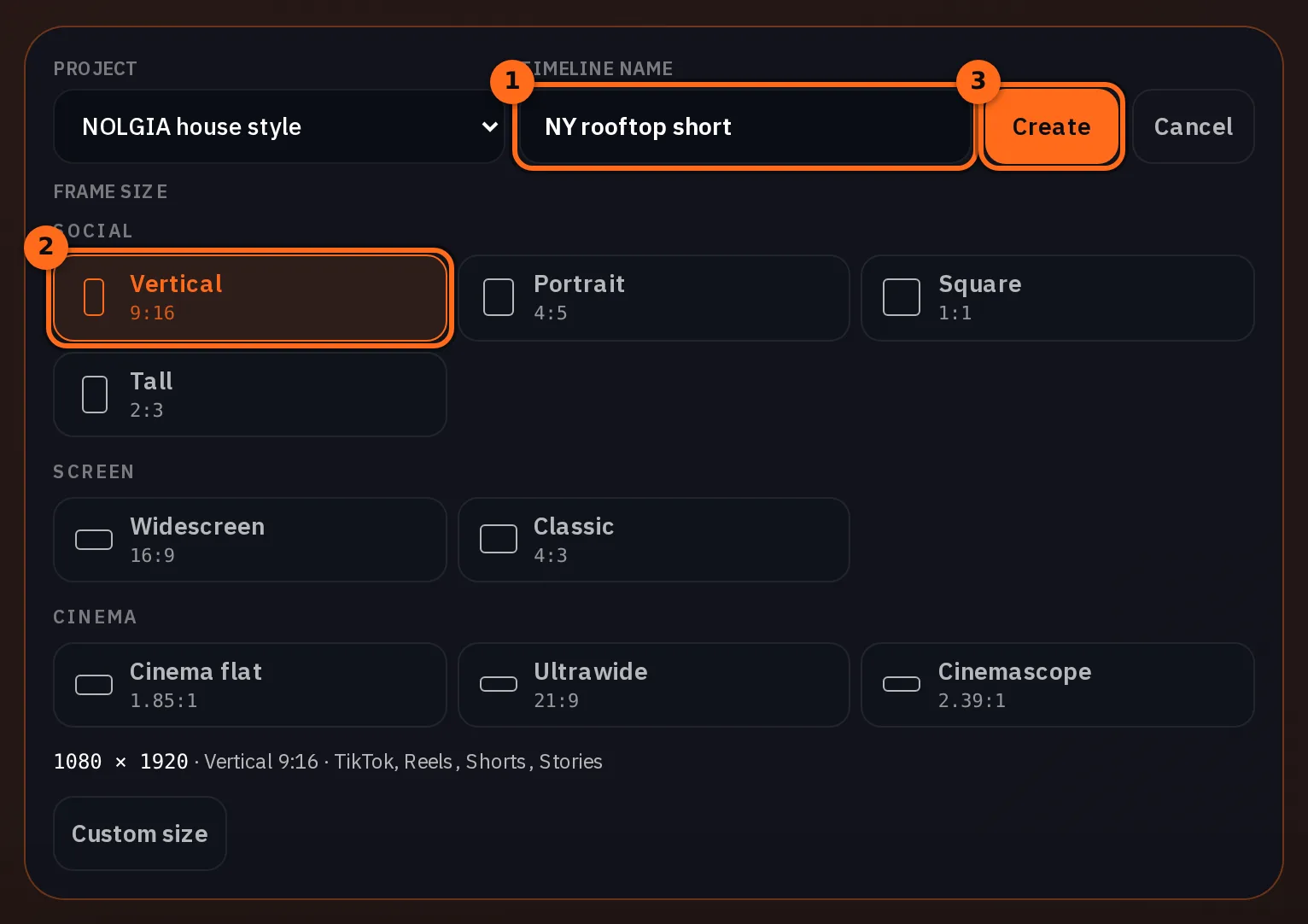
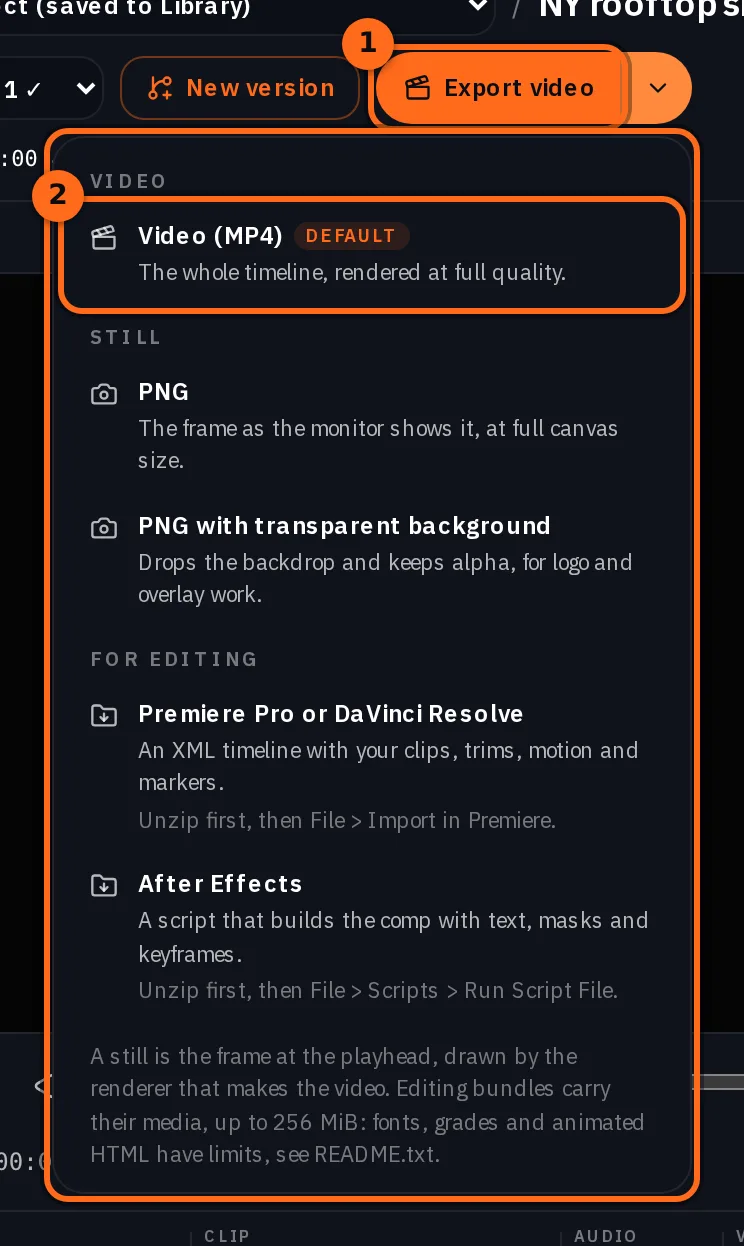
提示:讓畫面尺寸符合平台. 9:16 的時間軸 (1080 x 1920) 會匯出適合 TikTok、Reels 和 Shorts 的直立影片;同一個選擇器也有 4:5、1:1、16:9 和電影寬螢幕比例。已經用其他尺寸建立時間軸了?點擊編輯器標題列中的 影格速率 以開啟 專案設定,按下 變更畫面尺寸 並選擇 直立。使用 符合 時,9:16 的鏡頭會剛好填滿直立畫面;填滿 則會裁切任何其他形狀的片段以覆蓋畫面。
音訊指南 更詳細地說明了時間軸上的語音、音樂和音效。
你仍需重新生成的地方
- 時代感洩露了。 屋頂鏡頭顯示的是 1990 年代後期,但天際線中卻出現了世貿中心一號大樓。明確指出背景中應該出現什麼,或保持背景模糊,並檢查每一次的生成結果。
- 繁忙的鏡頭。鏡頭中的每個動作都是可能出錯的地方。街景鏡頭有六個動作,拍了十次;防火梯鏡頭有兩個動作,拍了三次。
- 對白。名字讀錯或台詞超出鏡頭長度意味著要重拍。將名字拼寫成發音的樣子,並確保台詞長度符合你選擇的時長。
- 臉孔。這裡每個鏡頭的服裝、頭髮和珠寶都來自角色設定表。至於臉孔在鏡頭之間是否為同一個人,我們尚未測量,因此不做此聲稱。
費用
角色設定表和靜態圖像按每張圖片計費,鏡頭按模型和長度計費,配樂按每次生成計費。每條發給 NOLGIA Agent 的訊息都算作一次代理回合,如 代理指南 所述。在時間軸上剪輯和匯出不計費。本短片中使用的模型即時費率如下:
GPT Image 2.5 SunburstEvery plan
Per image
Native 8 點 · 2K 21 點 · 4K 58 點
Seedance 2.5Pro and up
Per 5s clip
480p 26 點 · 720p 56 點 · 1080p 137 點
1080p renders at 16:9 and 9:16
Lyria 3.5Every plan
Per generation
Standard 5 點
頁面載入時從目錄即時讀取。 所有價格都會在生成前顯示。 查看所有費率.
檢查清單
- 向 NOLGIA Agent 解釋劇本、時代和感覺,並在輸入任何提示詞之前獲得計畫。
- 每個人的角色設定表,已核對時代背景並儲存為「演員」。
- 每個地點的靜態畫面,已核對是否有當時尚未存在的物品,並儲存為「地點」。
- 鏡頭清單:逐鏡說明劇情、攝影機位置與運動方式。
- 針對構圖精確的鏡頭,鎖定靜態畫面。
- 每個鏡頭的影片提示詞,包含時間節奏、引號內的對白、手部、眼神、光線、禁止事項,以及「無背景音樂」。
- 檢查每個拍攝版本的臉部、手部、服裝與時代背景。
- 為這支影片製作的配樂,或決定不使用配樂。
- 在「時間軸」編輯器中,將鏡頭、配樂與時間軸整合在一起。
若想用我們的演員陣容試試看,請下載設定表與屋頂靜態畫面,在你的帳號中儲存為兩個角色與一個地點,然後執行上述提示詞。
所需素材
常見問題
- 影片使用了哪個模型?
- 三個鏡頭皆使用 Seedance 2.5,並附加了兩個角色。它將兩張角色設定表作為參考,在同一個片段中生成了對白與街道環境音。
- 角色可以說話嗎?
- 可以。在每個節拍中將對白寫在引號內,說明誰說以及怎麼說,並保持簡短以符合鏡頭長度。品牌名稱請按發音拼寫。
- 每個鏡頭中都是同一個人嗎?
- 服裝、髮型和飾品來自每個鏡頭中的角色設定圖。至於臉部是否從一個鏡頭到另一個鏡頭都是同一個人,我們尚未進行測量,因此不做此宣稱。
- 為什麼要在每個鏡頭中標註「無背景音樂」?
- 片段的聲音是一條音軌。如果模型添加了配樂,你無法在對白下調低音量或在節拍處剪輯,因此配樂需單獨製作,並在時間軸上鋪設在鏡頭下方。
- 我必須在每個鏡頭前先製作靜態圖嗎?
- 不必。這裡的三個鏡頭直接從角色設定圖生成。當鏡頭持續無法準確呈現構圖、場景或道具時,靜態圖是有價值的,因為修正圖片比修正影片更省成本。
從規劃開始
開啟 NOLGIA Agent相關指南
影像製作
用 AI 製作短片:從劇本到最終剪輯的流程
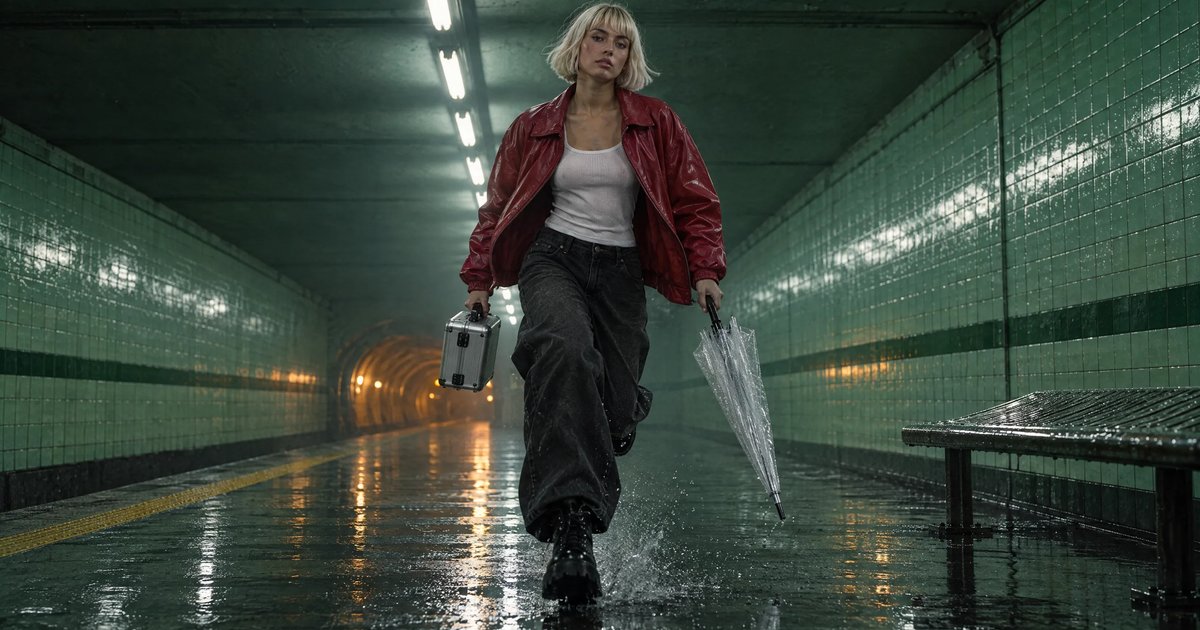
一部 25 秒的影片《Last Train》,從五行劇本到調色完成的剪輯:一個已儲存的角色、一個已儲存的地點、一個道具,先生成畫面,再生成鏡頭、聲音、Studio,最後匯出到 Premiere 或 Resolve。
· 閱讀時間 13 分鐘
提示詞
讓 AI 影片看起來真實:光線、動作與攝影機
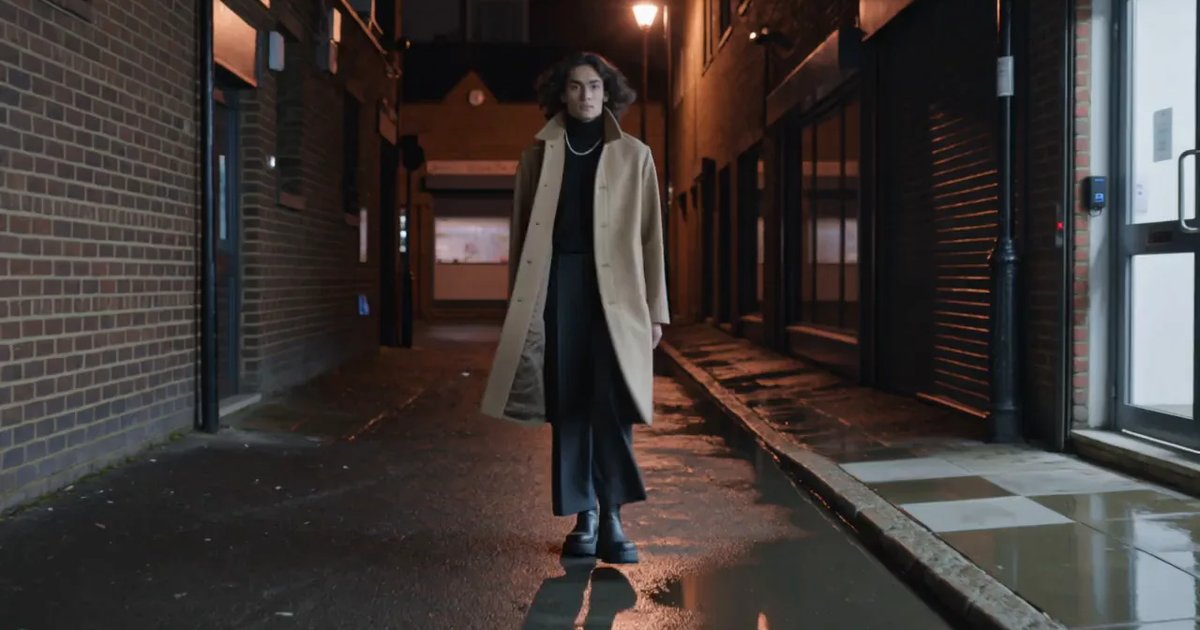
三句話就能讓片段看起來像實拍:一個具名的光源、有重量的行走、有人手持的攝影機。我們已在 Kling v3 上進行前後測試。
· 閱讀時間 9 分鐘
提示詞
Seedance 2.5:如何撰寫提示詞,並附實際執行過的媒體庫
如何在 NOLGIA 上為 Seedance 2.5 撰寫提示詞:文字轉影片、以靜態圖作為起始幀、將片段作為 @Video1 並包含其聲音、六種長寬比、4 到 30 秒,以及它拒絕的內容。
· 閱讀時間 10 分鐘