
Preset
Kinetic lower thirds
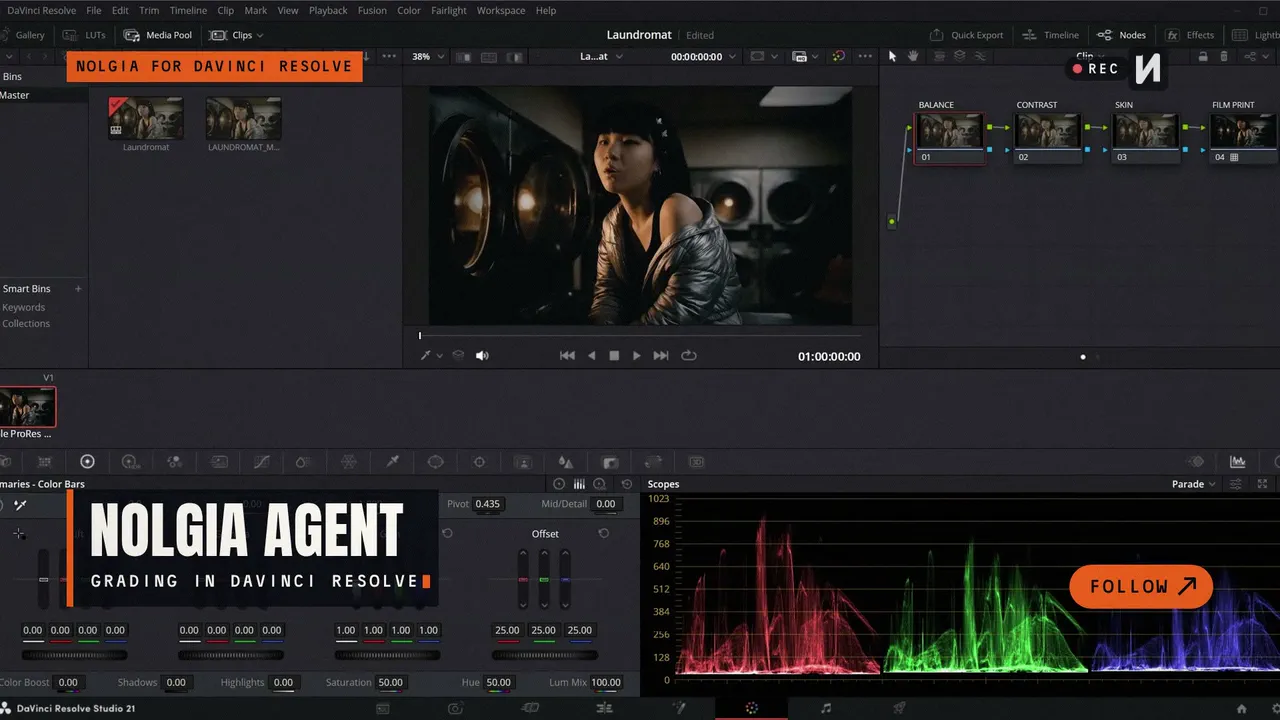
A name and role strip, a topic tag and a follow button, as a transparent file to lay over your video.
- Ideal für
- Interviews, podcasts, talking heads, livestream highlights
- Ergebnis
- Video
- Zeit
- About 1 minute
- Credits
- Kostenlos rendern
Du hast schon ein Konto? Anmelden
Kostenlos erstellbar: Das Formular auf dieser Seite generiert es aus deinen Antworten, für 0 Credits. Ein kostenloses Konto reicht, keine Kreditkarte nötig.
Hier erstellen, kostenlos
Beantworte die Fragen jetzt. Für das Rendern brauchst du ein kostenloses Konto: Du erstellst es vor dem Start, deine Antworten werden gespeichert.
Schritt 1 von 6
The name
The person's name as it should read.
0 / 300
So nutzt du es
Der NOLGIA Agent stellt diese Fragen im Chat, eine nach der anderen, mit deinem eigenen Material.
The name
Schreib es in deinen eigenen Worten. The person's name as it should read.
Zum Beispiel: Sam Lee
Their roleOptional
Schreib es in deinen eigenen Worten. A few words, like Head colorist. You can skip this.
Zum Beispiel: Head colorist
The topicOptional
Schreib es in deinen eigenen Worten. A short tag shown at the top, like Grading in Resolve. You can skip this.
Zum Beispiel: Grading in Resolve
The follow buttonOptional
Schreib es in deinen eigenen Worten. A handle, like @harborsupply. You can skip this.
Zum Beispiel: @harborsupply
How long it stays on screenOptional
Schreib es in deinen eigenen Worten. In seconds, 3 to 30. You can skip this (9 seconds).
Zum Beispiel: 9
Where will it play?
Wähle eine Option.
- Wide (16:9)
- Vertical (9:16)
Kostenlos rendern
Klicke auf „Kostenlos rendern“, und NOLGIA erstellt dein Video aus deinen Antworten: 0 Credits, keine Agenten-Runde. Es landet in deiner Bibliothek. Oder klicke auf „Mit NOLGIA Agent erstellen“, um im Chat mit dem Agenten daran zu arbeiten. Das dauert about 1 minute.
Über dieses Preset
A name and role strip, a topic tag, a corner bug and a follow button, animated in and out, as a transparent ProRes 4444 file to lay over your own footage in your editor. In NOLGIA Studio, pick Kinetic lower thirds in the Add menu and it lands on your timeline as a free transparent layer. Write the name, the role and the tag; they are printed exactly as you write them. With the NOLGIA Agent it can also be drawn over a clip of yours. It comes in 16:9 or 9:16. The render is free; with the NOLGIA Agent you pay only for its turn. You can also run it from Claude, Cursor or another agent with NOLGIA connected.
Anwendungsfälle
- A guest's name and role in an interview
- A podcast's topic tag and follow button
- A REC or LIVE corner bug
- The same lower third for every episode
Richtungen für mich vorschlagen
Sag, wofür du es machst, und NOLGIA schlägt ein paar Richtungen für Kinetic lower thirds vor, jede mit einem Prompt und den Optionen, die sie setzt. Nichts wird generiert, bevor du eine nutzt.
Bereit für Kinetic lower thirds?
Kostenlos erstellbar: Das Formular auf dieser Seite generiert es aus deinen Antworten, für 0 Credits. Ein kostenloses Konto reicht, keine Kreditkarte nötig.