
प्रीसेट
Kinetic lower thirds
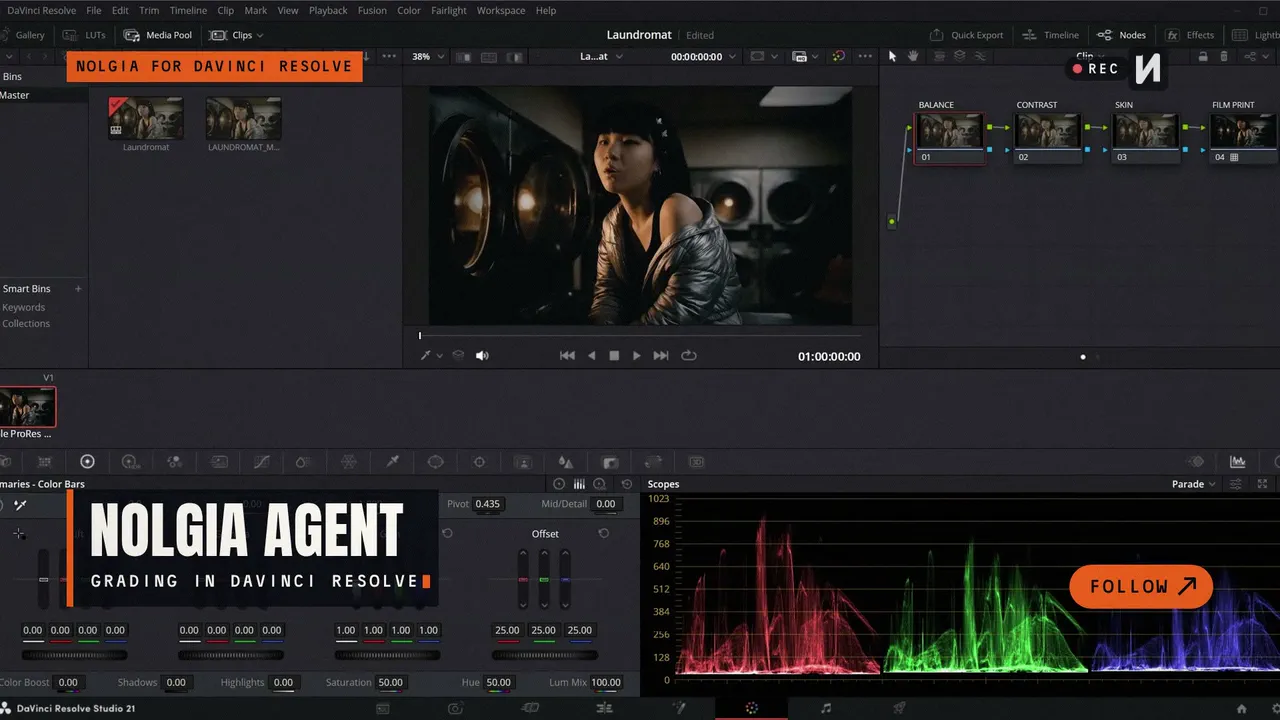
A name and role strip, a topic tag and a follow button, as a transparent file to lay over your video.
- किसके लिए बेहतरीन
- Interviews, podcasts, talking heads, livestream highlights
- आउटपुट
- वीडियो
- समय
- About 1 minute
- क्रेडिट
- रेंडर करना फ्री है
पहले से अकाउंट है? साइन इन करें
बनाने में फ़्री: इस पेज पर फ़ॉर्म आपकें जवाबों से इसे रेंडर करत है, 0 क्रेडिट्स पर। सिर्फ़ एक फ़्री अकाउंट क़ी जरूरत है, कार्ड क़ी नही।
यहाँ बनाएं, मुफ़्त
अभी जवाब दें। रेंडर के लिए एक मुफ़्त अकाउंट चाहिए: आप इसे शुरू होने से पहले बना लें, और आपके जवाब सेव रहेंगे।
स्टेप 1/6
The name
The person's name as it should read.
0 / 300
इसे कैसे इस्तेमाल करें
NOLGIA Agent चैट में ये सवाल एक-एक करके पूछता है, आपकी अपनी सामग्री के साथ।
The name
इसे अपने शब्दों में लिखें। The person's name as it should read.
उदाहरण के लिए: Sam Lee
Their roleवैकल्पिक
इसे अपने शब्दों में लिखें। A few words, like Head colorist. You can skip this.
उदाहरण के लिए: Head colorist
The topicवैकल्पिक
इसे अपने शब्दों में लिखें। A short tag shown at the top, like Grading in Resolve. You can skip this.
उदाहरण के लिए: Grading in Resolve
The follow buttonवैकल्पिक
इसे अपने शब्दों में लिखें। A handle, like @harborsupply. You can skip this.
उदाहरण के लिए: @harborsupply
How long it stays on screenवैकल्पिक
इसे अपने शब्दों में लिखें। In seconds, 3 to 30. You can skip this (9 seconds).
उदाहरण के लिए: 9
Where will it play?
एक चुनें।
- Wide (16:9)
- Vertical (9:16)
इसे मुफ़्त रेंडर करें
'इसे फ्री में रेंडर करें' दबाएं और NOLGIA आपके जवाबों से आपका वीडियो रेंडर करेगा: 0 क्रेडिट, कोई एजेंट टर्न नहीं। यह आपकी लाइब्रेरी में आ जाएगा। या 'NOLGIA Agent से बनाएं' दबाएं ताकि आप चैट में एजेंट के साथ इस पर काम कर सकें। इसमें about 1 minute लगते हैं।
इस प्रीसेट के बारे में
A name and role strip, a topic tag, a corner bug and a follow button, animated in and out, as a transparent ProRes 4444 file to lay over your own footage in your editor. In NOLGIA Studio, pick Kinetic lower thirds in the Add menu and it lands on your timeline as a free transparent layer. Write the name, the role and the tag; they are printed exactly as you write them. With the NOLGIA Agent it can also be drawn over a clip of yours. It comes in 16:9 or 9:16. The render is free; with the NOLGIA Agent you pay only for its turn. You can also run it from Claude, Cursor or another agent with NOLGIA connected.
इस्तेमाल के तरीके
- A guest's name and role in an interview
- A podcast's topic tag and follow button
- A REC or LIVE corner bug
- The same lower third for every episode
मेरे लिए डायरेक्शन सुझाएं
बताएं कि आप इसे किसके लिए बना रहे हैं, और NOLGIA Kinetic lower thirds के लिए कुछ डायरेक्शन सुझाता है, हर एक के प्रॉम्प्ट और उसके तय किए विकल्पों के साथ। जब तक आप कोई इस्तेमाल न करें, कुछ जनरेट नहीं होता।
Kinetic lower thirds बनाने के लिए तैयार हैं?
बनाने में फ़्री: इस पेज पर फ़ॉर्म आपकें जवाबों से इसे रेंडर करत है, 0 क्रेडिट्स पर। सिर्फ़ एक फ़्री अकाउंट क़ी जरूरत है, कार्ड क़ी नही।