
プリセット
Kinetic lower thirds
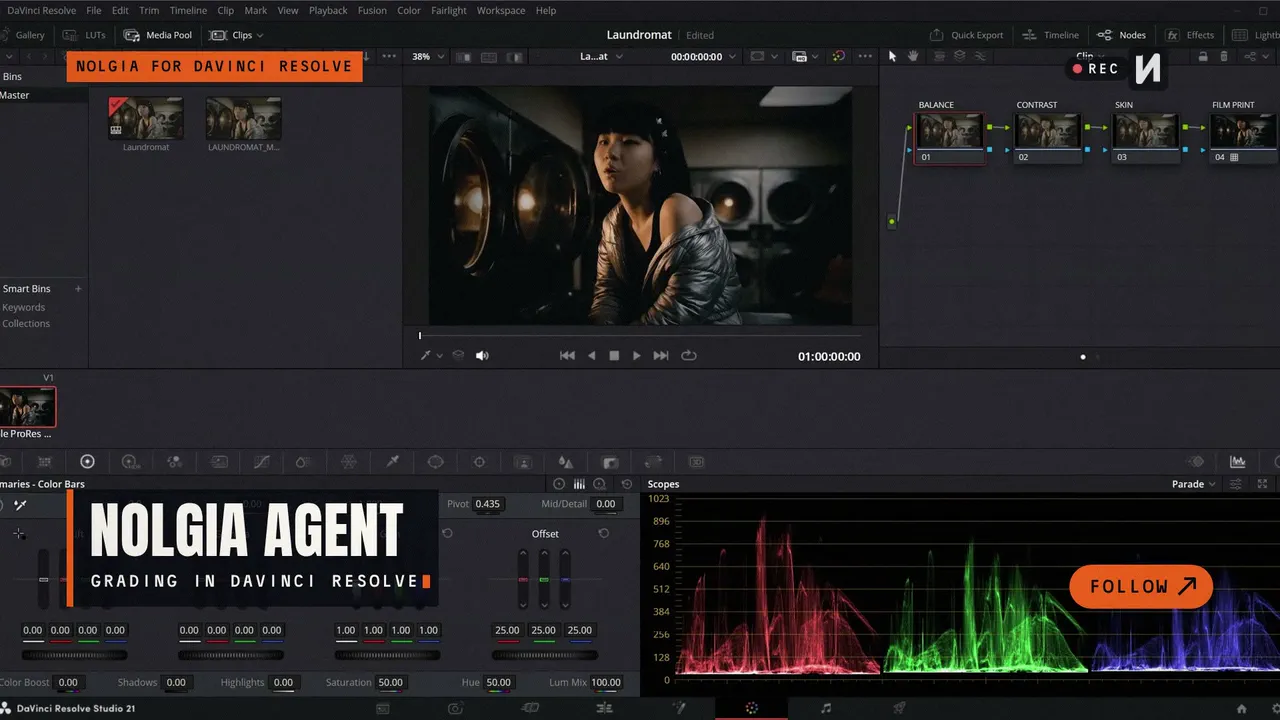
A name and role strip, a topic tag and a follow button, as a transparent file to lay over your video.
- おすすめの用途
- Interviews, podcasts, talking heads, livestream highlights
- 出力
- 動画
- 時間
- About 1 minute
- クレジット
- 無料でレンダリング
無料で作成可能:このページのフォームが回答に基づいて 0 クレジットでレンダリングします。無料アカウントのみで利用でき、カード登録は不要です。
ここで無料で作成
今すぐ回答してください。レンダリングには無料アカウントが必要です:開始前に作成し、回答内容は保存されます。
ステップ 1/6
The name
The person's name as it should read.
0 / 300
使い方
NOLGIA Agent がチャットで、あなたの素材についてこれらの質問を 1 つずつ尋ねます。
The name
自分の言葉で書いてください。 The person's name as it should read.
例: Sam Lee
Their role任意
自分の言葉で書いてください。 A few words, like Head colorist. You can skip this.
例: Head colorist
The topic任意
自分の言葉で書いてください。 A short tag shown at the top, like Grading in Resolve. You can skip this.
例: Grading in Resolve
The follow button任意
自分の言葉で書いてください。 A handle, like @harborsupply. You can skip this.
例: @harborsupply
How long it stays on screen任意
自分の言葉で書いてください。 In seconds, 3 to 30. You can skip this (9 seconds).
例: 9
Where will it play?
1 つ選んでください。
- Wide (16:9)
- Vertical (9:16)
無料でレンダリング
「無料でレンダリング」を押すと、NOLGIAがあなたの回答に基づいて動画をレンダリングします。クレジット消費は0、エージェントのターンも不要です。結果はライブラリに保存されます。または「NOLGIA Agentで作成」を押して、チャットでエージェントと一緒に作業することもできます。 所要時間は about 1 minute です。
このプリセットについて
A name and role strip, a topic tag, a corner bug and a follow button, animated in and out, as a transparent ProRes 4444 file to lay over your own footage in your editor. In NOLGIA Studio, pick Kinetic lower thirds in the Add menu and it lands on your timeline as a free transparent layer. Write the name, the role and the tag; they are printed exactly as you write them. With the NOLGIA Agent it can also be drawn over a clip of yours. It comes in 16:9 or 9:16. The render is free; with the NOLGIA Agent you pay only for its turn. You can also run it from Claude, Cursor or another agent with NOLGIA connected.
活用例
- A guest's name and role in an interview
- A podcast's topic tag and follow button
- A REC or LIVE corner bug
- The same lower third for every episode
方向性を提案
何に使うのかを伝えると、NOLGIA が Kinetic lower thirds の方向性をいくつか提案します。それぞれにプロンプトと設定されるオプションが付きます。使うまで何も生成されません。
Kinetic lower thirds を作ってみませんか?
無料で作成可能:このページのフォームが回答に基づいて 0 クレジットでレンダリングします。無料アカウントのみで利用でき、カード登録は不要です。