
Miroge: recast your clip 預設集
使用 AI 重新選角
使用 AI 重新選角:將自己、角色或寵物放入片段中,或無需重拍即可替換產品。 Keep the motion, change everything else. Recast a clip you already have with your own people, pets or characters, swap one thing in it, or move it to a new place. The moves, the timing and the camera carry over from your clip.
- 最適合
- Putting yourself, a character or your pet into a clip, swapping a product or prop without a reshoot, moving a shot to a new place
- 成果
- 影片
- 時間
- A few minutes
- 點數
- Priced on the Generate button
Miroge 需要訂閱方案:Starter 方案使用 Wan 3.0 Prime 執行,Pro 與 Studio 方案則支援所有模型。 在 Wan 3.0 Prime 上以 720p 品質生成 5 秒的片段,約需 78 點 點數。 建立免費帳號即可開啟 Miroge 編輯器:註冊即贈送 36 點數,無需綁定信用卡,可用於生成圖片及 Seedance 2.0 Mini 上的影片。
引導式:3 個步驟
使用方式
在 Agent 中,NOLGIA 會一次問一個這些問題。Miroge 生成面板則把所有問題放在同一個畫面。
Your clip
從你的裝置或媒體庫加入一段影片。 One clip of 3 to 10 seconds and up to 14 MB. It comes back the same length, framing and cut, with one thing changed.
What should change?
用你自己的話寫下來。 The one object or product to replace, and where it is in the shot.
例如: The white coffee mug on the desk
What it becomes
用你自己的話寫下來。 Describe the new object with its material, color and shape, so it comes out exactly as you picture it.
例如: A matte black steel travel bottle with a bamboo lid
建立
按一下「建立」就會製作你的影片,並存到你的媒體庫。價格就標在按鈕上,在你按下之前什麼都不會執行。 大約需要a few minutes。
關於這個預設集
Miroge takes a clip you already have and recasts it. The moves, the timing and the camera come from your clip, and what is in it comes from you. Open the Miroge composer, pick one of three modes, add the clip and your photos, and press Generate.
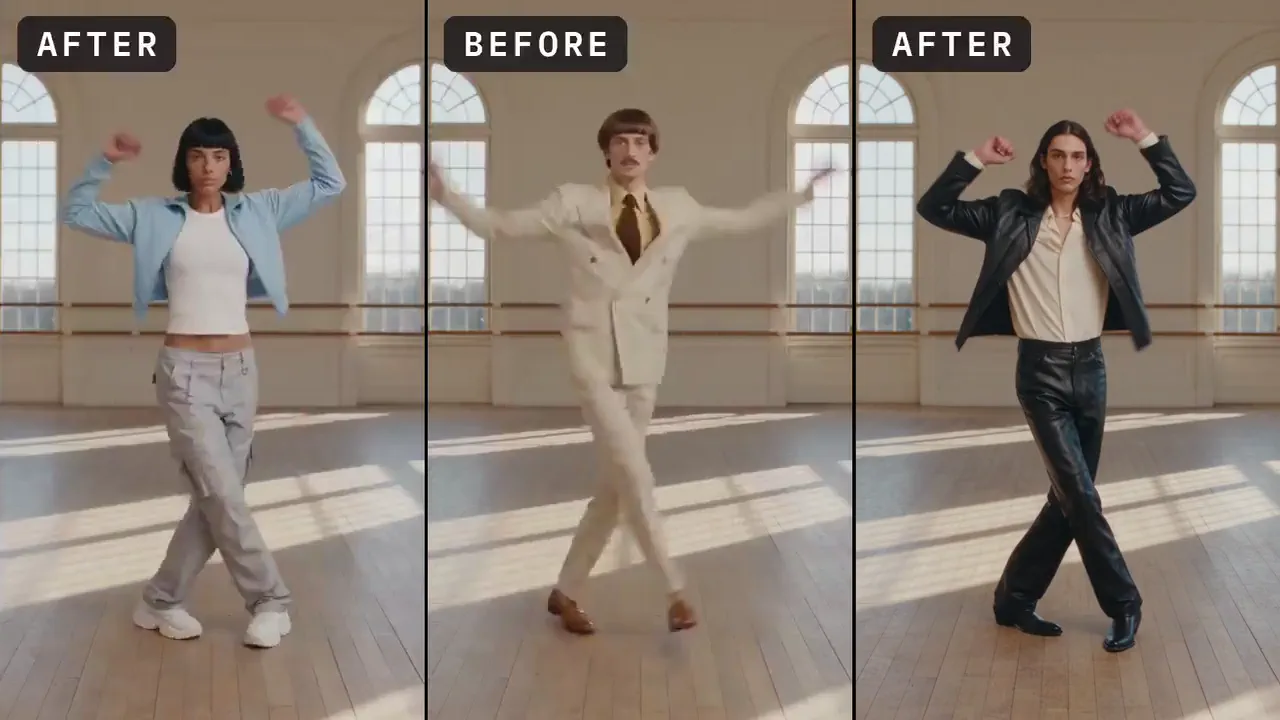
Motion transfer. Your cast performs the clip. Add one photo for each performer, a person, a pet or a character from your Characters library, and they take over the moves, the set and the camera of the original. It runs on Seedance 2.5 by default, with up to nine photos.
Swap. Change one thing: a person, an animal, a product or an outfit becomes the one in your photo, or the one you describe. Replace redraws the whole frame, so faces and details can shift; Remove takes a thing out and keeps the rest exactly as you filmed it. It runs on Seedance 2.5 by default.
New world. Keep the subject and its moves, and redraw the place and the light around it. Name what must stay first, in plain physical detail, then what changes. With Keep me exactly as filmed on, which it starts with, the person in your clip is cut out and put back as filmed over a new world made on Seedance 2.5. With it off, for a subject with no face in frame such as hands, a vehicle or a product, it runs on Gemini Omni 1.2 Edit by default, and Gemini Omni 1.1 Edit stays in the model list.
The prompt is optional in Motion transfer: with no words, Miroge replaces the people in the clip with the subjects in your photos. Type @ to point at the clip or a photo, and See what gets sent shows the whole instruction before you generate.
The composer shows the clip lengths, sizes and photo counts the chosen model accepts, and stops a clip that will not run before anything is charged. The price for your clip, model and quality is on the Generate button, and one click runs it. If the model refuses a clip, the credits come back. The result appears next to the form and in your Library, with Recreate, Compare and Download.
Use footage you shot or made yourself, because clips of well known people and copyrighted material are refused. Our guide Put your own character and your dog into any video walks through Motion transfer step by step, with the files to try it yourself.
使用情境
- Putting yourself, a friend or your dog into a clip with the moves you want
- Recasting a dance, a performance or a skit with your own characters
- Swapping a pet, a product, a prop or an outfit without a reshoot
- Trying a new product in a shot you already filmed
- Moving a hands-on or product shot to a new place
範例
用這個預設集製作,並附上每一個背後的提示詞。 「使用這個範例」會開啟 Miroge 生成面板,並載入該範例本身的檔案與設定。在你按下「生成」之前,什麼都不會執行。
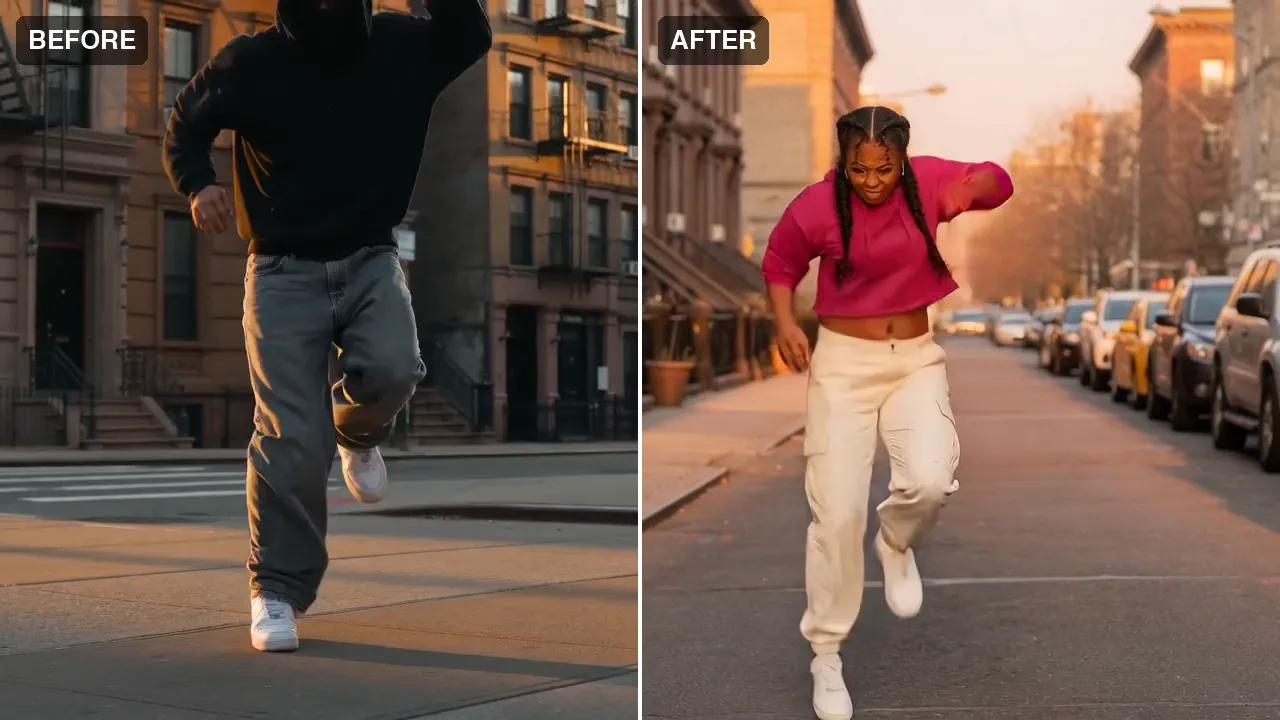
Before and after, side by side: a hooded dancer's hip-hop routine on a New York street, re-performed by a different dancer. Same choreography, beat for beat, and the new performer's braids, magenta hoodie and cargo pants carry through every move.
@Video1 provides the exact motion, choreography, timing and camera movement: reproduce every move frame for frame. The performer is @Image1, the young woman hip-hop dancer in the magenta cropped hoodie with braided hair, dancing in the same New York street at golden hour. Keep her hair and clothes exactly as they are in @Image1 throughout. Do not change the motion, the timing or the camera; change only who is performing. Photorealistic, no on-screen text, no signage, no logos.
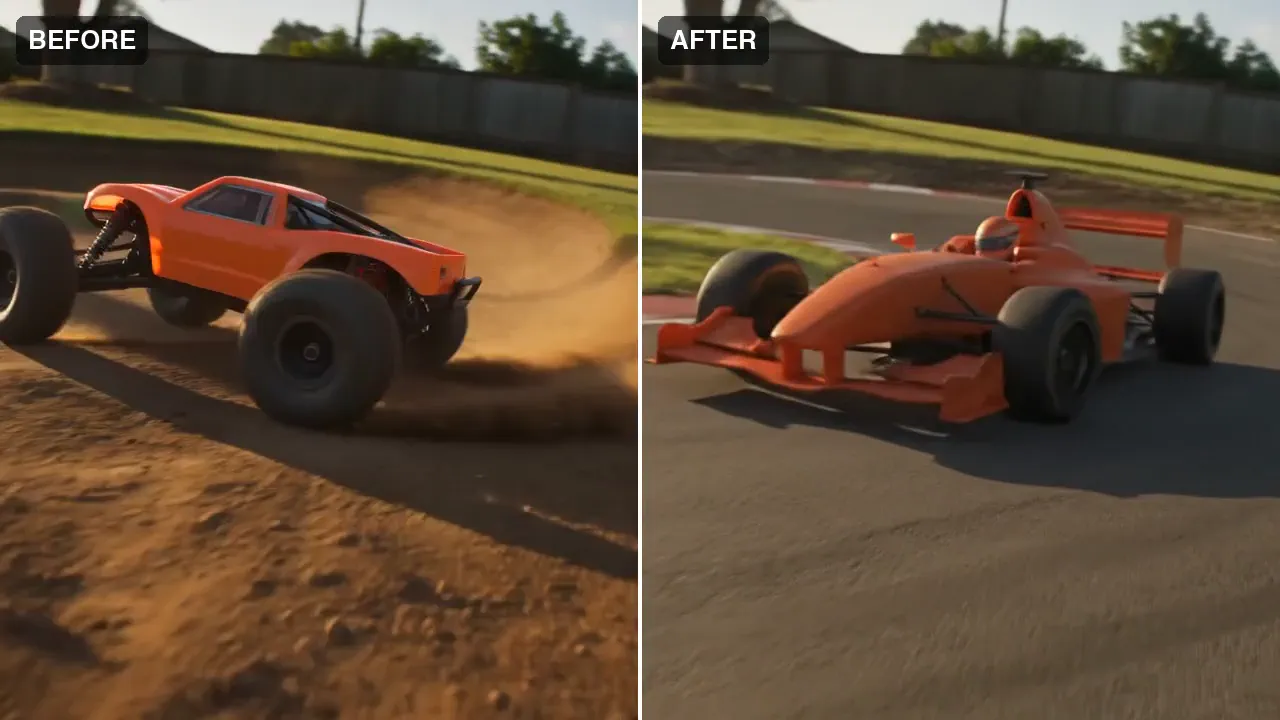
Before and after, side by side: a backyard RC buggy becomes a full-scale open-wheel race car on a real circuit. Same corner, same line, same camera move.
Edit this clip and change one thing only. THE TARGET: the small matte orange toy radio-controlled buggy drifting round the dirt corner. THE NEW OBJECT: a full-scale invented single-seat open-wheel race car in plain matte orange with a simple blade rear wing and bare black slick tyres, an anonymous unbranded prototype with no badges and no decals, at real car scale on a real asphalt race circuit with red-and-white kerbs. Replace the target with the new object at the same position and scale, moving exactly as the target moved, with matching shadows and reflections. Keep everything else the same: the same background, the same camera move, framing and cuts, the same lighting and colour, nothing else added or removed. No on-screen text, no watermark, no brand names, no badges, no logos, no sponsor decals, no trademarked or recognisable production designs - the new object must be an invented, generic shape.
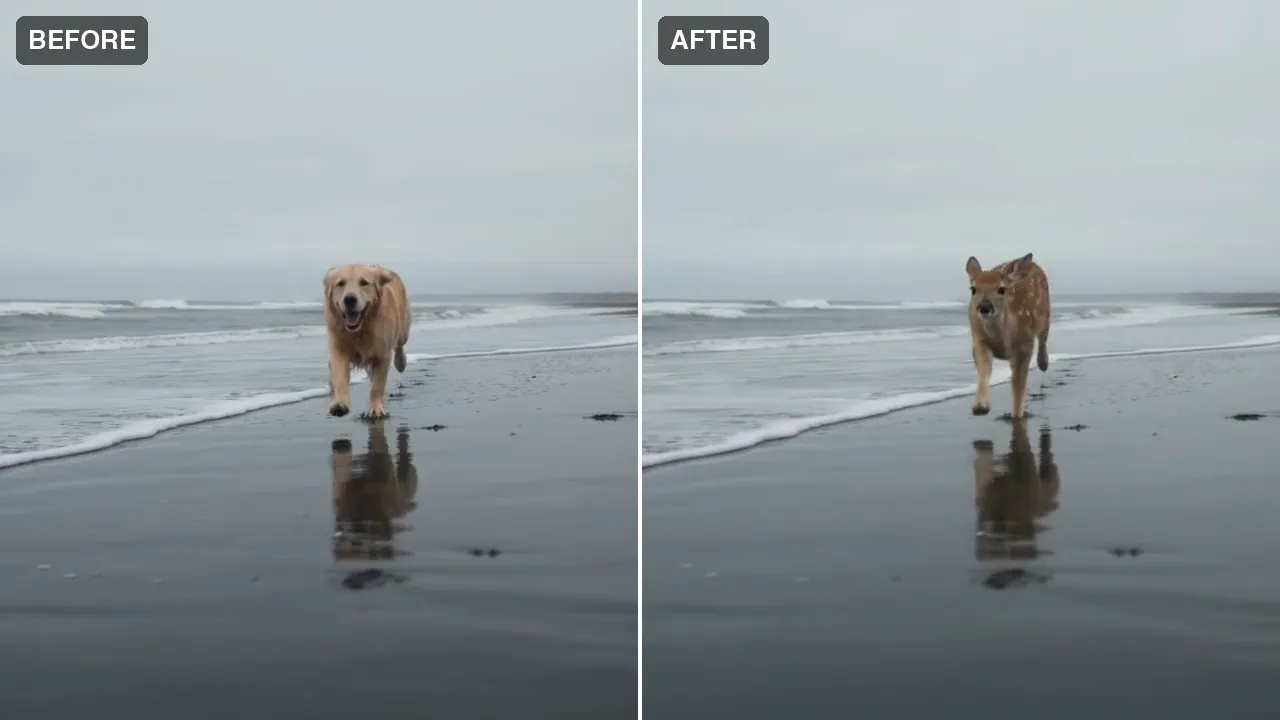
Before and after, side by side: a retriever running the wet sand becomes a spotted fawn. Same stride, same waves, same overcast light.
Edit this clip and change one thing only. THE TARGET: the golden retriever running along the wet beach toward the camera. THE NEW OBJECT: a young spotted fawn with reddish-brown fur, white spots and slender legs. Replace the target with the new object at the same position and scale, moving exactly as the target moved, with matching shadows and reflections. Keep everything else the same: the same background, the same camera move, framing and cuts, the same lighting and colour, nothing else added or removed. No on-screen text, no watermark, no brand names, no badges, no logos, no sponsor decals, no trademarked or recognisable production designs - the new object must be an invented, generic shape.
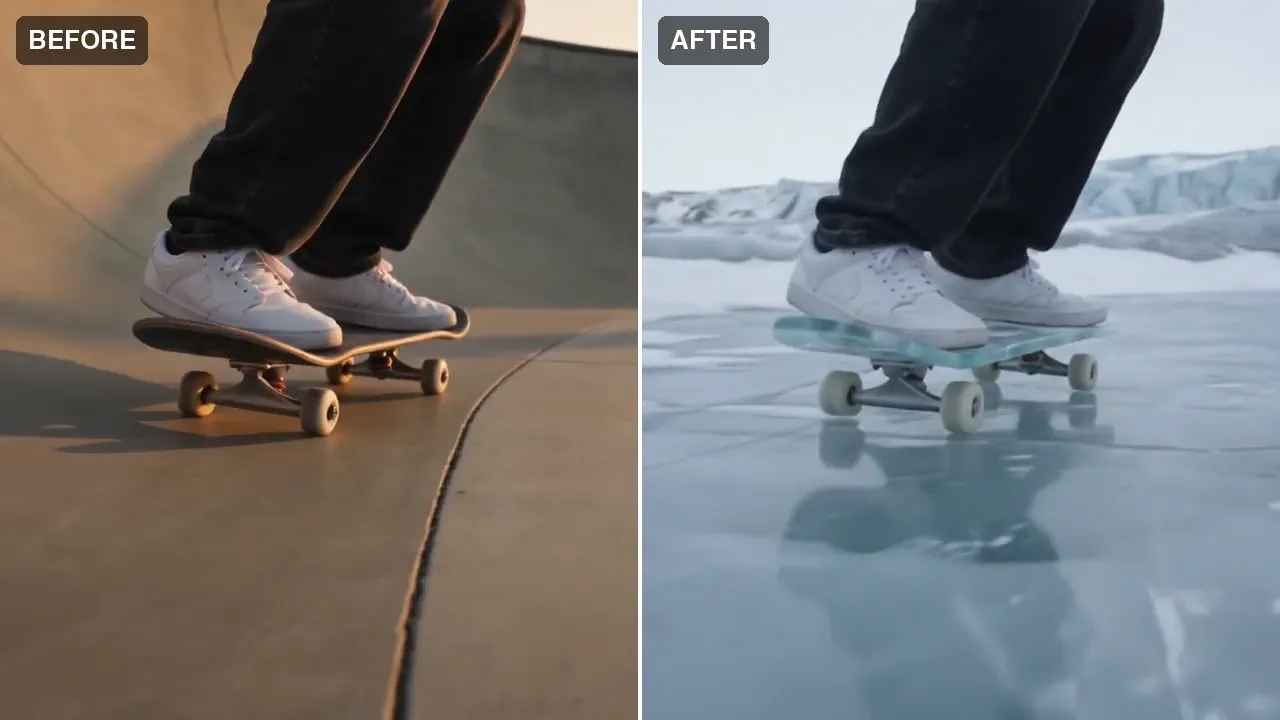
Before and after, side by side: a concrete skate bowl becomes an arctic glacier and the board becomes carved blue ice. Same rider, same trick, same timing.
Edit this clip and change the board and the world around it, but not the rider. KEEP THE RIDER EXACTLY AS THEY ARE: the same legs, the same black jeans, the same white sneakers, standing the same way on the board, performing exactly the same trick with exactly the same timing, the same body position frame for frame. Do not change the rider, their clothes, their stance or their movement in any way. Keep the same camera move, the same low tracking angle, the same framing and cuts, the same length. THE FIRST CHANGE: the skateboard under the rider's sneakers becomes a board of clear carved blue glacier ice, frosted and translucent, with pale icy wheels. THE SECOND CHANGE: the smooth concrete skatepark bowl becomes a curved bowl of polished glacier ice on an arctic glacier, walls of blue-white ice, drifting snow, pale cold daylight and a distant ridge of ice under an overcast polar sky. The warm golden light becomes cold blue-white light. No on-screen text, no watermark, no brand names, no logos.
幫我建議方向
說明你要做這個的用途,NOLGIA 就會為 Miroge: recast your clip 建議幾個方向,每個都附上提示詞與設定的選項。在你使用其中一個之前,什麼都不會生成。
使用的模型
NOLGIA Agent 在這個預設集上會使用的模型,依偏好順序排列。 登入即可查看模型目錄中的即時點數費用與功能。
Seedance 2.5
video- 每次生成的點數
- 66 credits per 5s clip
在 Miroge 生成面板中執行。
Gemini Omni 1.2
video- 每次生成的點數
- 23 credits per 5s clip
在 Miroge 生成面板中執行。
Gemini Omni 1.1
video- 每次生成的點數
- 50 credits per 5s clip
在 Miroge 生成面板中執行。
準備好製作Miroge: recast your clip了嗎?
Miroge 需要訂閱方案:Starter 方案使用 Wan 3.0 Prime 執行,Pro 與 Studio 方案則支援所有模型。