Preset
Glass lower third
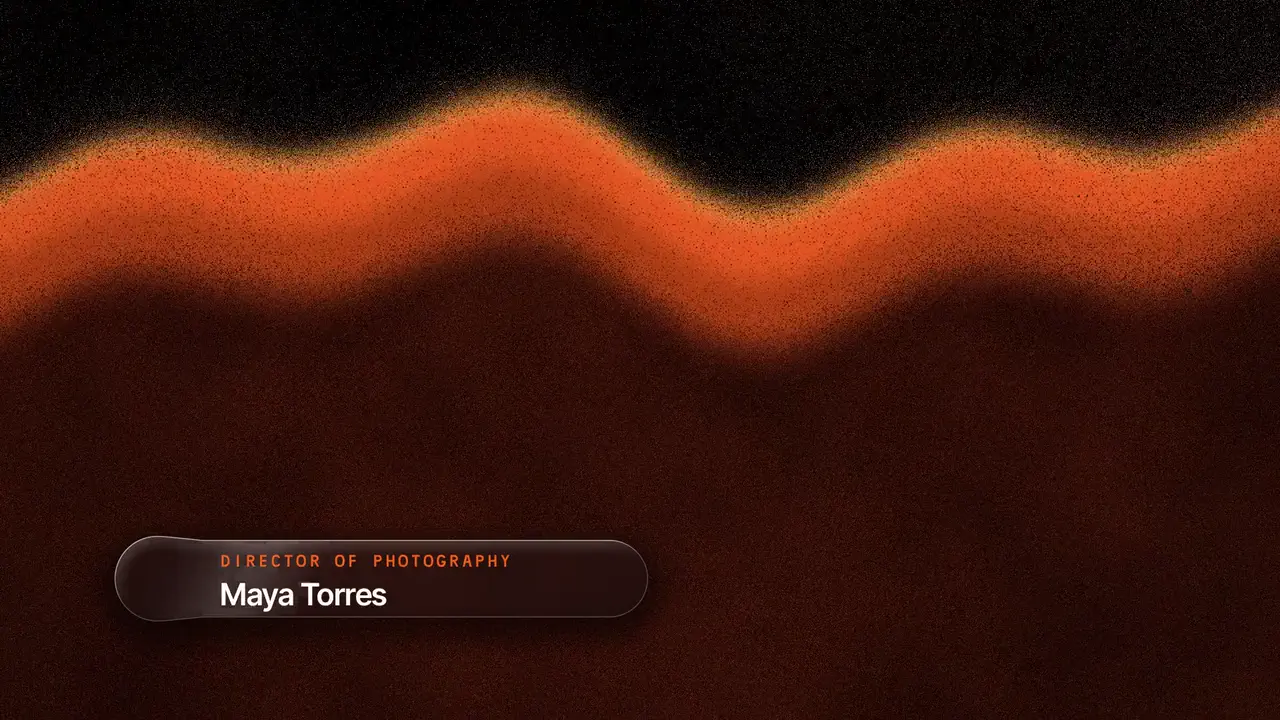
A name and a line on frosted glass, in your brand colours, as a transparent file or drawn over your own clip.
- Best for
- Interviews, podcasts, talking heads, event recaps and speaker intros
- Output
- Video
- Time
- About 2 minutes, 3 over a clip
- Credits
- Free to render
Already have an account? Sign in
Start free with 36 credits, no card needed. You land right in NOLGIA Agent, on this preset's questions, ready to run.
Make it here, free
Answer these now. The render needs a free account: you create one before it starts, and your answers are kept.
Step 1 of 7
The name or title
Printed exactly as you write it, on one line. 48 characters at most.
0 / 48
How to use it
NOLGIA Agent asks these questions in a chat, one at a time, with your own material.
The name or title
Write it in your own words. Printed exactly as you write it, on one line. 48 characters at most.
For example: Maya Torres
A small line above itOptional
Write it in your own words. A show, a place or a label, in 32 characters at most. You can skip this.
For example: The Morning Cut
Strip or card?
Pick one. Both are frosted glass in your colours.
- A strip
- A card
A line under itOptional
Write it in your own words. A role or a short line, 110 characters at most. It shows on the card. You can skip this.
For example: Director of photography
Your clipOptional
Add a video from your device or your Library. Add a clip and the glass is drawn over it, frosting what is behind it: 10 seconds of it, as an MP4. Without a clip you get a transparent file (ProRes 4444) to lay over your footage in an editor.
Your main brand colour
Write it in your own words. A hex code like #FF6A1A: the glass and the line take it. Pick it, or take it from your brand kit.
For example: #FF6A1A
A second brand colourOptional
Write it in your own words. A hex code like #4B7BFF. Leave it empty and a lighter shade of your main colour is used.
For example: #4B7BFF
Where will it play?
Pick one. The shape of the file. A lower third comes wide or tall.
- Wide, 16:9
- Tall, 9:16
Render it free
Press Render it free and NOLGIA renders your video from your answers: 0 credits, no agent turn. It lands in your Library. Or press Make it with NOLGIA Agent to work on it with the Agent in a chat. It takes about 2 minutes, 3 over a clip.
About this preset
Write the name and the line, and NOLGIA draws them on frosted glass in your brand colours: a strip at the bottom of the frame, or a card. Add your own clip and the glass is drawn over it, so it really frosts what is behind it (10 seconds of the clip are used). Without a clip you get a 5 second transparent file to lay over your footage in your editor. Your words are printed exactly as you write them. Make it with the NOLGIA Agent: it takes your colours from your brand kit, checks the words fit, starts the render and hands you the files in the same chat. Or fill in the form on this page and the render starts on its own, with no Agent turn. It comes in 16:9 or 9:16, and the render is free; with the Agent you pay only for its turn. You can also run it from Claude, Cursor or another agent with NOLGIA connected.
Use cases
- A name and title for an interview or a podcast guest
- A speaker intro for an event recap
- A location or a show name over a talking head
- The same lower third for every episode, in your colours
Suggest directions for me
Say what you are making it for and NOLGIA suggests a few directions for Glass lower third, each with a prompt and the options it sets. Nothing is generated until you use one.
Ready to make a Glass lower third?
A few quick questions in the chat, your own material, and NOLGIA makes it.