

You connect Claude Code or Cursor to NOLGIA with one Personal Access Token, and then you ask for images, video and audio in plain words. NOLGIA speaks the Model Context Protocol, MCP for short, through one hosted server at mcp.nolgia.ai that runs the same tools the NOLGIA Agent uses.
Today that works in Claude Code and Cursor. ChatGPT and Claude desktop and web are marked Soon on the MCP page: they sign you in instead of taking a token, and their setup steps are not published yet.
Before you start
- A NOLGIA account, and Claude Code or Cursor on your computer.
- Credits in your top-up balance. A token spends your top-up credits only, never your monthly plan credits.
- Pro or above for video generation. A token carries your account's plan, so it does not unlock a model your plan does not include.
Create your API token
Open API tokens in your account settings. Under Create a token, give it a name, for example the app you will use it in, and press Create token. NOLGIA shows the token only once, so copy it somewhere safe before you leave the page.
Watch for this:Shared it by mistake? Press Revoke next to it under Active tokens and create a new one. Anything using a revoked token stops working immediately.
Add NOLGIA to Claude Code
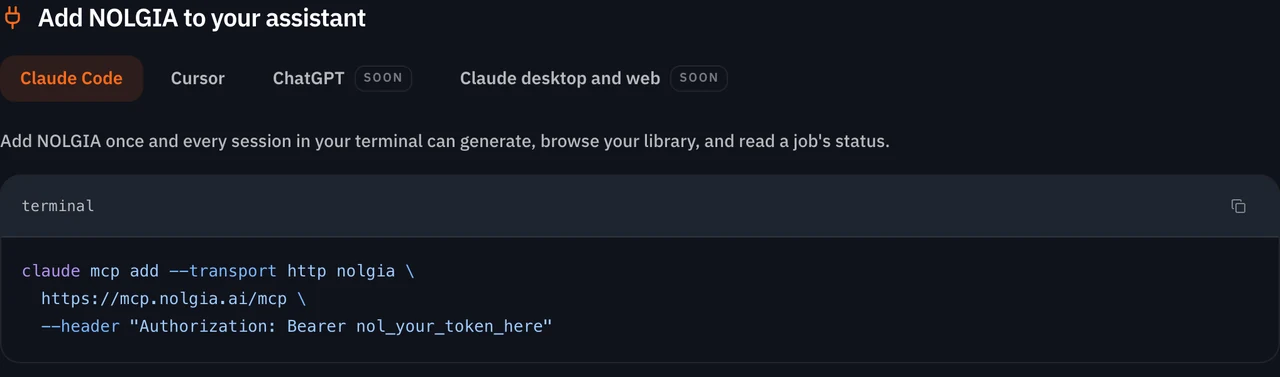
Open a terminal and run this command, with your token in place of nol_your_token_here. You add it once, and every Claude Code session in your terminal can generate, browse your library and read a job's status.
claude mcp add --transport http nolgia https://mcp.nolgia.ai/mcp --header "Authorization: Bearer nol_your_token_here"
Or add it to Cursor
In Cursor, the server goes in your MCP config file, ~/.cursor/mcp.json. Open the MCP page, choose the Cursor tab and copy the configuration. Paste it into the file, put your token in place of nol_your_token_here, and save.
The file should read like this, shown here on one line: { "mcpServers": { "nolgia": { "url": "https://mcp.nolgia.ai/mcp", "headers": { "Authorization": "Bearer nol_your_token_here" } } } }
Tip:Already using other servers? Add the nolgia entry inside the mcpServers object you already have, next to the others.
Ask in plain language
Once connected, ask for what you want in your own words. The server gives your app more than 50 tools in seven groups:
| Group | What it covers |
|---|---|
| Generate | Images, video, audio, 3D, image sets, preset runs, and clips and narration assembled into one video |
| Your library | Assets, uploads, characters, styles, transcripts and short clips |
| Projects | Projects, their assets and canvases |
| Edit sessions and tweaks | Step by step image edits, with an estimate and a revert |
| Presets | List the presets and read one |
| Timelines | Check masks and motion, list colour grade presets and check a render |
| Models, account and jobs | Models, your account, generation counts, and jobs, including cancelling one |
Use NOLGIA to make a 16:9 image of a singer in a silver bomber jacket walking through a concrete tunnel lined with red and magenta neon tubes, low haze on the floor.
Tip:Start from a preset. Each preset card on the MCP page has a prompt you can copy into Claude Code or Cursor, and each preset also has its own page on Presets.
For every tool, see Run MCP. For the skills that help a coding agent use NOLGIA, see Nolgia for Claude Code, Cursor and Codex.
Or set up the CLI instead
The MCP page also has a one line instruction for your coding agent. It does not add the MCP server: it installs the NOLGIA command line tool without sudo, waits while you sign in, installs the NOLGIA skills and runs one verification generation, which spends a small number of your credits.
Read https://raw.githubusercontent.com/nolgiainc/nolgia-cli/main/INSTALL_FOR_AGENTS.md and follow it end to end to install and set up the Nolgia CLI for me.
What it costs
Reading is free: listing your assets, checking a job or browsing presets spends nothing. Only a generation spends credits, at the rate the model publishes. Here are some of the models the MCP page lists, at their live rates.
Wan 3.0Pro and up
Per 5s clip
480p 14 credits · 720p 28 credits · 1080p 56 credits
Seedance 2.5Pro and up
Per 5s clip
480p 26 credits · 720p 56 credits · 1080p 137 credits
1080p renders at 16:9 and 9:16
GPT Image 2.5 SunburstEvery plan
Per image
Native 8 credits · 2K 21 credits · 4K 58 credits
Nano Banana 2Every plan
Per image
Native 4 credits · 2K 17 credits · 4K 54 credits
ElevenLabs v3Every plan
Per 1,000 characters
Standard 6 credits
Read live from the catalog when this page loads. Every price is shown before you generate. See every rate.
Rather not set anything up? The NOLGIA Agent drives the same tools for you, billed per chat turn, and is included with Studio plans.
Questions and answers
- Which apps can connect?
- Claude Code and Cursor work today, and any MCP client that can send an Authorization header can connect. ChatGPT and Claude desktop and web are marked Soon. The Run MCP page in the docs also shows a Codex setup.
- What does it cost?
- Reading is free; only a generation spends credits, at the rate the model publishes. Requests made with your token spend your top-up credits only, never your monthly plan credits.
- Does a token unlock video on my plan?
- No. A token carries your account's plan, so models that need Pro or above still need that plan.
- What if my token is exposed?
- Revoke it on the API tokens page in your settings and create a new one. Anything using a revoked token stops working immediately.
- Can the NOLGIA Agent run these tools for me?
- Yes. It drives the same tools on your behalf, billed per chat turn at the rate of the brain it thinks with. Studio plans include it.
Connect Claude Code or Cursor
See the MCP setupRelated guides

Agent
The NOLGIA Agent cookbook: what to say, and what happens next
Ten messages you can send the NOLGIA Agent, what it does with each one and the preset behind it, from product photos and a listing set to a hook score and a graded cut.
· 5 min read
Credits
How credits work, and what happens when a render fails
The price is on the Generate button, the job holds it while it works, and the hold becomes a charge or a refund. Here is when credits come back after a failure, a refusal or a cancel.
· 6 min read

Blog · Model
Kling 3.0 is in the catalog, and Kling renders settle within seconds
Kling v3 Turbo, v3 Omni and O1 join Kling v2.6, Avatar, Motion Control, v3 and v3 Pro, and a Kling render now shows as done within seconds of finishing.
· 5 min read