

How to make realistic AI videos
Realistic AI video is not one prompt. It is a small production: who is in it, where they are, what each shot looks like, how the camera sees it and how everyone moves, all settled before a single clip is generated. Here is that pipeline on a real late-1990s New York short made for NOLGIA, with every prompt as it was sent and the number of takes each shot needed.
- 20 min read
This guide follows one real piece from start to finish: a vertical, late-1990s New York short in which two friends talk to a camcorder on a rooftop, on a fire escape and on a street corner, and tell you how it was made. It was made for NOLGIA on the live composers, and both people in it are fictional. Every prompt below is quoted as it was sent; the only change is that long dashes are typed as hyphens.
The idea behind the workflow is control. Instead of asking a video model to invent the people, the place, the camera and the performance all at once, you settle each of them first, so the model only has to do the last part: make it move. The order is vision, characters, location, shots, camera, still, video prompt, video, music and edit, and every stage feeds the next.
Why most AI video still looks like AI
Realism does not come from the word photorealistic. It comes from controlling a lot of small things at once, and each of the usual giveaways has a stage in this guide that fixes it.
| What gives it away | Why it happens | Where it is fixed |
|---|---|---|
| A different person, or a different outfit, in every shot | The model invents the people from the words each time | Step 2: a character sheet, saved as a Character and attached to every shot |
| The world is from the wrong decade | The model draws the present day unless told otherwise, and sometimes even when told | Steps 3 and 6: the era named in every prompt, and every still checked for things that did not exist yet |
| A camera no one is holding | The prompt never says who holds it or how it moves | Steps 5 and 7: one camera move per beat, described from start to end |
| Stiff faces and busy hands | The prompt says what happens, not how people behave while it happens | Step 7: eyes, hands and delivery written for every line |
| A score you cannot change | The clip's sound is one track: dialogue, ambience and any music together | Step 9: dialogue and ambience only in the clip, the score made separately |
Start with the script and the vision
Everything starts with the script and the feeling you want. Before any prompt, tell the NOLGIA Agent what you are making, in plain words: the story, what the characters do, the era, how real it should look, the camera you imagine and how the finished video should feel. Then ask it for a plan, not a prompt.
- The story: what happens, and the lines each character says.
- The characters: who they are and how they behave on camera.
- The world: the place and the era. A late-1990s story needs late-1990s cars, clothes and streets.
- The look: how real, and shot on what. Ours is a friend's consumer camcorder.
- The camera: handheld or locked off, close or wide, still or moving.
- The feeling: what the viewer should feel at the end.
I want to make a short vertical 9:16 video, about 25 seconds, in three shots. Two friends in their late twenties, a man and a woman, talk straight to a camcorder on a New York rooftop, on a fire escape and on the street, where they catch a yellow taxi. Here are their lines: [paste the script]. It is set in the late 1990s and should look like real footage from a consumer camcorder of the time: handheld, warm late-afternoon sun, soft optics, analog grain. They are casual and funny, like friends being filmed, not presenters. It should feel candid, nostalgic and real, not like an ad. Before writing any prompts, help me plan it: describe each character and each place in detail, then break the script into shots with the framing, the camera move and what happens in each one.
The script for this short is the spoken lines of its three shots:
ROOFTOP. SHE: Everyone's trying to make cinematic AI videos, but most of them still look... AI. HE: The trick isn't just the model, it's how you build the whole shot.
FIRE ESCAPE. SHE: This is where the magic happens.
STREET. HE: That's the NOLGIA workflow. SHE, from the back of a taxi: Start making with NOLGIA today. Comment 'nol' to know more.
Tip:Ask for the plan first. The script is the foundation for everything after it: the characters, the places, the angles, the movement, the light and the sound all have to serve it. Settle those with the agent before you generate anything, and every later prompt gets shorter and more certain.
Design the characters before the scenes
Design each person before you build a scene around them. The aim is not an attractive face; it is a believable person who belongs in your world, described so completely that every later shot starts from the same person. A character sheet does this in one image: the same person from the front, at three-quarters and in profile, full length and close, with a few expressions and one extreme close-up of real skin.
- Real detail: skin texture and pores, natural eyes and hair, real hands, believable proportions, clothes that sit on a body.
- Light that could exist: daylight through a window or a practical lamp, with real highlights and shadows, not an even AI glow.
- The era: hair, makeup, clothes, accessories and silhouette from the period. A 1990s character should not be styled like the 2020s.
- One outfit: the same clothes and jewelry in every frame of the sheet, because the sheet is what every shot copies.
Solid white background. Create an ultra-realistic cinematic character reference sheet for a young adult woman in her mid-to-late 20s, designed for a realistic video campaign.

CHARACTER:
A naturally beautiful but completely believable young woman, around 25-28 years old. Long naturally styled light brown / dark blonde hair with soft volume, expressive eyes, natural eyebrows, realistic facial proportions and subtle imperfections. Warm, confident, playful personality. She should feel like a real person rather than a professional model.

WARDROBE:
Simple understated casual clothing with a slightly nostalgic late-1990s / early-2000s feeling: fitted dark burgundy long-sleeve top, relaxed blue jeans, small gold earrings and delicate layered gold necklace. Simple everyday accessories. No visible logos, no text, no branding. Keep the exact outfit and accessories identical across every frame.

CHARACTER SHEET LAYOUT:
Create a single professional character reference sheet containing multiple realistic photographic frames of the EXACT SAME WOMAN:
1. Full-body front view
2. Full-body 3/4 view
3. Medium waist-up front view
4. Medium 3/4 view
5. Side-profile view
6. Natural relaxed expression
7. Genuine smile / small laugh
8. Speaking naturally, mouth slightly open as if mid-sentence
9. Curious / surprised expression
10. EXTREME FACE CLOSE-UP showing authentic real skin texture, visible pores, tiny imperfections, peach fuzz, fine facial hairs, natural lips, subtle under-eye texture and realistic eye detail

The extreme close-up must look like a real cinema-camera photograph of human skin. Preserve natural skin texture. NO beauty filter, NO airbrushing, NO plastic skin, NO excessive makeup, NO CGI.

VISUAL STYLE:
Extremely photorealistic live-action photography. Warm nostalgic consumer-camcorder aesthetic inspired by late-1990s / early-2000s home-video footage. Slightly soft vintage lens rendering, subtle analog grain, gentle highlight halation, mild chromatic imperfections, natural exposure, warm organic skin tones, slightly lifted blacks and subdued contrast.

LIGHTING:
Natural available light. Soft daylight through windows, warm practical lamps indoors, occasional gentle sunlight hitting the hair and face. Slight natural lens flare and atmospheric glow when appropriate. Lighting must feel accidental and real rather than professionally staged.

CAMERA:
Handheld consumer/prosumer camcorder aesthetic. Camera is physically close to the subject, with imperfect human framing and subtle handheld movement. Occasional slight focus hunting and natural focus falloff. Mostly 35mm-50mm equivalent perspective, with the extreme close-up using a portrait lens.

ENVIRONMENT:
Authentic everyday locations such as a cozy neighborhood café, apartment, kitchen, hallway, sidewalk or casual restaurant. Realistic lived-in backgrounds, practical objects and imperfect environments. Nothing overly luxurious or artificially perfect.

IMPORTANT:
This is a CHARACTER CONSISTENCY SHEET. Every frame must depict the exact same woman with identical facial structure, hairstyle, skin tone, body proportions, jewelry and clothing. No identity drift. No wardrobe changes. No face reshaping. No beauty retouching.

Overall feeling: intimate, candid, nostalgic, playful, slightly funny, warm and extremely realistic - like a genuine person being casually filmed on an old camcorder, not a polished commercial model.
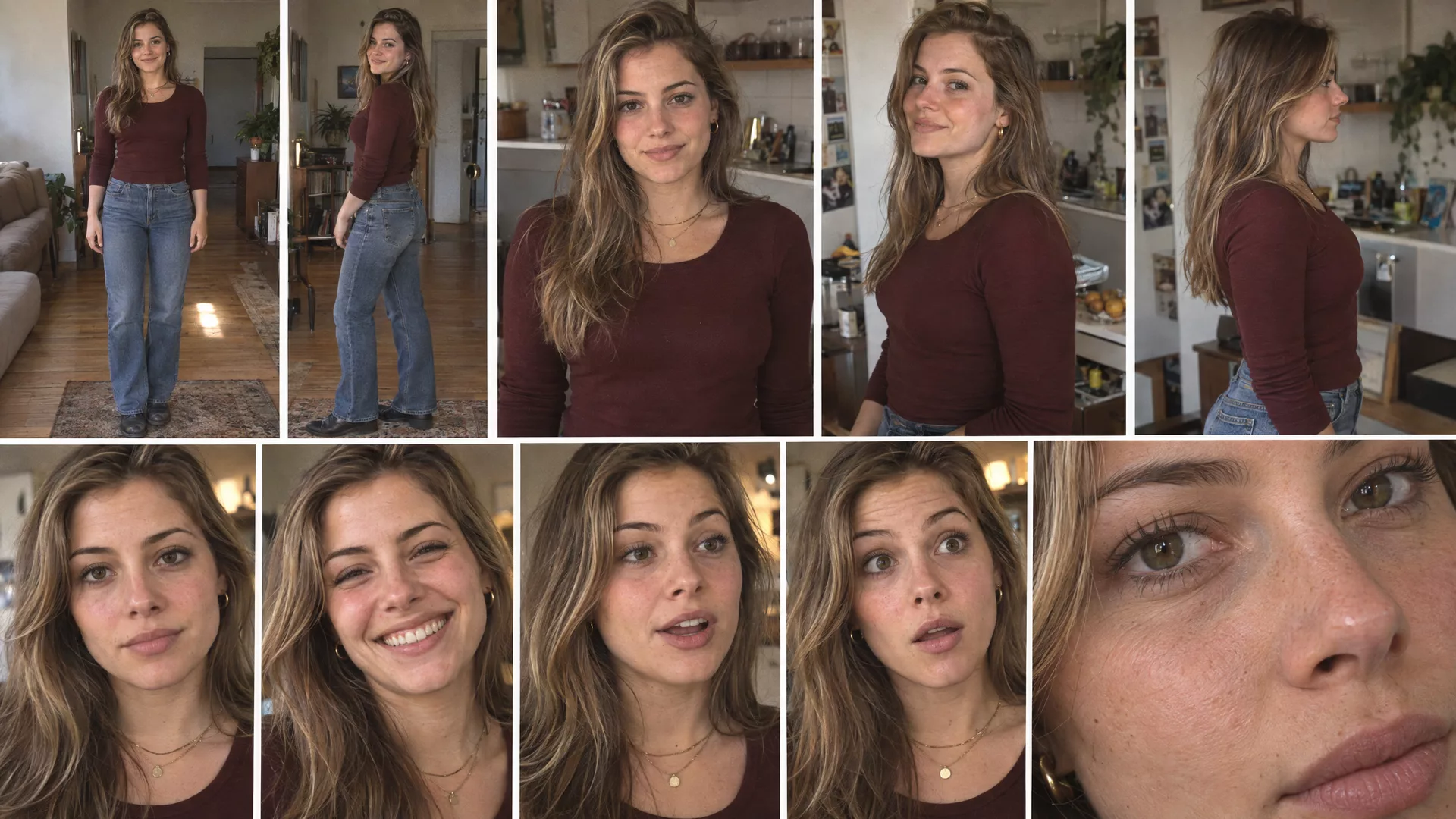
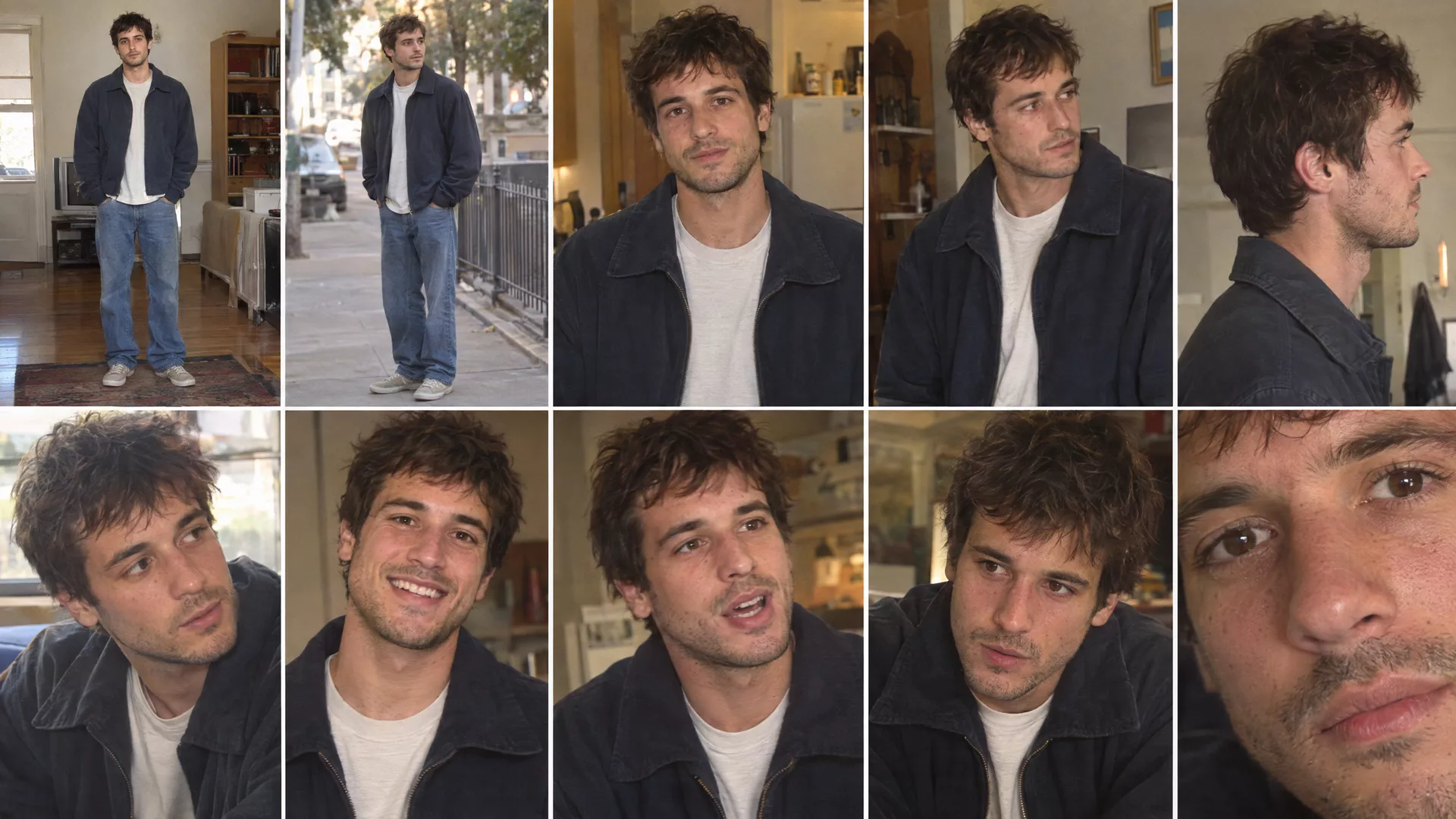
To save one, open Characters from the Create menu in the header. Type a Name and a Description, open Add reference images, and either Upload images of a sheet you already have or use Generate image with a Portrait prompt and a model, then click the thumbnail to pick it as a reference. Press Create character. Use in video on the card opens the video composer with the character attached.
Watch for this:Fix the sheet, not the shot. Anything wrong on the sheet will be wrong in every shot that uses it: a modern haircut, a logo, a second outfit. Regenerate the sheet until it is right; it costs one image, and a shot costs far more.
Build the location, and check the era
A realistic person in a place that is wrong still makes the whole shot feel wrong. Settle each place the same way you settled the people: where it is, what it looks like, what period it belongs to, which objects, buildings, vehicles and props are there, and what the natural light is doing. Then look for anything that did not exist yet.
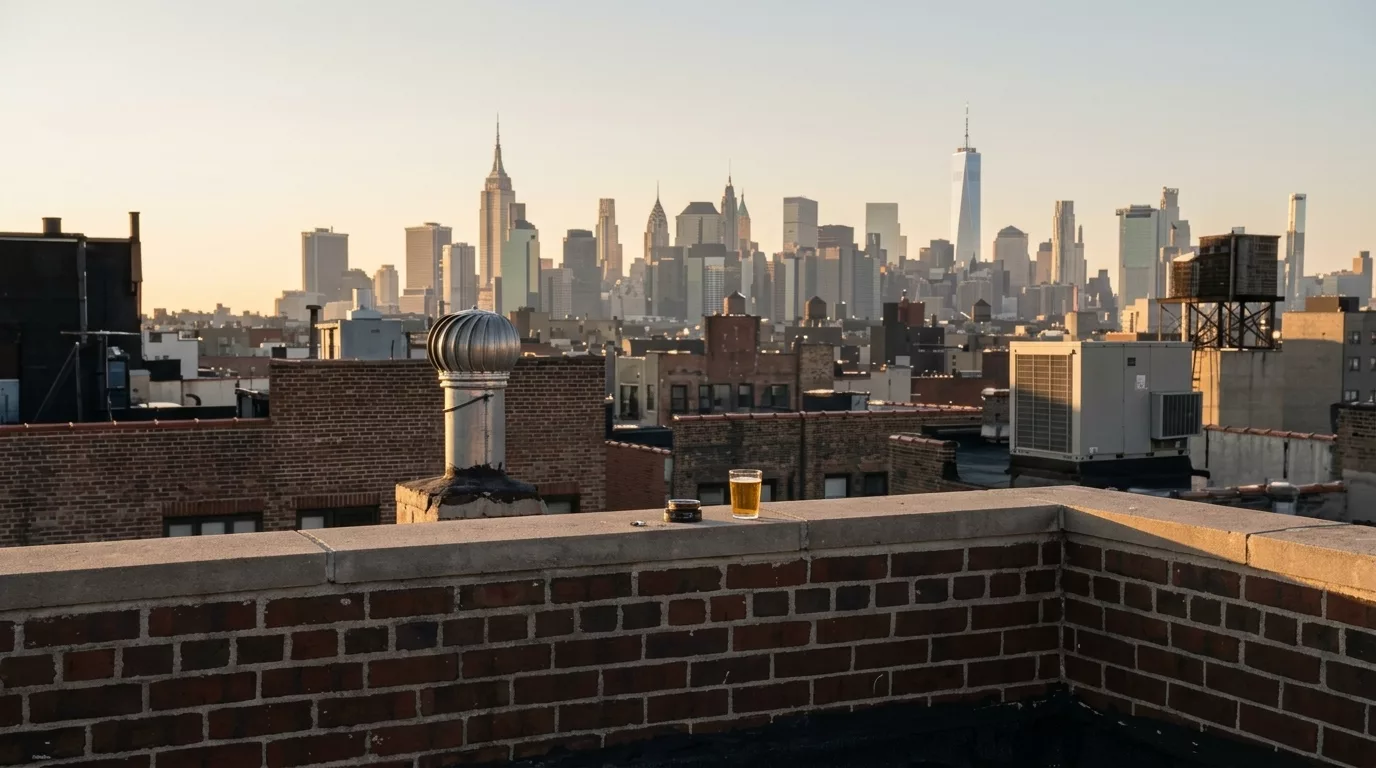
To save one, open Locations from the Create menu. Give it a Name and a Description, add the still under Reference images with Upload or pick it from your library, and press Save location. In the video composer, the Location button attaches it to a shot. In this project the places were written into each shot prompt, and the rooftop was saved as a location afterwards so later rooftop shots can start from it.
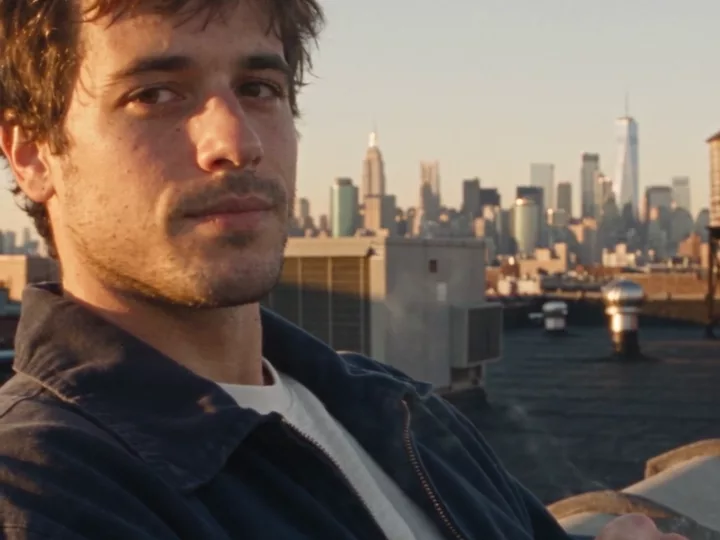
Watch for this:The model draws today's skyline. Look at the skyline in this still: the tall tower right of centre is One World Trade Center, which opened in 2014, and the thin towers on the right are newer still. The rooftop shot has the same tower, even though its prompt says late 1990s. For a period piece, check every still for things that did not exist yet: phones, cars, signs, skylines. Then name what should be there instead, or keep the background soft and out of focus.
Break the script into shots
Now treat the video as a set of controlled shots instead of one big generation. Ask the NOLGIA Agent to turn the script into a shot list, and make every shot answer the same questions:
- What happens, and where is each character?
- What is each character doing, looking at and saying?
- What should the audience see, and where is the camera?
- What are their faces and hands doing?
- What happens just before and just after?
| Shot | What happens | Camera | Length |
|---|---|---|---|
| 1. Rooftop | She leans on the wall and talks to the lens; he sits on the parapet, smoking, and answers | Low-angle handheld two-shot, a fast optical zoom into her close-up, a short pan to him | 10 s |
| 2. Fire escape | They walk down the stairs, she says her line to the lens, and they hop off the last step | Low angle from below, following them, pushing into a tight close-up | 4 s |
| 3. Street | He says his line walking, hails a taxi, they get in, she delivers the last line from the window and the taxi leaves | Handheld medium-wide walk, reframes to the taxi, tighter on her at the window, holds as the taxi drives off | 12 s |
Choose the framing and the camera move
The camera is part of the storytelling, not an afterthought. For each shot, choose the framing first: a wide, a medium, a close-up, a low or high angle, over the shoulder, tracking, handheld or a detail. Then choose how the camera moves, and make it fit the moment: an energetic beat can take handheld or tracking, an intimate one wants a calmer camera. Do not give every shot the same camera.
| Move | What the camera does | Use it for |
|---|---|---|
| Pan | Turns left or right on the spot | Moving from one person to another, like the rooftop's short turn to him |
| Tilt | Turns up or down on the spot | Revealing something tall, or following a look up or down |
| Dolly in or out | Physically moves toward or away from the subject | Building intimacy, or pulling back to show where they are |
| Zoom in or out | The lens changes, the camera stays | A sudden, handmade feel, like the rooftop's camcorder zoom |
| Tracking | Follows the person or the action | Walking and running, like the fire escape |
| Handheld | Moves with a person's breathing and footsteps | Anything that should feel filmed by someone who is there |
| Static | Stays still | Letting the performance carry the shot |
Tip:Say which way, and how far. The rooftop prompt spends a whole section on one short pan: the shortest turn toward him, at the same height, with no tilt, orbit or push-in. The more exactly you describe the move, the less the model invents. The camera moves guide explains twelve moves and the words that get each one.
Lock the look in a still before you animate
Before a video prompt, write an image prompt for the key moment of each shot and generate it as a still. The still is where you fix the look cheaply: the character, the wardrobe, the place, the era, the light, the framing, the angle, the lens, the pose, the expression, the props and the background. If the still is not right, do not move on to video.
- Who: the character, attached from Characters, with the wardrobe named.
- Where and when: the location and the era, with the details that sell it.
- Light: the source, the direction, the colour and the time of day.
- Camera: the position, the angle, the lens and the framing.
- Performance: the pose, the expression, where the eyes go.
- Continuity: the same wardrobe, props and light as the shots either side.
Once it is right, treat it as locked. The still becomes the visual reference for the video, so the model starts from something already solved instead of reinventing the character and the scene. To make one, open Image from the Create menu, attach the cast with Characters and the place with Location, pick the Aspect ratio your video will use, and press Generate images. Then, in the video composer, choose Animate an image under Start from and add the still with Add start frame.
Watch for this:What we did in this short. The three shots here went straight from the two character sheets to Seedance 2.5, with the place and the framing written into each prompt. The street shot, which has the most going on, took ten takes. When a shot keeps missing its framing or its place, a locked still is the first thing to add. The short film guide makes every shot from a still first.
Write the video prompt, beat by beat
Now turn each shot into motion instructions. "She talks to the camera" is not enough: say what happens across the whole shot, second by second. The rooftop prompt below has every part a realistic shot needs, in this order:
- The cast lock: use the same two characters from the sheets, with no changes to faces, hair, clothes or jewelry.
- Format and place: 9:16, an authentic New York rooftop, late 1990s, with the objects that sell it.
- Light: warm late-afternoon sun, where it falls and what it does as the camera moves.
- Timed beats: 0:00 to 0:02, 0:02 to 0:05 and so on, each with its action, its camera move and its line of dialogue in quotes.
- Performance: how the hands move, how much, and when they stay still; where the eyes go.
- Camera style and image: the camcorder, the handheld feel, the grain, the colour.
- The noes: no gimbal, no smooth zoom, no beauty filter, no influencer behavior, no background music.
- Sound: only the ambience of the place and the dialogue.
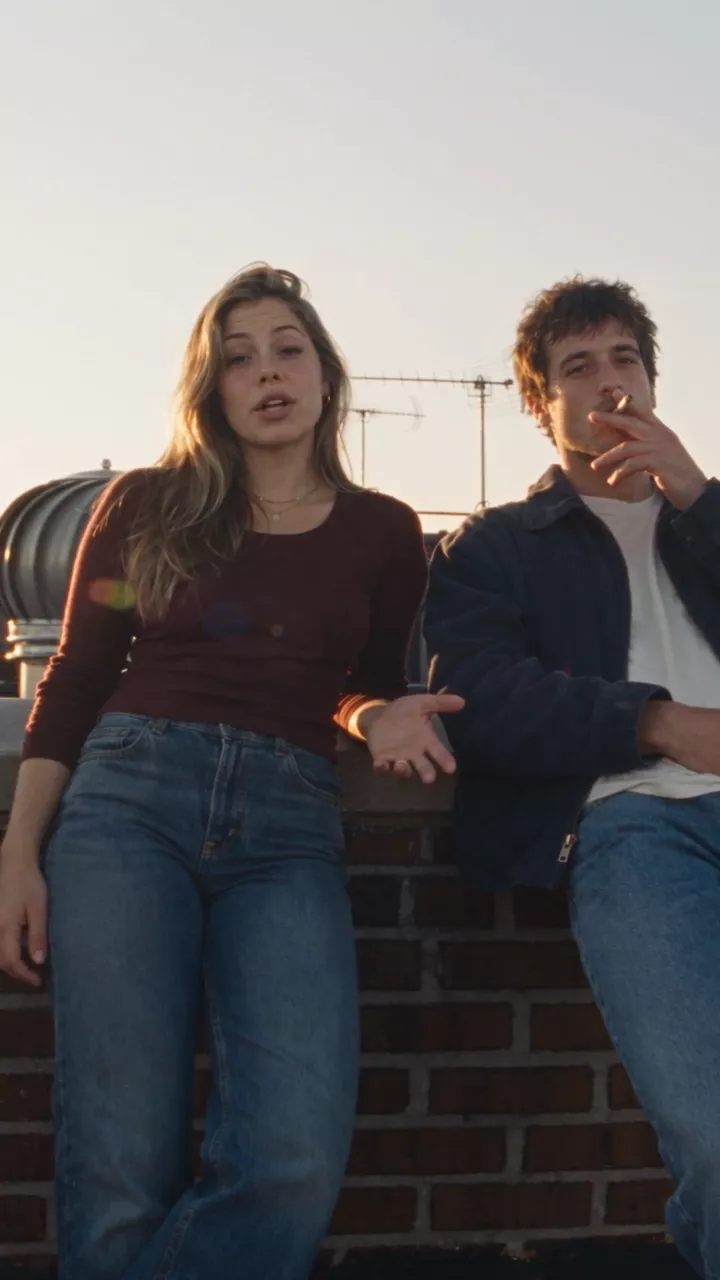
SEEDANCE 2.5 - ROOFTOP SCENE / 9:16 VERTICAL

Use the EXACT SAME male and female characters from the supplied character sheets.

Preserve their exact facial identity, hairstyle, skin tone, body proportions, clothing and accessories.

NO identity drift.
NO wardrobe changes.

FORMAT:
9:16 vertical.

LOCATION:
Authentic New York City rooftop, late 1990s America.

Concrete rooftop, brick walls, rooftop equipment, pipes, vents, water-tower elements and NYC skyline clearly visible.

The two characters feel like effortlessly cool young adults casually hanging out, not commercial presenters.

--------------------------------------------------
LIGHTING
--------------------------------------------------

Warm late-afternoon natural sunlight.

Use realistic sunlight and shadow across both characters.

Warm highlights on their faces and hair, natural shadows across their clothing and parts of their faces.

Allow subtle exposure breathing, highlight blooming and occasional natural lens flare as the camera moves.

The lighting must feel completely natural and available.

--------------------------------------------------
0:00-0:02 - OPENING
--------------------------------------------------

Start with a creative LOW-ANGLE handheld shot showing BOTH characters and the NYC rooftop.

The FEMALE is casually leaning against a rooftop wall.

The MALE is sitting casually on the inner side of the rooftop parapet, slightly slouched.

He is ALREADY smoking.

The female looks directly toward the camera and says:

“Everyone’s trying to make cinematic AI videos, but most of them still look…”

--------------------------------------------------
FEMALE PERFORMANCE
--------------------------------------------------

The female uses her hands while speaking, but ONLY in subtle, realistic conversational ways.

Her gestures should be restrained and believable:

- small movement of one hand while making a point
- slight open-palm gesture
- tiny wrist or finger movement
- occasionally moving one hand closer to her body
- relaxed natural arm movement

Do NOT have her constantly wave her hands.

Do NOT exaggerate the gestures.

Do NOT use influencer-style hand movements.

Her hands should sometimes remain completely still while she speaks.

The gestures should happen organically and occasionally, matching the rhythm of her speech.

She remains relaxed against the wall.

--------------------------------------------------
0:02-0:05 - SUDDEN OPTICAL ZOOM
--------------------------------------------------

As she continues speaking, suddenly hit the physical 1990s camcorder zoom rocker.

FAST, JERKY OPTICAL ZOOM:

LOW-WIDE TWO-SHOT
→ QUICK OPTICAL ZOOM
→ TIGHT CLOSE-UP OF FEMALE.

The zoom is sudden and slightly imperfect.

Mechanical zoom-rocker feel.
Small handheld wobble.
Brief motion softness.
Tiny autofocus adjustment.
Subtle exposure breathing.

End on a tight close-up.

She looks DIRECTLY INTO THE CAMERA and finishes:

“…AI.”

Keep her expression natural and understated.

--------------------------------------------------
0:05-0:07 - SHORT SIDEWAYS PAN TO MALE
--------------------------------------------------

IMPORTANT CAMERA INSTRUCTION:

The male is positioned relatively close to the female in the composition.

When transitioning from the female to the male, DO NOT make a long horizontal sweep across the entire rooftop.

Instead, perform the SHORTEST POSSIBLE SIDEWAYS HORIZONTAL PAN needed to move from her to him.

Think:

FEMALE CLOSE-UP
→ QUICK SHORT SIDEWAYS TURN
→ MALE.

The camera should rotate toward the SIDE OF THE FRAME WHERE THE MALE IS LOCATED.

The pan travels toward the NEAREST / SHORTEST SIDE of the next character.

If the male is just to the right of the female, pan quickly RIGHT.

If he is just to the left, pan quickly LEFT.

Never choose the longer direction around the composition.

The camera does NOT travel around the rooftop.

It simply makes a quick, short horizontal handheld turn toward the nearby character.

NO tilt up.
NO tilt down.
NO diagonal movement.
NO orbit.
NO push-in.
NO pull-out.

Keep the camera at approximately the same height.

Allow slight handheld motion blur and a tiny autofocus adjustment during the short pan.

--------------------------------------------------
0:07-0:10 - MALE
--------------------------------------------------

The short sideways pan lands naturally on the male.

Frame him in a low-angle medium close-up while still showing enough rooftop and NYC skyline to establish the location.

He remains relaxed and slightly slouched.

He is already smoking.

Warm sunlight catches one side of his face while the other remains naturally shaded.

He takes a small drag.

Subtle smoke catches the sunlight.

He looks toward camera and says:

“The trick isn’t just the model - it’s how you build the whole shot.”

He makes only a small, natural gesture with the cigarette.

No exaggerated movement.

--------------------------------------------------
CAMERA STYLE
--------------------------------------------------

Authentic late-1990s consumer/prosumer camcorder.

Handheld and imperfect, but visually intentional.

Use:
- creative low angles
- tight close-ups
- wide rooftop establishing framing
- sudden optical zoom
- short reactive sideways pan
- subtle handheld shake
- natural framing corrections
- realistic sunlight and shadows
- occasional focus breathing
- slight motion blur

The camera should feel like a real person casually filming their friends.

The camera movement should NEVER feel like modern stabilized cinema.

--------------------------------------------------
1990s IMAGE
--------------------------------------------------

Extremely photorealistic.

Authentic late-1990s American camcorder.

Slightly soft optical image.
Natural analog grain.
Warm organic skin tones.
Lifted blacks.
Subdued contrast.
Gentle highlight blooming.
Subtle halation.
Mild chromatic imperfections.
Natural lens flare.
Realistic exposure fluctuations.

Must look like actual footage recorded in the late 1990s, NOT modern footage with a retro filter.

NO gimbal.
NO perfect stabilization.
NO smooth cinematic zoom.
NO digital zoom.
NO long sweeping pan.
NO complicated camera movement.
NO exaggerated hand gestures.
NO influencer behavior.
NO beauty filter.
NO plastic skin.
NO CGI appearance.
NO background music.

Only authentic NYC rooftop ambience, distant traffic, wind and naturally recorded dialogue.

Cast: @Image1 is Male1: Character portrait of Male1. Clean studio reference image, front-facing, even lighting. @Image2 is Female2: Character portrait of Female2. Clean studio reference image, front-facing, even lighting.
What it made is shot 1 in the next step.
Tip:Restrain the hands. Both dialogue prompts treat the hands as part of the performance: they list the small gestures that are allowed, say the hands should sometimes stay completely still, and rule out pointing and influencer gestures, so talking does not turn into waving.
Tip:Spell names the way they sound. The street prompt writes the brand the way it is said, so the model knows how to pronounce it: "That's the nol-jia workflow." Do the same for any name a model might get wrong.
Generate the shots with Seedance 2.5
Open Video from the Create menu. Choose Seedance 2.5 with the model button, set the aspect ratio chip to 9:16 and the duration chip to the length of the shot, and leave Audio On so the dialogue and the ambience come back with the picture. Press Characters and add both people: they become @Image1 and @Image2 in the order of their chips, and typing @ in the prompt drops a name in. Pick your project in the Project dropdown so every take lands there, paste the prompt and press Generate video. The price is on the button before anything runs. The last line of each shot prompt in this guide, the one that starts with Cast, is added by NOLGIA from the attached characters; you do not type it.
SEEDANCE 2.5 - FIRE ESCAPE STAIRCASE SCENE / 9:16 VERTICAL

Use the EXACT SAME male and female characters from the supplied character sheets.

Preserve their exact:
- facial identity
- hairstyles
- skin tones
- body proportions
- clothing
- jewelry/accessories

NO identity drift.
NO wardrobe changes.

FORMAT:
9:16 vertical.

LOCATION:
Authentic New York City fire escape staircase attached to an old brick building, late-1990s America.

The environment should clearly read as a real NYC fire escape: aged brick walls, metal staircase, urban buildings, rooftop elements and NYC street visible below.

--------------------------------------------------
CAMERA + OPENING
--------------------------------------------------

Start with a CREATIVE LOW-ANGLE handheld shot from below the fire escape staircase, looking upward as both characters walk DOWN the stairs.

Do NOT shoot through railings as a framing device.

Keep the camera physically close to them and slightly below their level.

The female is slightly ahead of the male.

The camera follows them with genuine handheld camcorder movement.

She looks DIRECTLY INTO THE CAMERA while walking and says:

“This is where the magic happens.”

Her delivery is casual, playful and natural.

--------------------------------------------------
FEMALE PERFORMANCE
--------------------------------------------------

While saying the line, she uses ONLY subtle, natural hand gestures.

Small conversational movements:
- slight movement of one hand
- relaxed wrist movement
- a small open-palm gesture
- subtle movement toward herself

Her hands should NOT constantly move.

No exaggerated pointing.
No influencer gestures.
No theatrical acting.

Her eye contact with the camera is important - she should keep looking directly into the lens while speaking.

--------------------------------------------------
TIGHT CLOSE-UP
--------------------------------------------------

As she says the line, the camera moves into a VERY TIGHT CLOSE-UP of her face.

Use a creative low-angle perspective.

Her face fills most of the vertical frame while the NYC fire escape and brick building remain recognizable around the edges.

Keep the camera handheld and imperfect.

Small natural camera shake.
Subtle focus breathing.
Slight motion softness.
Tiny framing corrections.

She continues walking down the stairs while maintaining eye contact with the lens.

--------------------------------------------------
SUNLIGHT + SHADOW
--------------------------------------------------

Use natural late-afternoon sunlight.

As they descend the fire escape, sunlight falls across the female's face and hair while parts of her face naturally fall into shadow.

The camera movement causes the sunlight to shift subtly across her face.

Use:

- warm sunlight
- natural hard/soft shadows
- subtle highlight blooming
- slight lens flare
- realistic exposure breathing
- natural skin texture

Do NOT use studio lighting.

The sunlight should feel like real available NYC afternoon sunlight captured on a 1990s camcorder.

--------------------------------------------------
ENDING - JUMP
--------------------------------------------------

As the female finishes:

“This is where the magic happens.”

Both characters reach the bottom of the fire escape.

They playfully jump down from the final low step onto the pavement together.

The jump should be small, natural and spontaneous - NOT a stunt.

As they jump, the camera operator reacts naturally with a quick downward shake and slight reframing.

Hold for a brief moment as they land.

--------------------------------------------------
CAMERA STYLE
--------------------------------------------------

Authentic late-1990s American consumer/prosumer camcorder.

Creative but spontaneous handheld photography.

Use:
- low-angle perspective
- tight facial close-up
- slight upward perspective
- natural handheld shake
- spontaneous framing corrections
- subtle motion blur
- autofocus breathing
- realistic exposure fluctuations
- sunlight and shadow interaction

The camera should feel like a friend casually following them down the fire escape.

NOT professional stabilized footage.

NO gimbal.
NO Steadicam.
NO perfect stabilization.
NO smooth cinematic tracking.
NO digital zoom.
NO slow motion.
NO exaggerated camera movement.

--------------------------------------------------
1990s IMAGE
--------------------------------------------------

Extremely photorealistic.

Authentic late-1990s American camcorder footage.

Slightly soft optical image.
Natural analog grain.
Warm organic skin tones.
Lifted blacks.
Subdued contrast.
Gentle highlight blooming.
Subtle halation.
Mild chromatic imperfections.
Natural motion blur.
Realistic skin pores and fine facial hairs.

Must look like ACTUAL late-1990s footage, NOT modern footage with a retro filter.

NO beauty filter.
NO plastic skin.
NO CGI appearance.
NO exaggerated acting.
NO influencer behavior.
NO background music.

Only natural NYC street ambience, footsteps, distant traffic, fire escape sounds and naturally recorded dialogue.

Cast: @Image1 is Female2: Character portrait of Female2. Clean studio reference image, front-facing, even lighting. @Image2 is Male1: Character portrait of Male1. Clean studio reference image, front-facing, even lighting.
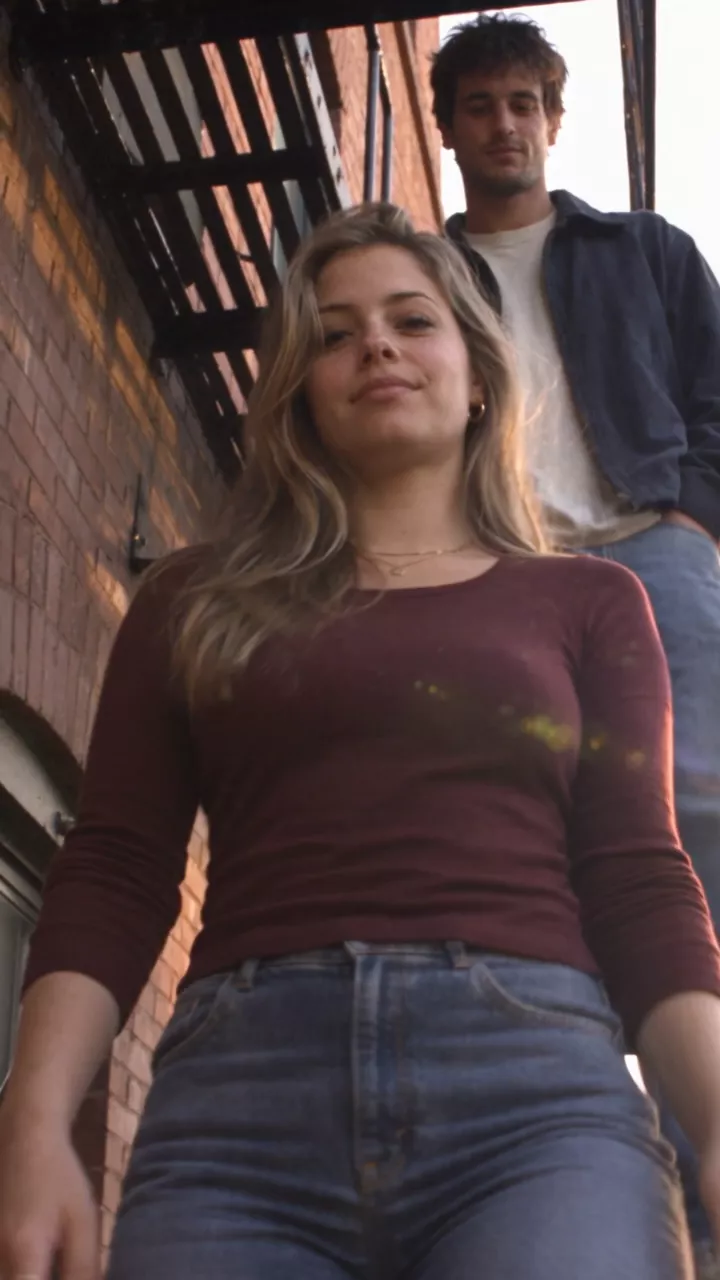
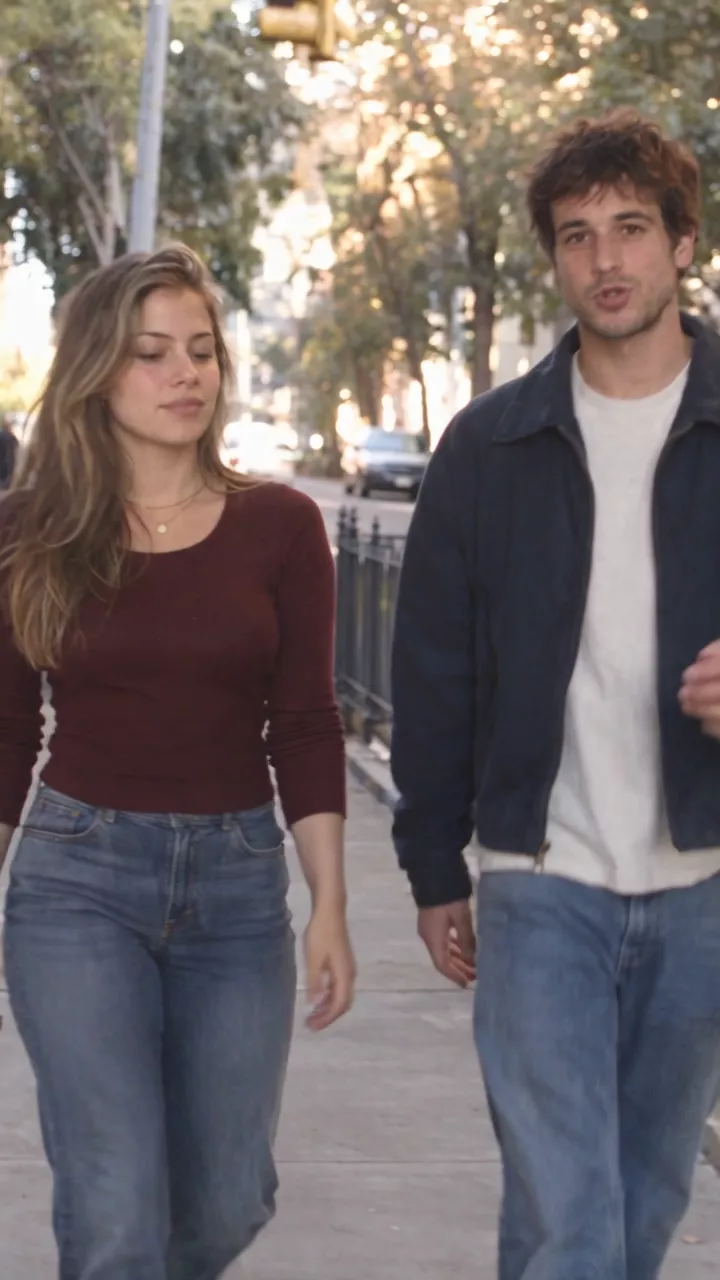
| Shot | Takes | Length of the one we kept |
|---|---|---|
| 1. Rooftop | 4 | 10 s |
| 2. Fire escape | 3 | 4 s |
| 3. Street | 10 | 12 s |
Expect retakes, and budget for them. The more a shot has to do, the more takes it needs: the street shot has a walk, a line, a hailed taxi, two people getting in, a second line and a car driving away, and it took ten. Change one thing per take, and watch each one for the face, the hands, the wardrobe and the era before you judge the rest.
Decide on music, and make it separately
Sound is its own stage. Some videos need no score at all, when the dialogue, the ambience or the performance should carry it. If you want music, make it for this video: the mood, the pace, the characters, the era, the place and the way they speak should all be in it. Ask the NOLGIA Agent to write the music prompt from the script and the look.
- Genre and era: 1990s jazz-blues, for a 1990s story.
- Tempo and energy: fast, but never loud enough to compete with the dialogue.
- Instruments: name them: brushed drums, upright bass, electric piano, muted trumpet.
- Mood: mysterious, playful, a little wacky.
- Vocals: none, under dialogue.
- What it must not be: no romance, no epic build-up, no solos.
Fast-paced 1990s jazz-blues instrumental background score, mysterious, quirky and slightly unpredictable. Designed as an energetic underscore beneath spoken dialogue.

Tight, dry brushed drums with a quick nervous groove, walking upright bass, short staccato electric piano chords, muted jazz guitar riffs, occasional muted trumpet stabs and strange little keyboard flourishes. Use syncopation, abrupt pauses, unexpected chord changes and quick musical turns to create a clever, mischievous feeling.

The mood is mysterious and serious but subtly wacky - like a clever character is about to reveal something unusual. Fast-moving without becoming loud or aggressive. Keep the melody fragmented and understated so it never competes with narration.

Strong 90s analog character: dry studio recording, warm tape saturation, slightly dusty texture, punchy drums, tight bass, minimal reverb. Feels like a quirky 90s Japanese TV show, detective scene, creative-tech segment or fast-paced documentary.

NO romance, NO sentimental melody, NO dreamy atmosphere, NO epic cinematic buildup, NO funk, NO vocals, NO big solos. Keep it instrumental, rhythmic, tense, playful and constantly moving.
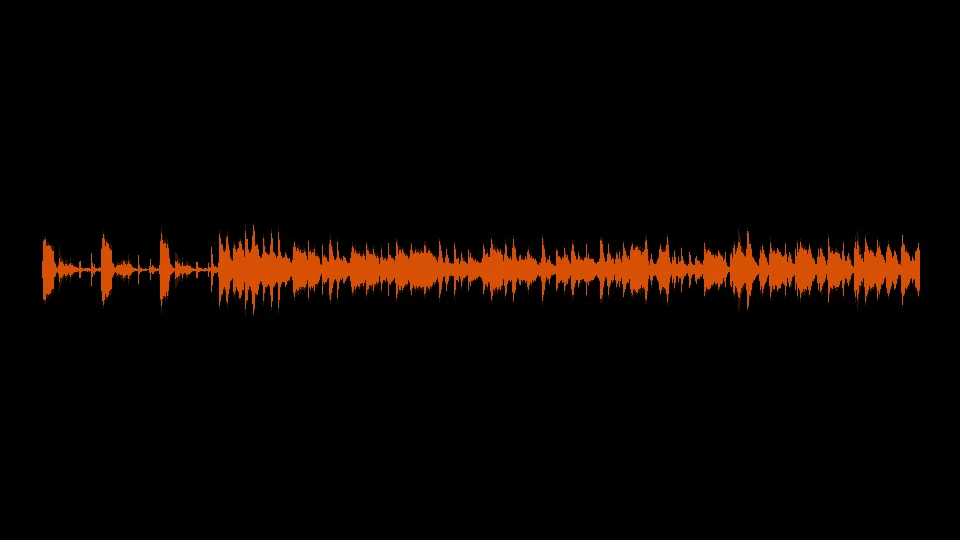
Open Audio from the Create menu, pick Music under What do you need?, choose Lyria 3.5, paste the prompt and press Generate audio. There is no length setting: this take came back at about 2 minutes, and you trim it on the timeline. The score took four takes: the first three asked for a subtle, quiet underscore, and the fourth, above, asked for something fast-paced. That is the one in the project.
Tip:Keep the score out of the clips. Every shot prompt ends with NO background music and names the only sounds allowed: the ambience of the place and the dialogue. The clip's sound is one track, so a score baked into it cannot be turned down or cut on the beat later.
Put it together in the Timeline editor
The last stage is the edit: the three shots in order, the score underneath and the timing tightened until it plays as one video.
- Open the project's Workspace and press New timeline, give it a name, set the frame size to Vertical 9:16 and press Create.
- In Project Media, add the three shots in order, rooftop, fire escape, street: drag each onto the timeline, or hover it and press + to add it at the playhead.
- Trim each shot so the cut lands on a line or a move: drag a clip's edge with the Select tool, or set Mark In and Mark Out in the preview before you add it.
- Add the score on its own audio track under the shots with Add audio track in the Audio group of the toolbar, split it at the end of the picture with Split and delete the tail.
- Select the score and, in the Audio inspector, lower Clip volume or turn on Duck under voice so the dialogue sits on top, and add a Fade out at the end.
- Press Export video. The finished MP4 lands in your Library, and the arrow beside the button has the cut for Premiere Pro or DaVinci Resolve and After Effects.
Tip:Match the frame to the platform. A 9:16 timeline (1080 by 1920) exports a vertical video for TikTok, Reels and Shorts; the same picker has 4:5, 1:1, 16:9 and the cinema widescreens. Already made the timeline at another size? Click Frame rate in the editor's header to open Project settings, press Change frame size and choose Vertical. With Fit, 9:16 shots fill a vertical frame exactly; Fill crops clips of any other shape to cover it.
The audio guide covers voice, music and sound effects on the timeline in more detail.
Where you still regenerate
- The era leaks in. The rooftop shot says late 1990s and still puts One World Trade Center on the skyline. Name what should be in the background, or keep it soft, and check every take.
- Busy shots. Each action in a shot is another thing that can go wrong. The street shot had six and took ten takes; the fire escape had two and took three.
- Dialogue. A misread name or a line that runs past the end of the shot means another take. Spell names as they sound and keep lines short enough for the length you picked.
- Faces. The outfit, hair and jewelry come from the sheets in every shot here. Whether the face is one person from shot to shot is not something we have measured, so we do not claim it.
What it costs
Character sheets and stills are priced per image, shots by model and length, and the score per run. Each message to the NOLGIA Agent is billed as one agent turn, as the agent cookbook explains. Cutting on the timeline and the export are not billed. Live rates for the models in this short:
GPT Image 2.5 SunburstEvery plan
Per image
Native 8 credits · 2K 21 credits · 4K 58 credits
Seedance 2.5Pro and up
Per 5s clip
480p 26 credits · 720p 56 credits · 1080p 137 credits
1080p renders at 16:9 and 9:16
Lyria 3.5Every plan
Per generation
Standard 5 credits
Read live from the catalog when this page loads. Every price is shown before you generate. See every rate.
Checklist
- The script, the era and the feeling explained to the NOLGIA Agent, and a plan back before any prompt.
- A character sheet for each person, checked for the era and saved as a Character.
- A still of each place, checked for anything that did not exist yet and saved as a Location.
- A shot list: what happens, where the camera is and how it moves, shot by shot.
- A locked still for any shot with a precise framing.
- A video prompt per shot with timed beats, dialogue in quotes, hands, eyes, light, the noes and NO background music.
- Every take checked for the face, the hands, the wardrobe and the era.
- A score made for this video, or a decision to go without one.
- The shots, the score and the timing put together in the Timeline editor.
To try it with our cast, download the sheets and the rooftop still, save them as two characters and a location on your own account, and run the prompts above.
The ingredients
Questions and answers
- Which model was used for the video?
- All three shots are Seedance 2.5 with both characters attached. It took the two character sheets as references and generated the dialogue and the street ambience in the same clip.
- Can the characters speak?
- Yes. Write each line in quotes inside its beat, say who says it and how, and keep it short enough for the shot. Spell brand names the way they sound.
- Is it the same person in every shot?
- The outfit, hair and jewelry come from the character sheets in every shot. Whether the face is one person from shot to shot is not something we have measured, so we do not claim it.
- Why write NO background music in every shot?
- The clip's sound is one track. If the model adds a score, you cannot turn it down under the dialogue or cut it on the beat, so the score is made separately and laid under the shots on the timeline.
- Do I have to make a still before every shot?
- No. The three shots here went straight from the character sheets. A still is worth it when a shot keeps missing its framing, its place or its props, because it is cheaper to fix a picture than a video.
Start with the plan
Open the NOLGIA AgentRelated guides
Filmmaking
A short film with AI: the pipeline from script to final cut
A 25 second film, Last Train, from a five line script to a graded cut: a saved character, a saved location, a prop, frames first, then shots, sound, Studio, and the export to Premiere or Resolve.
· 13 min read
Prompting
Make AI video look real: light, motion and camera
Three sentences make a clip read as filmed: a named light source, a walk with weight, a camera someone is holding. Each tested before and after on Kling v3.
· 8 min read
Prompting
Seedance 2.5: how to prompt it, with a library that was run
How to write for Seedance 2.5 on NOLGIA: text to video, a still as the start frame, a take as @Video1 with its sound, the six aspect ratios, 4 to 30 seconds, and what it refuses.
· 10 min read